概述
描述
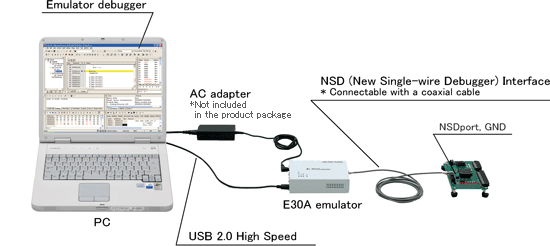
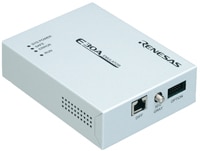
The E30A Emulator is an on-chip debugging emulator that makes use of the debugging circuit NSD (New Single-wire Debugger), that is built in the R32C/100 Series MCUs. NSD is Renesas original OCD (On-chip Debugger).
特性
- OCD (On Chip Debugger) method
- No probing the MCU's foot pattern is necessary, and free from worry about degradation of a MCU signal.
- No dedicated evaluation chip or packaged components required to debug the user system.
- Newly-developed NSD method (Emulator connection method)
- Allows emulator to debug the user system just connecting it to one coaxial cable.
- A dedicated coaxial cable which comes with the product is 1.8 meters in length and is flexible.
- Learn more
发布信息
R32C/100 E30A Emulator debugger
Latest Ver.: V.1.02 Release 00
Released: Feb 21, 2011
Details of upgrade (See Tool News)
目标设备
Additional Details
Specifications
| Item | Description | |||||||||||||||||
|---|---|---|---|---|---|---|---|---|---|---|---|---|---|---|---|---|---|---|
| Hardware break | ||||||||||||||||||
| Simultaneously usable functions by operation mode | Break | Trace | Execution Time | RAM Monitor | ||||||||||||||
| Execution Address | Data Access | Address Range | Data Comparison | |||||||||||||||
| Product part number | R0E00030AKCT00 (Discontinued product) | |||||||||||||||||
| Applicable MCU | M16C Family R32C/100 Series
| |||||||||||||||||
| Available MCU mode | Single-chip mode Memory expansion mode | |||||||||||||||||
| Max. operating frequency | 100MHz (CPU clock) | |||||||||||||||||
| Emulation memory | Not available (internal flash ROM used as emulation memory) | |||||||||||||||||
| Software break | Max. 256 points (implemented by instruction replacement) | |||||||||||||||||
| Execution Address break | Max. 8 points (execution address/ data access)
| |||||||||||||||||
| Combinatorial break point | OR/ status transition (in forward direction) | |||||||||||||||||
| Trace mode | Trace priority/ MCU execution priority specifiable | |||||||||||||||||
| Trace capacity | 8M events (Trace Priority)/ 512 events (MCU execution priority) | |||||||||||||||||
| Trace contents | Branch source and Branch destination/ conditional branch/ data access | |||||||||||||||||
| Trace event | Max. 8 points/ 4 areas (prefetch address/ data access)
| |||||||||||||||||
| Time measurement | Execution time (between Go-Stop, 32-bit CPU clock counter) Interval time 3 points (between data access, 40-bit counter) | |||||||||||||||||
| RAM monitor | Specifiable in byte or word unit
| |||||||||||||||||
| Coverage | Not available | |||||||||||||||||
| Trace | trace-priority | lens | lens | - | - | lens | - | - | ||||||||||
| MCU execution priority | lens | lens | - | lens | lens | - | - | |||||||||||
| Time measurement | lens | lens | - | - | - | lens | - | |||||||||||
| RAM monitor | lens | lens | lens | - | - | - | lens | |||||||||||
| Writer | - | - | - | - | - | - | - | |||||||||||
| Host machine I/F | USB 2.0(High Speed) | |||||||||||||||||
| Target I/F | 2-pin (50Ω coaxial cable) 3-pin (via coaxial converter board) 8-pin (via option board) | |||||||||||||||||
| Target I/F signal | NSDport, GND (When using coaxial cable/ coaxial converter board) NSDport, GND, Vcc1, Vcc2, RESET# (When using option board) | |||||||||||||||||
| Targetless debugging | Not available | |||||||||||||||||
| Emulator power supply | Supply power from a separately purchased AC adapter. For recommended specifications of the AC adapter, see the user’s manual for the E30A emulator. | |||||||||||||||||
| Target MCU power supply | Supplied from a user system | |||||||||||||||||
| Target host PC (OS) | Refer to Operating Environments of Products. | |||||||||||||||||
| Outside dimension (except the protruding part) | Width: 136.3mm, depth: 104.0mm, height: 36.8mm | |||||||||||||||||
| Weight | Approx. 300g | |||||||||||||||||
| Operating Environment | Temperature: 5ºC to 35ºC (No condensation) | |||||||||||||||||
| Storage Environment | Temperature: -10ºC to 60ºC (No condensation) | |||||||||||||||||
| Overseas standard | European Standards: EN 55022 Class A, EN 55024 US FCC Standard: FCC part 15 Class A | |||||||||||||||||
Note:lens Available | — Not Available
- When using E30A emulator with the device, please select the following MCU file name.
| Using device | Selecting MCU file | |
|---|---|---|
| MCU Group | Device name | |
| R32C/142 Group | R5F6442F | \McuFiles\R32C_145\R5F6445F_E30A.mcu |
| R32C/142 Group | R5F6442H | \McuFiles\R32C_145\R5F6445H_E30A.mcu |
Components
- E30A Emulator main unit
- USB I/F cable
- Target I/F cable
- Coaxial connector
- Coaxial converter board
- Connector for coaxial converter board
- Option I/F cable
- Option board
- Option board connector
- Software CD-ROM
- Integrated development environment High-performance Embedded Workshop
- R32C/100 E30A emulator debugger
- E30A emulator user's manual
System Configuration
图像