
概述
描述
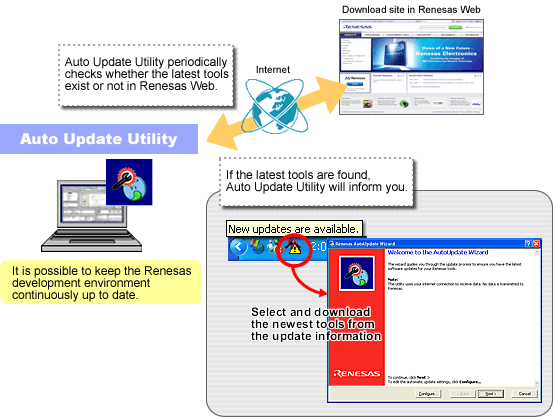
Auto Update Utility informs the user of the latest version of Renesas tools. You can update your tools to the latest version smoothly and keep the Renesas development environment continuously up to date using Auto Update Utility.
Auto Update Utility is included with High-performance Embedded Workshop V.4 or later in the Renesas tool package.
For detailed information about the tools that you can update using Auto Update Utility, see this page.
发布信息
目标设备
Additional Details
Basic Procedure
Initial Settings: Easy and trouble free! Simple initial settings
Install Auto Update Utility (When installing Renesas tools, you can also install Auto Update Utility at the same time.)
arrow_downward
Register the tools for Auto Update Utility (This setting registers automatically when you perform an initial installation and an update program of the tool.)
arrow_downward
Complete the initial settings (Auto Update Utility icon is displayed in the task bar.)
arrow_downward
Update: 3 easy steps
1. Auto Update Utility checks for update information, For details, see "How to Use". (Auto checking via the Internet. By default, auto-launch once a week.)
arrow_downward
2. Auto Update Utility informs user (If update information is found, a message is shown in the task bar.)
arrow_downward
3. Execute the update program (By selecting tools to be updated from the list, the update program(s) will be executed.)
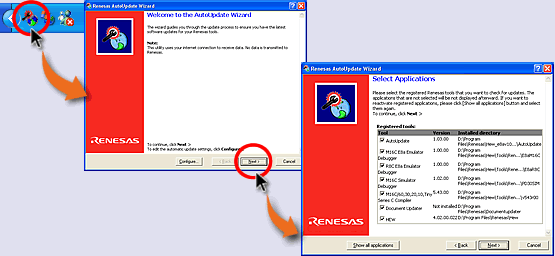
[To Confirm the Registered Renesas Tools]
Click the Auto Update Utility icon in the task bar.
arrow_downward
You can confirm the registered Renesas tools on the list in Auto Update Utility.
How to Use
The following steps are an example of how to use the Auto Update Utility.
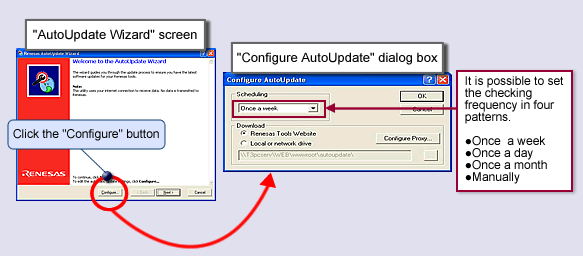
- Auto Update Utility checks the Renesas Web once a week automatically. To reset the checking frequency, see "How to Startup".
- If newer tools are found, a message, "New updates are available." is shown in the task bar.图像
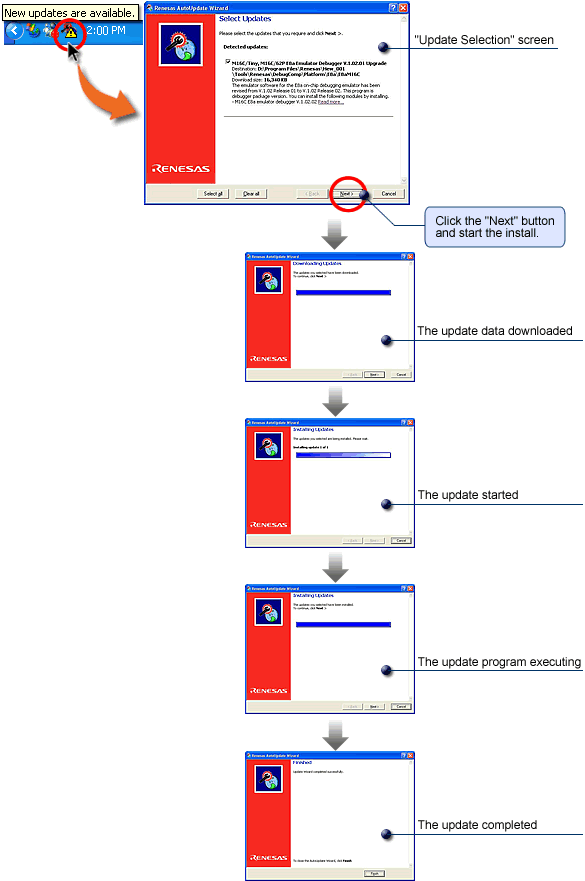
- Confirm the found information and execute the update program. Click the icon, and the found update information pops up in a list. Confirm the ticked checkbox for the tool to be updated and click the "Next" button to start the installation of the update.图像
How to Startup
There are three ways to startup Auto Update Utility after finishing the initial settings.
- Auto-start at regular intervals: Auto Update Utility starts automatically on user-defined schedule (by default, weekly).
- Start from the task bar: Double-click the Auto Update Utility icon in the task bar, or right-click the icon and select "Update Now" from the menu.图像
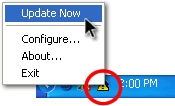
- Start from the menu
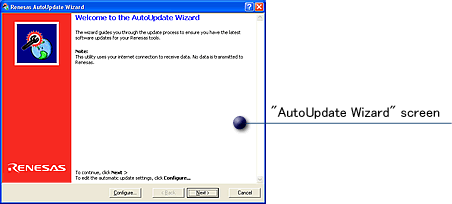
SelectWindows Start menu > Program menu > Renesas > Renesas AutoUpdate(* By default)[Startup screen]图像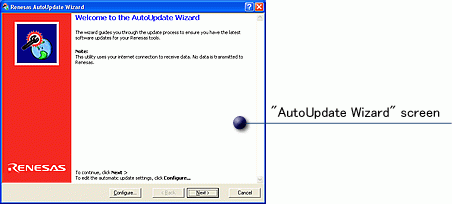
[The checking frequency can be switched from automatic to manual]
Tools Supported by Auto Update Utility
The tools that you can update using Auto Update Utility are as follows (as of 16 Feb., 2011). Other tools will also be supported by Auto Update Utility when they are upgraded and revised.
Note: "Supported version" and "Release date" in the table refer to the version and the release date of Renesas tool (software). In each version listed and future versions, the update program can be acquired from the web by Auto Update Utility.
[Integrated Development Environment]
| MCU | Product name | Software | Supported version | Release date |
|---|---|---|---|---|
| SuperH, H8SX, H8S, H8, M16C, R8C, 740 Family | Auto Update Utility | Auto Update Utility | V.1.00.02 | 26 Dec.,2005 |
| SuperH, H8SX, H8S, H8, M16C, R8C, 740 Family | Document Updater (Note1) | Document Update Utility/Document Updater | V.2.00.00 | 1 Jan., 2007 |
| SuperH, H8SX, H8S, H8, M16C, R8C, 740 Family | High-performance Embedded Workshop | High-performance Embedded Workshop | V.4.00.01 | 1 Apr., 2005 |
Note
- The Document Updater service has terminated.
[Compilers]
| MCU | Product name | Software | Supported version | Release date |
|---|---|---|---|---|
| SuperH Family | Compiler Package | C/C++ Compiler Package for SuperH Family | V.9.01 Release 01 | 8 Aug., 2007 |
| RX Family | Compiler Package | C/C++ Compiler Package for RX Family | V.1.00 Release 01 | 5 Aug., 2010 |
| M32R Family | Compiler Package | C/C++ Compiler Package for M32R Family [M3T-CC32R] | V.5.01 Release 01 | 1 May, 2009 |
| R32C Series | Compiler Package | C Compiler Package for R32C Series | V.1.02 Release 00 | 16 Jul., 2009 |
| M32C Series | Compiler Package | C Compiler Package for M32C Series [M3T-NC308WA] | V.5.40 Release 00 | 26 Dec., 2005 |
| M16C Series, R8C Family | Compiler Package | C Compiler Package for M16C Series and R8C Family [M3T-NC30WA] | V.5.40 Release 00A (Note1) | 1 Feb., 2006 |
| H8SX,H8S,H8 Family | Compiler Package | C/C++ Compiler Package for H8SX, H8S, H8 Family | V.6.02 Release 00 | 5 Sep., 2007 |
Note
- An on-line upgrade service for V.6.00 Release 00 is NOT available.
[Coding Assistance]
| MCU | Product name | Software | Supported version | Release date |
|---|---|---|---|---|
| RX Family | Peripheral Driver Generator V.2 | Peripheral Driver Generator | V.2.01 | 16 Feb., 2011 |
[Simulator Debuggers]
| MCU | Product name | Software | Supported version | Release date |
|---|---|---|---|---|
| SuperH Family | C/C++ Compiler Package | Simulator Debugger for SuperH Family | V.9.07.00 | 1 Sep., 2007 |
| RX Family | C/C++ Compiler Package | Simulator Debugger for RX Family | V.1.01.00 | 16 May, 2010 |
| R32C Series | C/C++ Compiler Package | Simulator Debugger for R32C Series | V.1.01 Release 00 | 16 Jul., 2009 |
| M32C Series | C/C++ Compiler Package | Simulator Debugger for M32C Series | V.1.02 Release 00 | 16 Sep., 2006 |
| M16C Series, R8C Family | C/C++ Compiler Package | Simulator Debugger for M16C Series and R8C Family | V.1.02 Release 00 | 16 Sep., 2006 |
| H8SX,H8S,H8 Family | C/C++ Compiler Package | Simulator Debugger for H8SX, H8S, and H8 Families | V.5.06.00 | 1 Sep., 2007 |
| 740 Family | C/C++ Compiler Package | Simulator Debugger for 740 Family | V.1.02 Release 00 | 16 Sep., 2006 |
[In-circuit Emulators]
| MCU | Product name | Software | Supported version | Release date |
|---|---|---|---|---|
| M16C/65, /64A, /64 Group | E100 emulator | M16C R8C E100 emulator software | V.1.01 Release 00 | 1 Feb., 2009 |
| H8S Family | E100 emulator | H8S/Tiny H8S/2400 E100 emulator software | V.2.00 Release 00 | 1 Aug., 2010 |
| H8SX Family | E6000H emulator | E6000H emulator software (for High-performance Embedded Workshop) | V.4.05 Release 00 | 16 Jan., 2008 |
| H8/3800 Series | E6000 emulator HS38000EPI61H | E6000 emulator software (for High-performance Embedded Workshop) | V.6.00 Release 01 | 1 Aug., 2006 |
| H8/388R Series | E6000 emulator HS38000EPI61H | E6000 emulator software (for High-performance Embedded Workshop) (for HDI) | V.6.00 Release 01 | 1 Aug., 2006 |
| H8S/2646 Group | E6000 emulator HS2646EPI61H | E6000 emulator software (for High-performance Embedded Workshop) | V.6.01 Release 00 | 1 Dec., 2007 |
| M16C Family, R8C Family | PC7501 emulator | M16C R8C PC7501 Emulator Debugger | V.1.01 Release 01 | 1 Oct., 2005 |
| M32C Series | PC7501emulator | M32C PC7501 Emulator Debugger | V.1.02 Release 00 | 16 Sep., 2006 |
| 740 Family | PC4701 emulator | 740 PC4701 Emulator Debugger | V.1.02 Release 00 | 16 Sep., 2006 |
| M16C Series | PC4701 emulator | M16C PC4701 Emulator Debugger | V.1.01 Release 01 | 1 Oct., 2005 |
| M32C Series | PC4701 emulator | M32C PC4701 Emulator Debugger | V.1.02 Release 00 | 16 Sep., 2006 |
[Compact Emulators]
| MCU | Product name | Software | Supported version | Release date |
|---|---|---|---|---|
| 740 Family | Compact Emulator M38000T2-CPE | 740 Compact Emulator Debugger | V.1.02 Release 00 | 16 Sep., 2006 |
| H8/300H Tiny Series | Compact Emulator R0E436640CPE00 | H8/300H Tiny Compact Emulator Debugger | V.1.01 Release 00 | 16 Feb., 2006 |
| M16C Series, R8C Family | Compact Emulator R0E521000CPE00, M3062PT3-CPE, M3028BT2-CPE | M16C R8C Compact Emulator Debugger | V.1.01 Release 01 | 1 Oct., 2005 |
| M32C Series | Compact Emulator M30870T2-CPE, M30850T3-CPE | M32C Compact Emulator Debugger | V.1.02 Release 00 | 16 Sep., 2006 |
[On-chip Debugging Emulators]
| MCU | Product name | Software | Supported version | Release date |
|---|---|---|---|---|
| H8S device group | E10A-USB emulator HS0005KCU01H, HS0005KCU02H | E10A-USB emulator software | V.2.00.01 | 1 Mar., 2005 |
| H8SX device group | E10A-USB emulator HS0005KCU01H, HS0005KCU02H | E10A-USB emulator software | V.2.00.01 | 1 Mar., 2005 |
| MPEG (SH-Mobile device group) | E10A-USB emulator HS0005KCU01H, HS0005KCU02H | E10A-USB emulator software | V.2.00.01 | 1 Mar., 2005 |
| SH-2 device group | E10A-USB emulator HS0005KCU01H, HS0005KCU02H | E10A-USB emulator software | V.2.00.01 | 1 Mar., 2005 |
| SH-2A device group | E10A-USB emulator HS0005KCU01H, HS0005KCU02H | E10A-USB emulator software | V.2.00.01 | 1 Mar., 2005 |
| SH-3 device group | E10A-USB emulator HS0005KCU01H, HS0005KCU02H | E10A-USB emulator software | V.2.00.01 | 1 Mar., 2005 |
| SH-4 device group | E10A-USB emulator HS0005KCU01H, HS0005KCU02H | E10A-USB emulator software | V.2.00.01 | 1 Mar., 2005 |
| SH-4A device group | E10A-USB emulator HS0005KCU01H, HS0005KCU02H | E10A-USB emulator software | V.2.00.01 | 1 Mar., 2005 |
| SH-Mobile device group | E10A-USB emulator HS0005KCU01H, HS0005KCU02H | E10A-USB emulator software | V.2.00.01 | 1 Mar., 2005 |
| New SH-Mobile device group | E10A-USB emulator HS0005KCU01H, HS0005KCU02H | E10A-USB emulator software | V.2.00.01 | 1 Mar., 2005 |
| SH-4AL-DSP device group | E10A-USB emulator HS0005KCU01H, HS0005KCU02H | E10A-USB emulator software | V.1.01.00 | 1 Mar., 2005 |
| SH-Mobile G1 device group | E10A-USB emulator HS0005KCU01H, HS0005KCU02H | E10A-USB emulator software | V.1.01.00 | 1 Mar., 2005 |
| H8/300H Series | E10T-USB emulator HS0005TCU01H | E10T-USB emulator software | V.2.01 Release 00 | 1 Apr., 2006 |
| 740 Family | E8a emulator | 740 E8a Emulator Debugger | V.1.01.00 | 1 Feb., 2008 |
| H8 Tiny/Super Low Power Series | E8a emulator | H8 Tiny/Super Low Power E8a Emulator Debugger | V.1.01.00 | 9 Jul., 2007 |
| M16C Series | E8a emulator | M16C E8a Emulator Debugger | V.1.01.00 | 1 Feb., 2008 |
| M32C Series | E8a emulator | M32C E8a Emulator Debugger | V.1.01.00 | 1 Feb., 2008 |
| R32C/100 Series | E8a emulator | R32C E8a Emulator Debugger | V.1.00.00 (Note1) | 1 Feb., 2008 |
| R8C Family | E8a emulator | R8C E8a Emulator Debugger | V.1.01.00 | 1 Feb., 2008 |
| M16C, H8 Family | E8 emulator | E8 emulator software (Full Update Version) | V.2.02 Release 00 | 1 May, 2005 |
| M16C, H8 Family | E7 emulator | E7 emulator software | V.3.00 Release 00 | 16 Jul., 2005 |
| M32C Series | FoUSB/UART Debugger | M32C FoUSB/UART Debugger | V.1.02 Release 00 | 16 Sep., 2006 |
| M16C Family, R8C Family | FoUSB/UART Debugger | M16C R8C FoUSB/UART Debugger | V.1.01 Release 01 | 1 Oct., 2005 |
Note
- You can update your emulator debugger using Auto Update Utility from the working sample (WS) version for Renesas Starter Kits to V.1.00.00.
[Flash Programming Software]
| MCU | Product name | Software | Supported version | Release date |
|---|---|---|---|---|
| SuperH, H8SX, H8S, H8, M16C, R8C, 740 Family | Flash Development Toolkit | Flash Development Toolkit | V.3.07 Release 00 | 6 Nov., 2006 |
| SuperH, H8SX, H8S, H8, M16C, R8C, 740 Family | Flash Development Toolkit | Flash Development Toolkit | V.4.00 Release 00 | 16 Jun., 2007 |
支持
支持社区
- RL78F24 使用 CS+ IDE 在Win11環境下 編譯卡住問題
... Smart Configurator for RL78 that generates device driver.Stack Usage Tracer V1.05.00.02 [30 Jul 2014] Utility to display and adjust stack usage of each functions. Update Manager Plug-in V2.03.00.02 [29 Oct 2018] Plug-in to communicate with CS+ Update Manager. 電腦CPU
2025年8月14日


