


The embedded design journey is inherently complex, requiring developers to navigate component selection, toolchain decisions, design trade-offs, and cross-functional collaboration. Each decision point introduces friction that can slow development and delay time to market. Simplifying these steps is key to helping teams move quickly and confidently through the design journey.
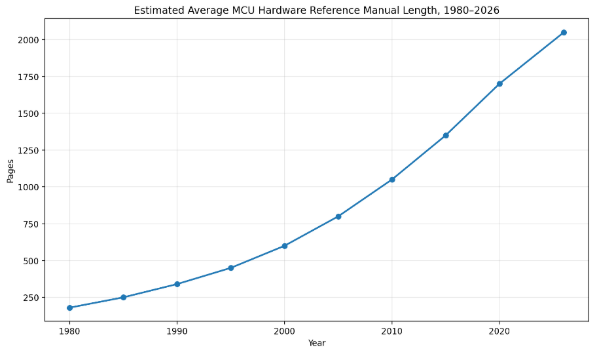
Once a system architecture is identified, the challenge of bringing up individual peripherals or subsystems is significantly daunting. Just over 40 years ago, an MCU had a reference manual of 150 pages, as shown in Figure 2. Today, it averages 2,500 pages. Back then, an engineer could easily scan the information, create configuration code, and use a peripheral. Now, code generation efficiency presents challenges too, as peripherals have so many functions that optimizing settings alone can be difficult, especially if the user doesn’t know the complexity of the register set.
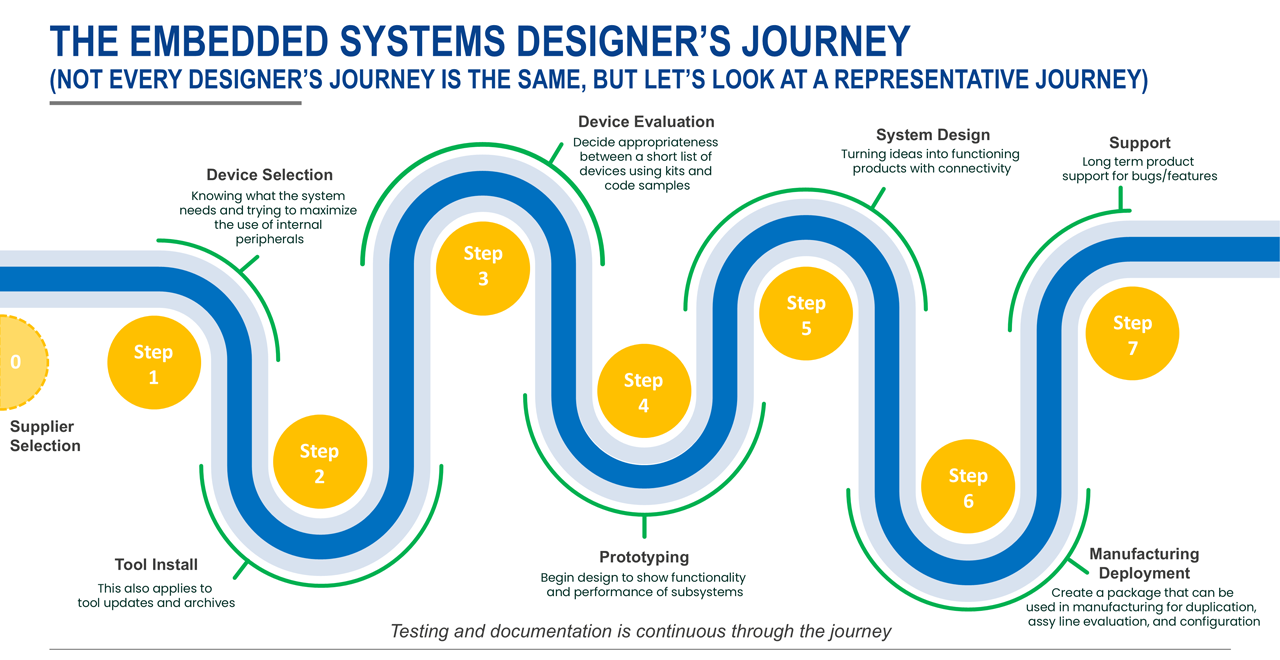
Think about the impact of this on the entire design journey. The seven steps, depicted in Figure 1, are all affected by increased chip complexity and the software solutions designed to address that complexity.
Effective device selection requires a clear understanding of available peripheral functions. This is because peripherals across families, and sometimes even within a family, differ, and that increases the effort needed to evaluate the vast number of choices. Software support also results in additional tool installation and maintenance.
Reducing the number of choices through intelligent guidance helps reduce friction at step three. The challenges faced in steps four and five relate to ensuring the prototype works with the system design and managing algorithms to configure the peripherals. During the release and lifecycle steps, good design tools and a deep understanding of peripheral function become critical aspects for testing and component engineering. Overall, supporting all seven steps in Figure 1 requires high-quality code generation for peripherals.
Code Generation: Beyond Peripheral Configuration
Today, hardware abstraction code generation has become an essential part of embedded development. It helps configure increasingly complex peripherals, and the engineers who designed the hardware are well placed to provide that configuration support.
However, a working I²C, SPI, or UART interface is only the starting point. You still need to configure and communicate with the connected sensor, output driver, display, or other device. Raw data must also be converted into meaningful application values, such as temperature or humidity. Reusable, tested code blocks help bridge this gap, handling device-level interactions while working efficiently with the hardware registers.
Tools: Closing the Gaps Between Development Tasks
Schematic and PCB design, code editing, compilation, programming, and debugging tools have evolved significantly over the past 20 years. Yet many still operate in silos. Manually transferring data between them adds effort and introduces opportunities for error, which makes quick evaluations, hardware/software tradeoff analysis, and design activities harder than they need to be.
The integrated development environment (IDE) brings several of these tasks together. Editing, building, programming, and debugging are available in one tool suite, reducing some of the disconnects within software development. However, even with an IDE, managing the development environment remains a task in its own right. Installation, version control, updates, and backups all require attention.
Even AI assistance can introduce another disconnected step when individual code snippets are copied from a separate tool rather than generated within the development workflow, and the gap is wider still between hardware and software development, where disconnected tools make it harder to bring both sides of the design together.
Deployment: From Working Design to Product Lifecycle
A working system is not the end of the development journey. Releasing the design to manufacturing and maintaining it in the field are the next steps in turning engineering work into a product customers can use. Production testing and long-term maintenance are critical to sustaining product revenue and customer value, while component lifecycle issues, customer feedback, bug fixes, and changing market requirements all need to be addressed beyond the initial release. Supporting this full product lifecycle is a core concept behind the goals of the Xplore Developer Hub.
The Ultimate Dilemma
Embedded development traditionally begins with hardware selection, followed by the effort required to build an application around that hardware. Yet consumers don't care about the processor, peripherals, or development tools. They care about what the product does. A thermostat, for example, is valued for its ability to sense, control, and maintain temperature. But what if that process were reversed?
Instead of starting with hardware and working toward an application, developers could begin with the desired functionality and then identify the hardware and software needed to deliver it. By taking an application-first approach, engineers can evaluate design alternatives earlier, make more informed trade-offs, and let application requirements drive technology decisions. The result is a faster path from concept to a working solution, with less time spent navigating countless hardware and software options.
The Changing Landscape of Development Paradigms
Many companies have assembled ecosystems of tools, software, and services to try to address these issues. Renesas has gone one step further to release the new Xplore Developer Hub integrated with Renesas 365, creating a more connected experience that helps developers move from application concept to implementation faster than ever, and with less friction (Figure 3).
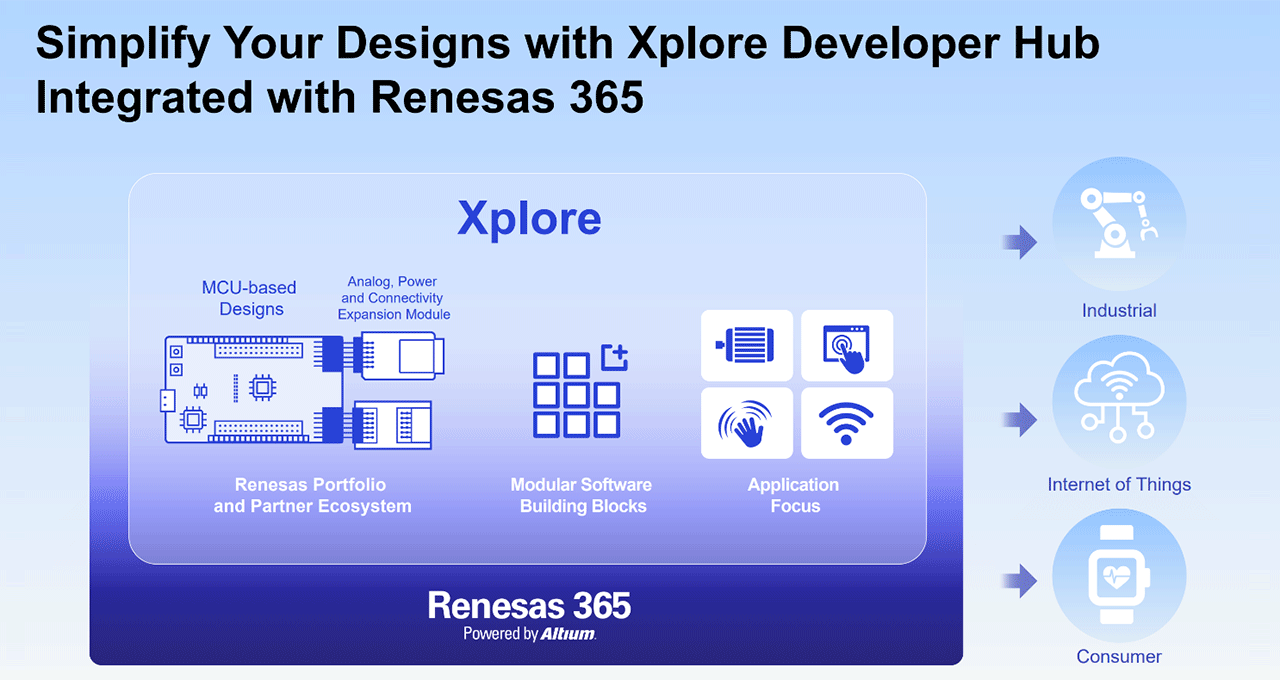
This new platform employs an application-centric design paradigm and allows the engineer to assemble a system design based on software and hardware building blocks. Scalable and cost-effective hardware building blocks, combined with application-focused software building blocks, provide a practical starting point for development. Ready-to-evaluate solution projects show how these elements come together to implement a useful system. Rather than starting each function from scratch, developers can evaluate existing building blocks and adapt them to their requirements in an environment designed to eliminate the friction within each of the seven steps outlined in Figure 1.
Furthermore, technology partnerships extend the available functionality with complementary capabilities, as our partner ecosystem solutions help designers further expand system optimization earlier in the design cycle.
A Unified Experience with Renesas 365
The Xplore Developer Hub and Renesas 365 come together to provide a unified development experience that connects hardware and use-case driven software building blocks in one environment. This integrated approach streamlines development and enables collaboration and lifecycle management across engineering, product teams, and manufacturing.
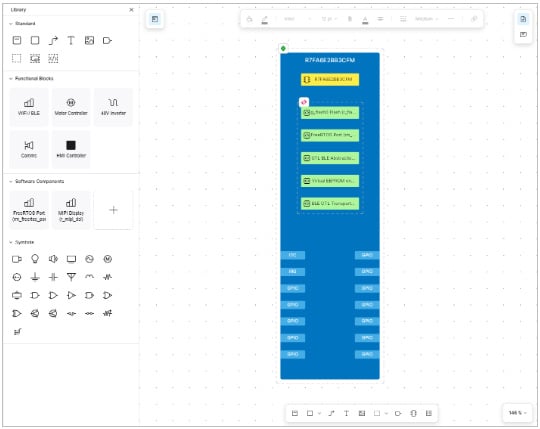
This integration is built on three core principles. First, it delivers vertical and horizontal scalability, enabling developers to move easily across devices, architectures, and system configurations using application-oriented resources. Second, it provides tested and validated code created by engineers for engineers, helping teams accelerate development with confidence. Third, it leverages the broader Renesas 365 ecosystem to provide a unified experience across tools and workflows, breaking down silos that traditionally separate the teams managing design, software, hardware, and manufacturing. These principles have served as the foundation for every design decision behind the platform.
An Environment Designed for Innovation
Importantly, Xplore Developer Hub integrated with Renesas 365 is more than a development tool; it is a continuously evolving environment that grows alongside the Renesas ecosystem. Early users have praised its ability to remove friction from the embedded design journey by helping teams make critical decisions earlier in the process.
Many of the design choices that traditionally delay development, from device selection to software configuration and system integration, can now be evaluated and validated much sooner. By shifting decision-making earlier in the development cycle and providing a connected path from application requirements to implementation, Xplore Developer Hub with Renesas 365 helps developers spend less time navigating complexity and more time building innovative products.
What could you build next with more solutions at your fingertips? Stay tuned for ongoing enhancements to both Xplore and Renesas 365 that will open up more possibilities, make development much easier for your next project, and accelerate time-to-market.
Meanwhile, to explore the available building blocks and start your design, visit Xplore Developer Hub.
新闻及更多资源
页面 2026年11月3日 |
页面 2026年3月31日 |