
概览
描述
在Renesas Synergy™平台上评估电容式触摸技术并使用Synergy S124和S3A7 MCU群组进行开发。
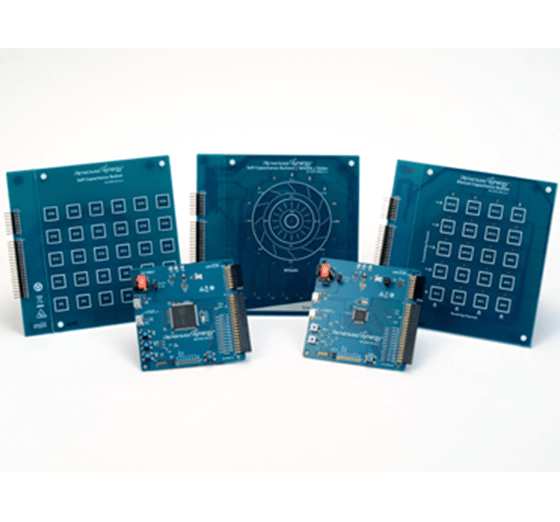
套件内容
- AE-CAP1-BWS应用板
- AE-CAP1-MC应用板
- AE-CAP1-SC应用板
- AE-CAP1-S1目标板
- AE-CAP1-S3目标板
- 快速入门指南
- 2根USB A型转USB Micro-B电缆
- 5V电源
特性
- 使用精密触摸感应板测试和开发互电容或自电容式触摸、按钮、滑块和滚轮功能
- 使用电容式触摸感应单元(CTSU)应用程序框架构建应用程序
- 使用电容式触摸Workbench以图形方式设计、调整和优化按钮和区域
- 自定义用于硬件设计的软件项目、有用提示和应用笔记
- 利用原理图、物料清单(BOM)和PCB布局指南优化电路设计
- 使用紧密集成和经过认证的Synergy软件包(SSP)加快代码开发
- 使用瑞萨电子的e2 studio ISDE或用于Renesas Synergy™的IAR Embedded Workbench®查看、单步调试和调试代码
- 通过板载(OB) J-Link®进行调试和编程
应用
文档
相关文档
请登录后开启订阅
|
|
|
|
|---|---|---|
| 类型 | 文档标题 | 日期 |
| 快速入门指南 | PDF 589 KB | |
| 应用说明 |
PDF
5.95 MB
日本語
AI 生成的摘要:
The document explains how to create a custom Board Support Package (BSP) for Renesas Synergy SSP v1.2.0 or later. It details the BSP contents, including pin configuration files, driver sets, and XML specification files linking devices and boards. Two main approaches for creating custom BSPs are described: modifying existing BSPs using built-in tools in e² studio or IAR EW for Synergy, or manually editing files in the SSP installation folder. The process includes creating a new Synergy C project, selecting a board with a similar device, and configuring the toolchain and debugger.
|
|
| 应用说明 |
PDF
1.36 MB
日本語
AI 生成的摘要:
Capacitive touch sensing integration using Renesas Synergy MCUs involves creating a project with e2 studio and Synergy Smart Configurator, adding required modules, and using QE for Capacitive Touch plug-in for interface creation, tuning, and monitoring. The process includes starting measurements with scanStart() API, checking results, and detecting touches via dataGet() API. Development requires S3A7(CTSU) board, e2 studio IDE, GNU ARM compiler, QE for Capacitive Touch, and SSP drivers. The document guides through project creation, module addition, interface setup, tuning, and performance monitoring.
|
|
| 应用说明 | PDF 2.27 MB 日本語 | |
| 应用说明 |
PDF
1016 KB
日本語
AI 生成的摘要:
The document provides programming guidelines for the Renesas Synergy AE-CAP1 out-of-box demonstration. It details minimum PC requirements, AE-CAP1 kit components, and available demonstration programs with their functionalities. It explains installing USB CDC device drivers for Windows 7 and 10, highlighting automatic enumeration on Windows 10 and manual driver installation on Windows 7. Instructions for reloading the AE-CAP1-BWS demonstration on AE-CAP1-S1 and AE-CAP1-BWS boards are included, specifying jumper settings for proper setup.
|
|
| 应用说明 |
PDF
1.71 MB
日本語
AI 生成的摘要:
The guide explains how to import and build projects using IAR Embedded Workbench (EW) for Renesas Synergy. It details opening the workspace file from an extracted example project, viewing the project structure, and configuring settings for the Synergy Standalone Configurator (SSC) and Synergy Software Package (SSP). It also covers setting the SSC/SSP path and license file, and launching the Synergy Standalone Configurator within the IDE to generate project files.
|
|
| 应用说明 |
PDF
439 KB
AI 生成的摘要:
The document explains how to create and migrate custom Board Support Packages (BSPs) for Renesas Synergy SSP versions 1.1.z and 1.2.0. It details the use of the Custom BSP Creator and Custom Pack Creator tools to generate, modify, and package BSPs. Custom BSPs mainly require changes in the board folder, including essential files like bsp.h and bsp_init.c. The process involves creating a base BSP, making a template pack for modifications, editing in e2 studio, and finalizing a standard pack for distribution. An example using the DK-S7G2 board illustrates these steps.
|
|
| 应用说明 | PDF 593 KB | |
| 手册 - 开发工具 | PDF 1021 KB | |
| PCB 设计文件 | Renesas Synergy™ AE-CAP1 Application Example for Capacitive Touch v1.1 Design Data
|
|
10 项目
|
||
设计和开发
样例程序
样例程序
筛选
|
||
|---|---|---|
| 类型 | 文档标题 | 日期 日期 |
| 示例代码 | AE-CAP1 Out-of-Box Demonstration Programming Guidelines - Application Project Rev.1.03 - Sample Code
|
|
| 示例代码 | Creating a Custom Board Support Package for SSP 1.1.z - Application Project Rev.1.06 - Sample Code
|
|
2 项目
|
||
产品选项
| 器件号 | 状态 | 库存 | Sampleable | Pb (Lead) Free | ECCN (US) | HTS (US) | RoHS Compliant | China RoHS Compliant |
|---|---|---|---|---|---|---|---|---|
| YSAECAP1S11 | Obsolete | 缺货 | N/A | No | 3A991.a.2 | 8471.50.0150 | No | No |


