特性
- Power Conversion
- High efficiency
- 3 A continuous output current
- Integrated MOSFET switches
- 4.5 V to 14 V input range
- 0.54 V to 5.5 V output range (with margin)
- ±1% output voltage accuracy
- 200 kHz to 2 MHz switching frequency
- Supports phase spreading
- Small footprint (6 x 6 mm QFN package)
- Power Management
- Digital soft start/stop
- Precision delay and ramp-up
- Power good/enable
- Voltage tracking, sequencing, and margining
- Output voltage/current monitoring
- Thermal monitor w/ shutdown
- Non-volatile memory
- I2C/SMBus™ communication bus
- PMBus compatible
描述
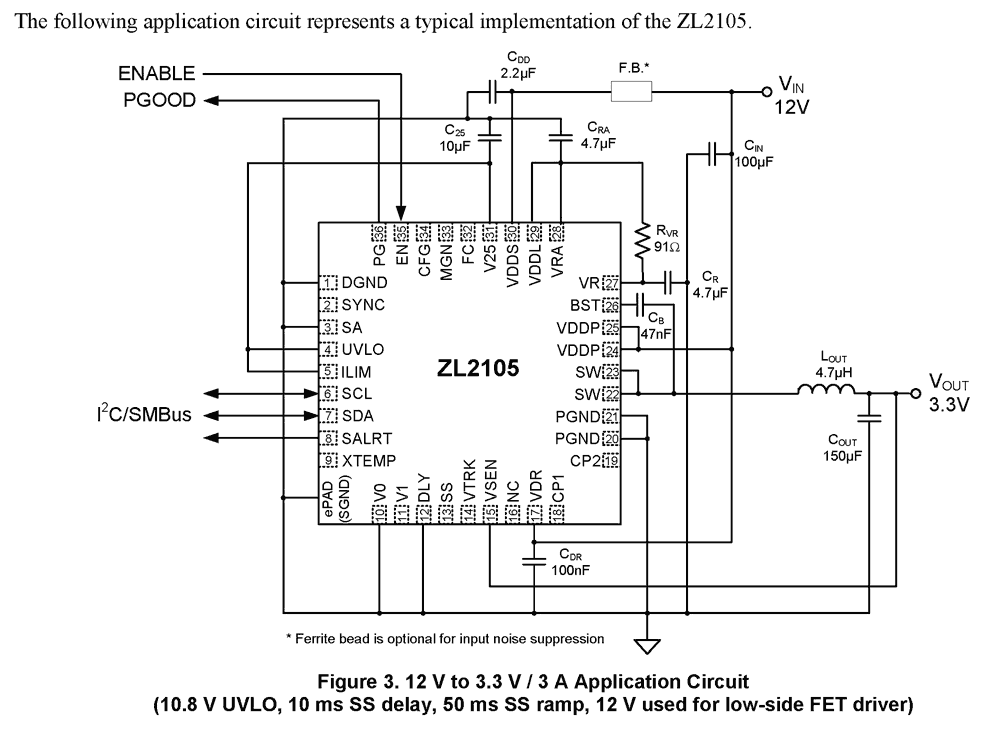
The ZL2105 is an innovative power conversion and management IC that combines an integrated synchronous step-down DC-DC converter with key power management functions in a small package, resulting in a flexible and integrated solution. Zilker Labs Digital-DC™ technology enables unparalleled power management integration while delivering industry-leading performance in a tiny footprint. The ZL2105 can provide an output voltage from 0. 6 V to 5. 5 V from an input voltage between 4. 5 V and 14 V. Internal 4. 5 A low RDS(ON) synchronous power MOSFETs enable the ZL2105 to deliver continuous loads up to 3 A with high efficiency, and an internal Schottky bootstrap diode further reduces discrete component count. The ZL2105 also supports phase spreading for reduced system capacitance. Power management features such as digital soft-start delay and ramp, sequencing, tracking, and margining can be configured by simple pin-strapping or through an on- chip serial port. The ZL2105 uses standard PMBus™ protocol for communicating with other devices to provide intelligent system power management.
应用
- Telecom and storage equipment
- Digital set-top box
- Industrial supplies
- 12 V distributed power systems
- Point of load converters
| Part Number | Status | Samples | Stock | RoHS | Package | Lead Count (#) | Carrier Type | Moisture Sensitivity Level (MSL) | Pb (Lead) Free | Pb Free Category | Temp. Range (°C) |
|---|---|---|---|---|---|---|---|---|---|---|---|
| ZL2105ALNF | Obsolete | N/A | Out of Stock | RoHS:EN | QFN | 36# | Tube | 2 | Yes | Pb-Free 100% Matte Tin Plate w/Anneal-e3 | -40 to +85°C |
| ZL2105ALNFT | Obsolete | N/A | Out of Stock | RoHS:EN | QFN | 36# | Reel | 2 | Yes | Pb-Free 100% Matte Tin Plate w/Anneal-e3 | -40 to +85°C |
| ZL2105ALNFT1 | Obsolete | N/A | Out of Stock | RoHS:EN | QFN | 36# | Reel | 2 | Yes | Pb-Free 100% Matte Tin Plate w/Anneal-e3 | -40 to +85°C |
- 应用说明英语PDF 805 KB an2018 2018年5月15日AI 生成的摘要: The ZL_PMBus API provides functions to interact with Zilker Labs PMBus devices, including retrieving the DLL version, firmware version, and scanning connected devices. The ZL_DLLVersion function returns the API DLL version, while ZL_FWVersion obtains the firmware version from a device handle. ZLDeviceScan lists all connected PMBus interfaces by their serial numbers, requiring memory allocation based on the number of devices found. Proper error handling and usage conditions are described for each function.
- 应用说明英语PDF 621 KB an2016 2018年5月14日AI 生成的摘要: The document explains the design and function of digital and analog compensation circuits in voltage mode power supplies. It details how compensation modifies gain and phase to stabilize the control loop, using poles and zeroes to counteract LC filter effects. The analog compensator uses resistors and capacitors, while the digital system employs a programmable gain amplifier, A/D converter, anti-aliasing filter, and digital PWM. Stability criteria and gain calculations are also covered.
- 应用说明英语PDF 528 KB an2028 2018年5月04日AI 生成的摘要: Configuration files consist of PMBus commands to set device parameters, starting with restoring factory settings and ending with storing configurations in non-volatile memory. Devices read pin-strap settings on power-up and update configurations accordingly. Examples of configuration files are provided in both text and hex formats. PowerNavigator software offers a graphical interface for controlling and configuring devices via SMBus/PC, enabling engineers to generate configuration files and monitor device status and parameters.
- 应用说明英语PDF 262 KB an2023 2018年5月04日AI 生成的摘要: The document explains how to configure two ZL2005EV1 evaluation boards for voltage tracking using pin-strap settings and PMBus commands. It details the necessary hardware connections, including bus, ENABLE, SYNC pins, and power connections. PMBus commands such as TRACK CONFIG, TON_DELAY, and VOUT_COMMAND allow precise tracking mode configuration. Pin-strap settings establish device addresses and voltage limits for protection. The master device controls timing delays to synchronize tracking devices. PowerPlans are downloadable configuration files for master and tracking modes.
- 应用说明英语PDF 589 KB an2014 2018年5月04日AI 生成的摘要: Digital-DC devices use bus addresses and CFG pin settings to determine sequencing order in autonomous groups, with the first and last devices identified by address and CFG. ENABLE pins connect to control power-up and shutdown sequences, including fault handling. Event-based sequencing uses PG signals or PMBus SEQUENCE commands for flexible order control. Devices synchronize via internal PLL or external clocks through the SYNC pin, configurable by PMBus. Voltage tracking allows devices to follow a master device’s voltage using the VTRK pin, with master devices controlling ramp delay and voltage limits. Tracking configurations can be set by pin-strap or PMBus commands, including tracking ratio and timing delays for coordinated operation.
- 应用说明英语PDF 441 KB an2013 2018年5月04日AI 生成的摘要: The document details the Zilker Labs PMBus Command Set, outlining various command categories such as fault response, time setting, status, monitoring, identification, configuration, group commands, and security. It references key PMBus and SMBus specification documents and related forums for further technical information. The command set facilitates power management communication and control through defined protocols and interfaces.
- 应用说明英语PDF 232 KB an2022 2018年5月03日AI 生成的摘要: The document explains how to connect and operate multiple evaluation boards using Autonomous Sequencing™ Technology. It details the interconnections between boards, including ENABLE and SYNC pins, and the setup of jumpers and switches for master and monitor modes. The enable and disable sequences demonstrate timed power ramping and communication between devices via an inter-device bus, ensuring coordinated power-up and power-down. The document also includes revision history and references.
- 应用说明英语PDF 1.43 MB an2010 2018年5月01日AI 生成的摘要: The document details power dissipation characteristics and thermal guidelines for Digital-DC™ controllers with internal and external switches. It explains how power dissipation depends on gate drive current, switching frequency, and FET gate charge. It provides calculations for power dissipation in different scenarios and highlights the importance of managing package temperature via external drivers or reduced operating parameters. The thermal limits for components, including PCB materials and junction temperatures, are also specified.
- 产品变更通告英语PDF 124 KB PCN16089A 2016年10月31日
- 应用说明英语PDF 686 KB an2030 2016年3月31日AI 生成的摘要: The document details configuring a device via the SMBus using configuration files in text and hex formats. It explains the production programming flowchart, including device ID verification, serial number insertion, and error checking. Examples of configuration files for the ZL2005 device show commands for restoring factory settings, setting voltages, timing delays, and security passwords. The process ensures proper device setup and security during production programming.
- 应用说明英语PDF 1.08 MB an2026 2014年5月08日AI 生成的摘要: The GROUP MONITOR screen in PowerNavigator displays real-time monitoring and basic configuration for up to three voltage rails simultaneously. It shows device descriptions, address selection, enable status, and margin settings. Key parameters like input/output voltage, current, duty cycle, switching frequency, and temperature are continuously updated via SMBus. The status region highlights operational faults such as power good and voltage/current deviations, allowing users to monitor and clear faults efficiently.
- 应用说明英语PDF 1.01 MB an2031 2011年6月16日AI 生成的摘要: The document explains how to write and modify configuration files for Intersil digital power devices using PowerNavigator software. It details the syntax for commands, storing settings in Default and User Stores, and the process of saving and editing configuration files. It also covers adding password protection to commands using PRIVATE_PASSWORD, PUBLIC_PASSWORD, and UNPROTECT commands to secure device settings.
- 产品变更通告英语PDF 88 KB PCN11032 2011年3月30日
推荐文档 (1)
数据手册 (1)
- 手册 - 硬件英语PDF 693 KB intersil-zlusb-install-guide 2010年5月25日
手册和指南 (3)
- 应用说明英语PDF 805 KB an2018 2018年5月15日AI 生成的摘要: The ZL_PMBus API provides functions to interact with Zilker Labs PMBus devices, including retrieving the DLL version, firmware version, and scanning connected devices. The ZL_DLLVersion function returns the API DLL version, while ZL_FWVersion obtains the firmware version from a device handle. ZLDeviceScan lists all connected PMBus interfaces by their serial numbers, requiring memory allocation based on the number of devices found. Proper error handling and usage conditions are described for each function.
- 应用说明英语PDF 621 KB an2016 2018年5月14日AI 生成的摘要: The document explains the design and function of digital and analog compensation circuits in voltage mode power supplies. It details how compensation modifies gain and phase to stabilize the control loop, using poles and zeroes to counteract LC filter effects. The analog compensator uses resistors and capacitors, while the digital system employs a programmable gain amplifier, A/D converter, anti-aliasing filter, and digital PWM. Stability criteria and gain calculations are also covered.
- 应用说明英语PDF 528 KB an2028 2018年5月04日AI 生成的摘要: Configuration files consist of PMBus commands to set device parameters, starting with restoring factory settings and ending with storing configurations in non-volatile memory. Devices read pin-strap settings on power-up and update configurations accordingly. Examples of configuration files are provided in both text and hex formats. PowerNavigator software offers a graphical interface for controlling and configuring devices via SMBus/PC, enabling engineers to generate configuration files and monitor device status and parameters.
- 应用说明英语PDF 262 KB an2023 2018年5月04日AI 生成的摘要: The document explains how to configure two ZL2005EV1 evaluation boards for voltage tracking using pin-strap settings and PMBus commands. It details the necessary hardware connections, including bus, ENABLE, SYNC pins, and power connections. PMBus commands such as TRACK CONFIG, TON_DELAY, and VOUT_COMMAND allow precise tracking mode configuration. Pin-strap settings establish device addresses and voltage limits for protection. The master device controls timing delays to synchronize tracking devices. PowerPlans are downloadable configuration files for master and tracking modes.
- 应用说明英语PDF 589 KB an2014 2018年5月04日AI 生成的摘要: Digital-DC devices use bus addresses and CFG pin settings to determine sequencing order in autonomous groups, with the first and last devices identified by address and CFG. ENABLE pins connect to control power-up and shutdown sequences, including fault handling. Event-based sequencing uses PG signals or PMBus SEQUENCE commands for flexible order control. Devices synchronize via internal PLL or external clocks through the SYNC pin, configurable by PMBus. Voltage tracking allows devices to follow a master device’s voltage using the VTRK pin, with master devices controlling ramp delay and voltage limits. Tracking configurations can be set by pin-strap or PMBus commands, including tracking ratio and timing delays for coordinated operation.查看更多 (16)
应用说明和白皮书 (16)
- 产品变更通告英语PDF 124 KB PCN16089A 2016年10月31日
- 产品变更通告英语PDF 88 KB PCN11032 2011年3月30日
- 查看更多 (7)
产品通告(产品变更、EOL 等) (7)
No Results Found.
确保所有关键词拼写正确。
尝试使用更少、不同或更宽泛的词语来改变搜索结果。
如果您使用了筛选器,请考虑取消选择某些筛选器选项以扩大搜索结果。
- 搜索我们丰富的知识库,帮助您解答常见问题
- 前往支持论坛,获取瑞萨电子技术专家和社群的帮助
No Results Found.
确保所有关键词拼写正确。
尝试使用更少、不同或更宽泛的词语来改变搜索结果。
如果您使用了筛选器,请考虑取消选择某些筛选器选项以扩大搜索结果。
- 搜索我们丰富的知识库,帮助您解答常见问题
- 前往支持论坛,获取瑞萨电子技术专家和社群的帮助
No Results Found.
确保所有关键词拼写正确。
尝试使用更少、不同或更宽泛的词语来改变搜索结果。
如果您使用了筛选器,请考虑取消选择某些筛选器选项以扩大搜索结果。
- 搜索我们丰富的知识库,帮助您解答常见问题
- 前往支持论坛,获取瑞萨电子技术专家和社群的帮助
No Results Found.
确保所有关键词拼写正确。
尝试使用更少、不同或更宽泛的词语来改变搜索结果。
如果您使用了筛选器,请考虑取消选择某些筛选器选项以扩大搜索结果。
- 搜索我们丰富的知识库,帮助您解答常见问题
- 前往支持论坛,获取瑞萨电子技术专家和社群的帮助
No Results Found.
确保所有关键词拼写正确。
尝试使用更少、不同或更宽泛的词语来改变搜索结果。
如果您使用了筛选器,请考虑取消选择某些筛选器选项以扩大搜索结果。
- 搜索我们丰富的知识库,帮助您解答常见问题
- 前往支持论坛,获取瑞萨电子技术专家和社群的帮助
No Results Found.
确保所有关键词拼写正确。
尝试使用更少、不同或更宽泛的词语来改变搜索结果。
如果您使用了筛选器,请考虑取消选择某些筛选器选项以扩大搜索结果。
- 搜索我们丰富的知识库,帮助您解答常见问题
- 前往支持论坛,获取瑞萨电子技术专家和社群的帮助
No Results Found.
确保所有关键词拼写正确。
尝试使用更少、不同或更宽泛的词语来改变搜索结果。
如果您使用了筛选器,请考虑取消选择某些筛选器选项以扩大搜索结果。
- 搜索我们丰富的知识库,帮助您解答常见问题
- 前往支持论坛,获取瑞萨电子技术专家和社群的帮助
其他 (1)
No Results Found.
确保所有关键词拼写正确。
尝试使用更少、不同或更宽泛的词语来改变搜索结果。
如果您使用了筛选器,请考虑取消选择某些筛选器选项以扩大搜索结果。
- 搜索我们丰富的知识库,帮助您解答常见问题
- 前往支持论坛,获取瑞萨电子技术专家和社群的帮助
No Results Found.
确保所有关键词拼写正确。
尝试使用更少、不同或更宽泛的词语来改变搜索结果。
如果您使用了筛选器,请考虑取消选择某些筛选器选项以扩大搜索结果。
- 搜索我们丰富的知识库,帮助您解答常见问题
- 前往支持论坛,获取瑞萨电子技术专家和社群的帮助