
概述
描述
The I/O DLL kit provides a means for extending the functions of the simulator debugger in the High-performance Embedded Workshop integrated development environment (IDE). This kit supports the creation of I/O DLLs. The I/O DLL refers to a DLL (Note1) that operates in cooperation with the simulator engine of the simulator debugger.
Once the necessary settings are made, the simulator debugger allows you to load an I/O DLL and operate it synchronously with the timing at which instructions are single-stepped, memory is read or written or an interrupt occurs. That way, the operation of the input/output ports or the internal peripheral functions of the microcomputer can be simulated as a means of debugging the target program. Furthermore, linked operation with an external tool can be realized by, for example, sending and receiving data to and from that tool.
Any desired I/O DLL can be created by using C/C++ language. To create an I/O DLL, you need to have Microsoft Visual C++, a Windows application development environment available on the market.
Note
- DLL is the acronym of Dynamic Link Library. This is a function of the operating system that allows you to save executable routines (routines that supply a specific function or a set of functions) to be saved separately as a file with the extension ".dll". These routines are loaded only when they are needed by the calling program.
目标设备
下载
|
|
|
|
|---|---|---|
| 类型 | 文档标题 | 日期 |
| 软件和工具 - 其他 | Simulator Debugger Customizing Kit I/O DLL Kit V.2.00 Utility
|
|
| 软件和工具 - 其他 | Simulator Debugger Customizing Kit PDxxSIM I/O DLL Kit V.1.20 Utility
|
|
2 项目
|
||
Additional Details
Linkage Between the Simulator Engine and I/O DLL
The simulator engine calls the functions that have been predefined on the I/O DLL side synchronously with the timing shown below:
- After executing one instruction (number of execution cycles)
- Before execution (PC value)
- When the target is reset
- When an interrupt occurs
- Immediately before memory read (address information)
- Immediately after memory write (address information)
Conversely, the following functions that have been made public for the simulator engine can be called from the I/O DLL side:
- Get memory contents
- Set a memory value
- Get a register value
- Set a register value
- Interrupt occurrence
- Confirm interrupt occurrence condition
- Inspect the total number of cycles executed
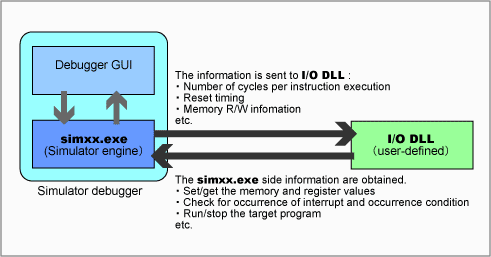
Processing flow
Supported Simulator Debuggers
This I/O DLL kit is available for the following simulator debuggers in the compiler packages :
- Simulator Debugger for M16C Series and R8C Family
- Simulator Debugger for M32C Series
- Simulator Debugger for R32C Series
Note: This I/O DLL kit is NOT supported by the M3T-PDxxSIM simulator debuggers. For M3T-PDxxSIM, use the PDxxSIM I/O DLL Kit.
Development Tools Used
To create an I/O DLL, you need to have Microsoft Visual C++, a Windows application development environment available on the market.
Sample Programs
The following sample programs are stored in a location at the hierarchical level below the directory in which this I/O DLL kit is installed. Refer to the release note for details on how to install the I/O DLL kit.
- I/O DLL to link with Excel from Microsoft Corporation
- I/O DLL to read/write data from a file
- I/O DLL to simulate the operation of a microcomputer's internal peripheral functions
支持
支持社区
- Can not run ble_adv example on Dialog 14681-pro kit
... Unknown command line parameter singlerun found. -----GDB Server start settings----- GDBInit file: none GDB Server Listening port: 2331 SWO raw output listening port: 2332 Terminal I/O port: 2333 Accept remote connection: localhost only Generate logfile: on Verify download: on Init regs on start: on Silent mode: off Single ...
2016年11月16日


