
概述
描述
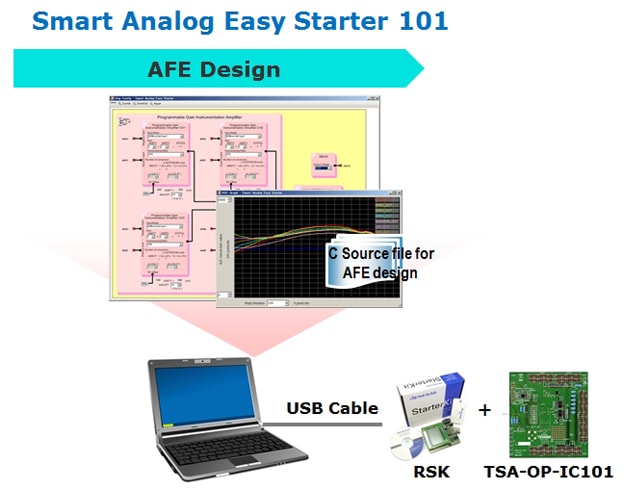
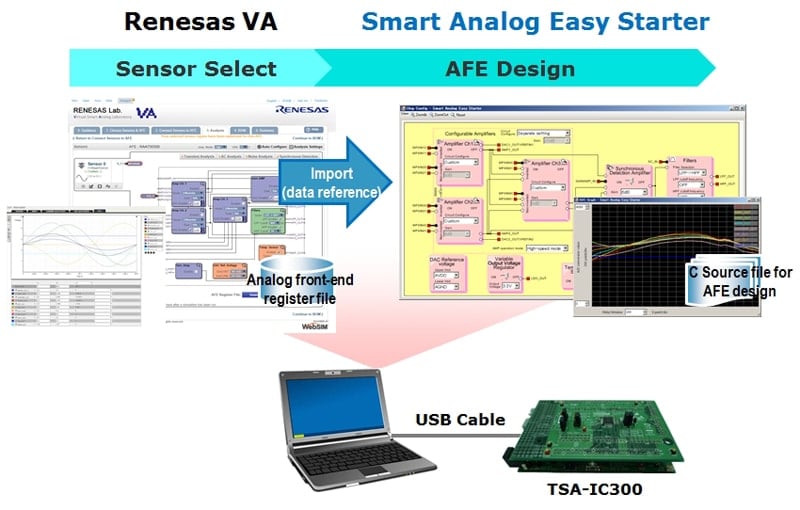
Smart Analog Easy Starter is a GUI evaluation tool for designing the analog front-end circuit of Smart Analog devices and editing analog circuit data while observing the waveforms on a computer screen. Circuit design can be performed easily by operating a mouse on a computer screen using a Smart Analog evaluation board manufactured by Tessera Technology.
特性
- GUI tool for Smart Analog evaluation board
- Perform circuit design and customization using a circuit block diagram style GUI.
- The circuit data (register values, etc.) you create can be displayed in a list, saved, and restored
- AFE register files created in the Renesas VA online simulator can be imported*1
- Edit circuit data while observing waveforms in Easy Starter
- Generate C source code for circuit design*2
- Generated C source code is compatible with files generated by SA-Designer (project not registered to CS+)
- Notes:
- AFE register files created in Renesas VA cannot be imported to Smart Analog Easy Starter 101.
- Except interface C source code.
发布信息
Hardware Requirements
| Supported OS | Windows® 7, Windows Vista®, Windows® XP SP3 |
|---|---|
| CPU | At least 1 GHz (multicore CPU supported) |
| Main memory | At least 1 GB |
| Display | At least 800 x 600 |
| Interface | At least 1 USB port that supports USB 1.1 |
| Other software requirements in addition to Windows OS | Microsoft .NET Framework 3.0 USB driver for target board |
目标设备
下载
|
|
|
|
|---|---|---|
| 类型 | 文档标题 | 日期 |
| 软件和工具 - 其他 | Analog-front-end circuit design tool Smart Analog Easy Starter (V2.0)
|
|
| 软件和工具 - 其他 | Analog-front-end circuit design tool Smart Analog Easy Starter 101
|
|
2 项目
|
||
文档
请登录后开启订阅
|
|
|
|
|---|---|---|
| 类型 | 文档标题 | 日期 |
| 应用说明 |
PDF
1.54 MB
日本語
AI 生成的摘要:
This section explains how to solder pin sockets and headers to the RSK CPU board and TSA-OP-IC101 board for proper connection. Pin sockets on the RSK CPU board are soldered facing upward, while pin headers on the TSA-OP-IC101 board face downward. It also covers jumper settings, specifically setting the J5 jumper on the RSK CPU board to supply 5V power to the TSA-OP-IC101 board. Instructions ensure correct mounting orientation and jumper configuration for proper operation.
|
|
| 应用说明 |
PDF
4.70 MB
日本語
AI 生成的摘要:
This section lists the required components for development using the TSA-IC500 evaluation board, including the Smart Analog IC 500 and RL78/G1A microcontroller. It specifies the need for the Renesas E1 on-chip debugging emulator, New Japan Radio phototransistor NJL7502L as a sensor, LEDs for status indication, and resistors for LED current control. It also details how to obtain the TSA-IC500 board and the E1 emulator through distributors or online sources.
|
|
| 应用说明 |
PDF
1.50 MB
日本語
AI 生成的摘要:
The hardware setup for sensor evaluation using Smart Analog Easy Starter requires a sensor board, evaluation board, computer, and USB cable. Power can come from USB or an external supply, with external power recommended to reduce noise. The sensor output is amplified and A/D converted by Smart Analog IC and RL78/G1A, then sent to the computer via USB for display. Software setup involves launching Easy Starter, detecting the virtual serial port, and configuring analog circuit parameters in the Chip Config window.
|
|
3 项目
|
||
Additional Details
| Smart Analog Easy Starter 101 | Smart Analog Easy Starter | |
|---|---|---|
| Supported evaluation boards | Smart Analog IC101 RSK Option Board TSA-OP-IC101 | Smart Analog IC Evaluation Board TSA-IC300 Smart Analog IC Evaluation Board TSA-IC301 Smart Analog IC Evaluation Board TSA-IC500*3 Smart Analog Stick (RL78/G1E Stick Starter kit) RL78/G1E-STICK |
| Supported devices | Smart Analog IC101 | Smart Analog IC300 Smart Analog IC301 Smart Analog IC500 Smart Analog IC501 Smart Analog IC502 Smart Analog MCU (RL78/G1E) |
Please download USB drivers for TSA-IC300 and TSA-IC301 for Windows 7, Windows XP, and Windows Vista from Tessera Technology's website:
TSA-IC300/301 USB drivers


