
概览
描述
灵活的全功能人机界面(HMI)和通信产品示例,基于旗舰级Synergy S7G2 MCU群组。
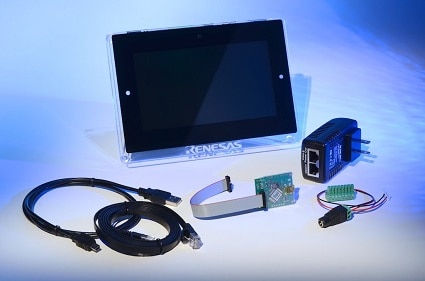
套件内容
- S7G2 MCU和I/O板
- 7"电容式触摸、WVGA 800x480彩色显示屏
- 快速入门指南
- USB A型转USB Micro-B电缆
- 以太网电缆
- 5V电源
- 以太网供电(PoE)电源
- RS232/485/CAN连接器
- J-Link® Lite调试器
系统要求
- Microsoft® Windows® 7或10,运行频率≥ 2.0 GHz的Intel® Core™系列处理器或同等处理器
- ≥ 8 GB系统RAM
- ≥ 2 GB可用硬盘空间
- USB 2.0端口
- 互联网连接
Knowledge Base
特性
- 天气面板应用演示展示了多线程HMI示例,支持同时管理多个功能,如渲染和用户输入
- 温控器应用演示展示了触摸屏、Wi-Fi连接和Web服务器,后者可连接到接入点或无线路由器,以便从智能手机、平板电脑或PC进行远程无线访问
- 使用片上LCD控制器、视频帧捕获引擎、2D绘图引擎和丰富的功能(如Alpha混合)覆盖多个图形屏幕和编解码器
- 使用随附的GUIX Studio™可视化带背光的7”多视角(MVA)彩色LCD电容式触摸显示屏上的图形,并在上面添加图形
- 使用板载以太网、Bluetooth®双模式、USB和Pmod™等灵活的连接选项
- 利用原理图、物料清单(BOM)和PCB布局指南优化电路设计
- 使用紧密集成和经过认证的Synergy软件包(SSP)加快代码开发
- 通过J-Link® Lite进行调试和编程
应用
文档
相关文档
请登录后开启订阅
|
|
|
|
|---|---|---|
| 类型 | 文档标题 | 日期 |
| 快速入门指南 | PDF 812 KB 日本語 | |
| EOL 通告 | PDF 221 KB | |
| 应用说明 |
PDF
2.21 MB
AI 生成的摘要:
This document guides users through setting up and developing a simple GUI application using GUIX Studio on the Renesas Synergy Platform for PE-HMI1. It explains how to import a completed project into e2 studio or create a new project from scratch. Steps include launching e2 studio, selecting or creating a workspace, starting a new Synergy C/C++ project, naming the project, and verifying the GCC ARM Embedded toolchain. The document also references a project import guide and a zipped completed project file for quick verification.
|
|
| 应用说明 |
PDF
61 KB
AI 生成的摘要:
The document provides a comprehensive look-up table for Synergy MCU Kits, listing current and new orderable part numbers to assist customers in ordering through distributors. It emphasizes precautions for handling microprocessing and microcontroller units, including electrostatic discharge prevention, power-on processing, signal input during power-off, unused pin handling, clock signal stability, and voltage waveform considerations. It also covers prohibitions on accessing reserved addresses, product differences, and safety and legal disclaimers. The document includes URLs for support, software, and additional resources related to the Synergy Platform. It highlights quality grades and usage restrictions for Renesas products, emphasizing user responsibility for safety and compliance.
|
|
| 应用说明 |
PDF
2.92 MB
日本語
AI 生成的摘要:
This document guides the creation of advanced graphical user interfaces using Express Logic GUIX Studio and Renesas Synergy GUIX Module. It covers widget creation, multi-screen management, smooth screen transitions, sliders, and animations. It details hardware acceleration using JPEG codec and 2D drawing engines, memory requirements for Flash and RAM, image storage options, and touch interface integration. It also explains software and hardware rendering trade-offs, screen rotation support, and SSP framework components including touch panel, I2C, PWM, and pin configurations. Performance considerations based on memory type, color depth, and display resolution are included to optimize GUI design on Renesas Synergy MCUs.
|
|
| 应用说明 |
PDF
703 KB
日本語
AI 生成的摘要:
The Wi-Fi application project on the PE-HMI1 board demonstrates client mode connectivity to an Access Point using user credentials and DHCP for IP address assignment, displaying the IP on the LCD. It integrates with ThreadX RTOS, NetX, GUIX, and SSP frameworks. The Wi-Fi Framework provides vendor-independent APIs for configuration and control, interfacing with the GT202 Wi-Fi module via SPI drivers. Hardware requirements include the PE-HMI1 board, Mini USB Cable, J-Link Lite, and power supply. The project can be extended by modifying the existing Synergy Thermostat application to add Wi-Fi features using GUIX Studio and ISDE configurator.
|
|
| 应用说明 | PDF 2.27 MB 日本語 | |
| 应用说明 |
PDF
1.04 MB
日本語
AI 生成的摘要:
The document explains how to use the Audio Player application on supported Renesas Synergy boards, including S7G2 and PK-S5D9. It details connecting the board, importing the project into e² studio, and running the application. Supported audio files are mono, signed, 16-bit, 44.1 kHz PCM WAVE files. The UI includes splash, USB, and main screens, with volume control via buttons or GUI. It notes a current limitation in smooth audio switching, recommending stopping playback before changing tracks.
|
|
| 应用说明 | PDF 277 KB | |
| 应用说明 | PDF 284 KB 日本語 | |
| 应用说明 | PDF 224 KB | |
| 应用说明 |
PDF
2.14 MB
日本語
AI 生成的摘要:
The document details the setup and configuration of the PE-HMI1 and DK-S7G2 boards for running the Weather Panel application, including specific DIP switch settings and J-Link programming interface connections. It highlights the application’s use of complex HMI designs with GUIX Studio, multi-threading with ThreadX RTOS, and Synergy messaging for inter-thread communication. The Weather Panel leverages Synergy S7G2 or S5D9 MCUs based on ARM Cortex-M4, utilizing various peripherals and drivers to streamline embedded application development.
|
|
| 应用说明 |
PDF
644 KB
日本語
AI 生成的摘要:
This section explains how to connect the target board using the SEGGER J-Link debugger and power it up. It details setting DIP switches for specific DK-S7G2 board versions and connecting an Ethernet cable between the board and PC. It guides configuring a static IP address on the PC Ethernet port, using 192.168.0.200 as an example, and running the command prompt as administrator to verify IP settings with the ipconfig command. Finally, it advises selecting a unique IP address for the board, such as 192.168.0.2.
|
|
| 应用说明 |
PDF
586 KB
AI 生成的摘要:
This document explains how to connect and configure a target board for use with the NetX Web Server on the Renesas Synergy Platform. It details setting up the SEGGER J-Link debugger, enabling Ethernet ports via DIP switches on specific DK-S7G2 board versions, and connecting the board to a PC using an Ethernet cable. It also guides configuring a static IP address on the PC and selecting a unique IP address for the board. Instructions for running the command prompt as an administrator and using the ipconfig command to verify network settings are included.
|
|
| 应用说明 | PDF 2.00 MB | |
| 应用说明 |
PDF
250 KB
AI 生成的摘要:
The USBX Host Class Hub Module manages USB hubs, supporting stand-alone or compound devices, self-powered or bus-powered modes, and cascading of up to five hubs. It requires defining USB host controllers and device classes for operation. The module uses USB controller interrupts and transfer module interrupts, with priority settings configurable in the Synergy Configuration tool. Integration involves adding the module to a thread stack via the SSP configurator, which automatically includes necessary lower-level modules. The module itself has no user APIs or configurable properties; configuration occurs through associated modules.
|
|
| 应用说明 | PDF 456 KB | |
| 应用说明 | PDF 306 KB | |
| 应用说明 |
PDF
1.71 MB
日本語
AI 生成的摘要:
The guide explains how to import and build projects using IAR Embedded Workbench (EW) for Renesas Synergy. It details opening the workspace file from an extracted example project, viewing the project structure, and configuring settings for the Synergy Standalone Configurator (SSC) and Synergy Software Package (SSP). It also covers setting the SSC/SSP path and license file, and launching the Synergy Standalone Configurator within the IDE to generate project files.
|
|
| 应用说明 |
PDF
439 KB
AI 生成的摘要:
The document explains how to create and migrate custom Board Support Packages (BSPs) for Renesas Synergy SSP versions 1.1.z and 1.2.0. It details the use of the Custom BSP Creator and Custom Pack Creator tools to generate, modify, and package BSPs. Custom BSPs mainly require changes in the board folder, including essential files like bsp.h and bsp_init.c. The process involves creating a base BSP, making a template pack for modifications, editing in e2 studio, and finalizing a standard pack for distribution. An example using the DK-S7G2 board illustrates these steps.
|
|
| 应用说明 |
PDF
538 KB
AI 生成的摘要:
The DK-S7G2 kit powers on via a 5 V barrel connector, indicated by LED3 status lights. Connecting the USB J-Link OB to the PC enables programming through a batch file using SEGGER J-Link, with a recommended firmware update. The demonstration application loads automatically, initializing LEDs and Ethernet indicators. The LCD displays a splash screen with date and time. Users can access a Thermostat Demonstration, adjust settings such as time, date, and sound, and navigate the Thermostat Control Menu for further controls.
|
|
| 应用说明 |
PDF
217 KB
AI 生成的摘要:
Connect the J-Link Lite for Cortex M to the PC using the supplied USB cable and ensure the LED shows solid green for proper communication. Attach the provided Ethernet cable from the PE-HMI1 board to a Power over Ethernet (PoE) supply. Run the “Program PE-HMI1 OOB Demo.bat” file to program the PE-HMI1 with the demo application, updating the J-Link firmware if prompted. The demo displays a weather pane on the LCD, allowing interaction with graphics effects like alpha-blending by pressing different days of the week. Support and technical contact details are provided online.
|
|
| PCB 设计文件 | Renesas Synergy™ PE-HMI1 Product Example v2.0 Design Data
|
|
| 手册 - 开发工具 | PDF 2.19 MB 日本語 | |
24 项目
|
||
设计和开发
样例程序
样例程序
筛选
|
||
|---|---|---|
| 类型 | 文档标题 | 日期 日期 |
| 示例代码 | GUIX "Hello World" for PE-HMI1– Application Project - Sample Code
|
|
| 示例代码 | Getting Started with the Audio Player Application using SSP - Application Project Rev.1.03 - Sample Code
|
|
| 示例代码 | USBX™ Host Class CDC-ACM Module Guide - Application Project Rev.1.02 - Sample Code
|
|
| 示例代码 | USBX™ Device Class HID Module Guide - Application Project Rev.1.04 - Sample Code
|
|
| 示例代码 | USBX™ Device Class Mass Storage Module Guide - Application Project (r11an0104eu0104) Rev.1.04 - Sample Code
|
|
| 示例代码 | Getting Started with the Weather Panel Application - Application Project Rev.2.10 - Sample Code
|
|
| 示例代码 | Getting Started with the Thermostat Application for S7G2 and S5D9 - Application Project Rev.1.06 - Sample Code
|
|
| 示例代码 | Getting Started with NetX Duo™ Web Server - Application Project Rev.1.08 - Sample Code
|
|
| 示例代码 | Getting Started with NetX™ Web Server - Application Project Rev.1.10 - Sample Code
|
|
| 示例代码 | USBX™ Host Class Hub Module Guide - Application Project Rev.1.01 - Sample Code
|
|
| 示例代码 | USBX™ Device Class CDC-ACM Module Guide - Application Project Rev.1.01 - Sample Code
|
|
| 示例代码 | USBX™ Host Class Video Module Guide - Application Project Rev.1.00 - Sample Code
|
|
| 示例代码 | Creating a Custom Board Support Package for SSP 1.1.z - Application Project Rev.1.06 - Sample Code
|
|
| 示例代码 | DK-S7G2 v3.0 Out-of-Box Demonstration Programming Guidelines - Application Project (r12an0024eu0125) Rev.1.25 - Sample Code
|
|
14 项目
|
||
产品选项
| 器件号 | 状态 | 库存 | Sampleable | Pb (Lead) Free | ECCN (US) | HTS (US) |
|---|---|---|---|---|---|---|
| RTK7PEHMP1S00002BU | Last Time Buy | 有库存 | N/A | No | 3A991.a.2 | 8471.50.0150 |
| YSPEHMI1S20 | NRND | 有库存 | N/A | No | 3A991.a.2 | 8471.50.0150 |


