
Simplifying the embedding of peripheral function module drivers and improving portability between RL78 MCUs are emphasized in the software integration system (SIS). The purpose of the SIS concept is reducing the loads of development of programs and management of software resources in the use of RL78 Family devices by software engineers.
About SIS
Features of SIS
SIS lays out clear rules for sample code (middleware and drivers) provided for RL78 Family devices as follows.
- MCU initial settings
- How to define a target board
- File configuration
- Common interface with user application
Conventionally, the above information has in many cases varied by sample code, so changes needed to be made to sample code when embedding into a user application. With SIS, there are rules for this information, so each sample code can be embedded into a user application with ease. Also, the peripheral function drivers and middleware which support SIS have a common interface with user applications. This makes it easy to port user applications when migrating between RL78 microcontrollers.
Easy Embedding to Project Generated by Integrated Development Environment
The CS+ integrated development environment (IDE), which provides simplicity, security, and ease of use, has a plug-in GUI facility for incorporating SIS modules. This facility enables the simple incorporation of SIS modules into the projects generated by CS+. The e² studio IDE also supports the use of SIS modules.
Configuration of SIS
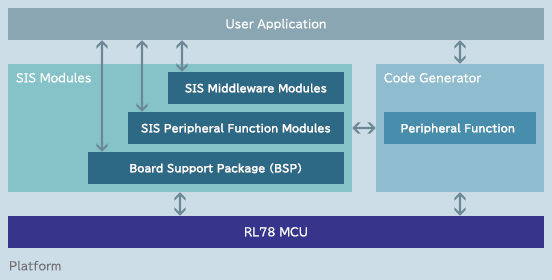
SIS consists of a Board Support Package (BSP), peripheral function modules, and middleware modules.
- BSP
Module that performs initial MCU settings, clock settings, board settings, and so on - Peripheral Function Modules
- Middleware Modules
- Code Generator
Settings for peripheral functions and pins are made in the GUI; source code will be output in accordance with the settings.
Using SIS modules helps ease development.
How to Obtain
You can confirm the device support status of each Software Integration System module included in the latest version of the RL78 Driver Package by viewing the List of SIS Modules ( XLSX version or PDF version ).
Implementing SIS
Please refer to the following before implementing SIS modules. We recommend using the Smart Configurator.
User's Manual
- RL78 Smart Configurator User's Guide: CS+ (PDF | English, 日本語)
- RL78 Smart Configurator User's Guide: e² studio (PDF | English, 日本語)
- RL78 Smart Configurator User's Guide: IAREW (PDF | English, 日本語)
Application Note
- RL78 Family Board Support Package Module Using Software Integration System Rev.1.92 (PDF | English, 日本語)
The document covers conventions of the r_bsp so that users will know how to use it, configure it, and create a BSP for their own board.
Application
视频
This video introduces how to create a LIN project with Smart Configurator on e² studio.
