
概览
描述
评估Synergy S128 MCU群组的全部特性并使用Synergy软件和工具开发低功耗应用程序。
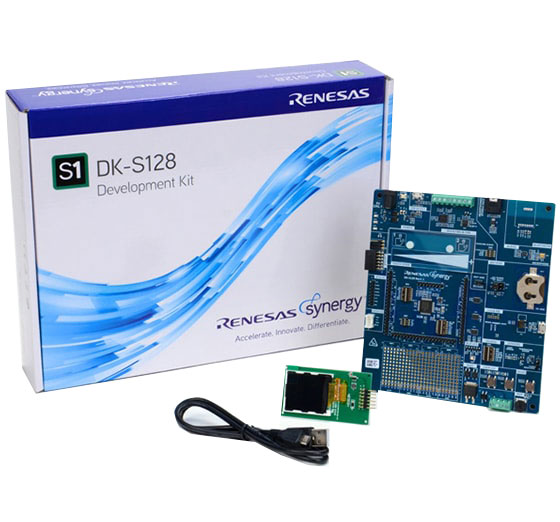
套件内容
- DK-S128开发板
- Pmod™ LCD显示板
- 快速入门指南
- USB A型转USB Micro-B电缆
- 5根分流跳线
系统要求
- Microsoft® Windows® 7或10,运行频率≥ 2.0 GHz的Intel® Core™系列处理器或同等处理器
- ≥ 8 GB系统RAM
- ≥ 2 GB可用硬盘空间
- ≥ 2 USB 2.0端口
- 互联网连接
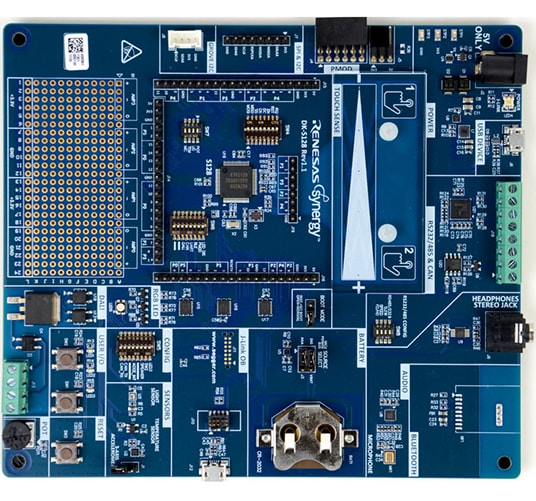
特性
- 访问Synergy S128 MCU群组的大多数引脚和板载外设
- 使用紧密集成和经过认证的Synergy软件包(SSP)加快代码开发
- 使用瑞萨电子的e2 studio ISDE或用于Renesas Synergy™的IAR Embedded Workbench®&查看、单步调试和调试代码
- 灵活的连接选项,包括USB、CAN、DALI 2.0、SEEED Grove I2C I/F和用于第三方、现成和自定义多功能板的Pmod™连接器
- 提供人机界面(HMI)功能,集成电容式触摸感应单元和Pmod™ LCD显示屏,用于开发用户界面屏幕
- 板载加速度计、灯和温度传感器
- 在程序执行期间测量实时功耗
- 安全和加密功能可实现安全的数据通信和存储,支持工业标准算法,如AES128/256
- 安全功能包括硬件诊断、存储器保护和看门狗超时
- 通过板载(OB) J-Link®&进行调试和编程
应用
文档
相关文档
请登录后开启订阅
|
|
|
|
|---|---|---|
| 类型 | 文档标题 | 日期 |
| 快速入门指南 | PDF 636 KB 日本語 | |
| 应用说明 |
PDF
61 KB
AI 生成的摘要:
The document provides a comprehensive look-up table for Synergy MCU Kits, listing current and new orderable part numbers to assist customers in ordering through distributors. It emphasizes precautions for handling microprocessing and microcontroller units, including electrostatic discharge prevention, power-on processing, signal input during power-off, unused pin handling, clock signal stability, and voltage waveform considerations. It also covers prohibitions on accessing reserved addresses, product differences, and safety and legal disclaimers. The document includes URLs for support, software, and additional resources related to the Synergy Platform. It highlights quality grades and usage restrictions for Renesas products, emphasizing user responsibility for safety and compliance.
|
|
| 应用说明 | PDF 2.27 MB 日本語 | |
| 手册 - 开发工具 | PDF 4.22 MB | |
| 应用说明 |
PDF
280 KB
日本語
AI 生成的摘要:
The DAC8 HAL module configures an 8-bit digital-to-analog converter to output 256 voltage levels with selectable data formats and modes, including normal and real-time event link modes. It supports synchronous anti-interference with ADC to reduce noise and allows enabling or disabling a hardware charge pump for low voltage operation. The module requires manual configuration of output pins and Event Link Controller for real-time mode. Integration into applications involves adding the driver via the SSP configurator, setting properties like interrupt priority, data format, and synchronization with ADC. Typical usage includes initializing, writing data, starting, stopping, and closing the DAC8 module. Pin configuration must be set to analog in the SSP configurator.
|
|
| 应用说明 |
PDF
1.71 MB
日本語
AI 生成的摘要:
The guide explains how to import and build projects using IAR Embedded Workbench (EW) for Renesas Synergy. It details opening the workspace file from an extracted example project, viewing the project structure, and configuring settings for the Synergy Standalone Configurator (SSC) and Synergy Software Package (SSP). It also covers setting the SSC/SSP path and license file, and launching the Synergy Standalone Configurator within the IDE to generate project files.
|
|
| 应用说明 |
PDF
439 KB
AI 生成的摘要:
The document explains how to create and migrate custom Board Support Packages (BSPs) for Renesas Synergy SSP versions 1.1.z and 1.2.0. It details the use of the Custom BSP Creator and Custom Pack Creator tools to generate, modify, and package BSPs. Custom BSPs mainly require changes in the board folder, including essential files like bsp.h and bsp_init.c. The process involves creating a base BSP, making a template pack for modifications, editing in e2 studio, and finalizing a standard pack for distribution. An example using the DK-S7G2 board illustrates these steps.
|
|
| 应用说明 |
PDF
947 KB
AI 生成的摘要:
The DK-S128 kit includes analog sensors and a 3-axis accelerometer connected via I2C. It continuously reads sensor values and displays them on a Pmod LCD. Three onboard LEDs flash or chase based on sensor inputs controlled by pushbuttons S1 and S2. The software uses multithreading with separate threads for reading inputs, updating the LCD, and controlling LEDs. The input thread samples sensors and switches every 50 ms, providing data to other threads without global variables. The LCD thread updates the display with the current mode and sensor data.
|
|
| 应用说明 |
PDF
743 KB
日本語
AI 生成的摘要:
This example demonstrates creating a simple graphics application using an Okaya Pmod LCD display controlled by two pushbuttons and a potentiometer on the DK-S128 board. The software architecture includes an LCD thread handling button interrupts and display updates, and a control thread managing backlight intensity via ADC readings from the potentiometer. The LCD driver operates over SCI in Simple SPI mode, supporting screen rotation and multiple display stages. ADC sampling filters jitter to stabilize PWM backlight control.
|
|
| PCB 设计文件 | Renesas Synergy™ Development Kit DK-S128 v2.0 Design Data
|
|
| 手册 - 开发工具 | PDF 2.92 MB 日本語 | |
| PCB 设计文件 | Renesas Synergy™ Development Kit DK-S128 v1.1 Design Data
|
|
12 项目
|
||
设计和开发
软件与工具
软件与工具
| Software title
|
Software type
|
公司
|
|---|---|---|
| 快速连接平台 快速连接平台通过提供兼容的硬件和软件构建模块,实现快速原型设计。
|
Software and Hardware Development Tools | 瑞萨电子 |
1 项目
|
||
样例程序
样例程序
筛选
|
||
|---|---|---|
| 类型 | 文档标题 | 日期 日期 |
| 示例代码 | DAC8 HAL Module Guide - Application Project Rev.1.01 - Sample Code
|
|
| 示例代码 | Creating a Custom Board Support Package for SSP 1.1.z - Application Project Rev.1.06 - Sample Code
|
|
| 示例代码 | DK-S128 v1.1 Out-of-Box Demonstration Programming Guidelines - Application Project Rev.1.02 - Sample Code
|
|
| 示例代码 | Simple PMOD Display Application Example for DK-S128 - Application Project Rev.1.01 - Sample Code
|
|
4 项目
|
||
产品选项
| 器件号 | 状态 | 库存 | 预算价格(美元) | Sampleable |
|---|---|---|---|---|
| RTK7DKS128S00001BU | Active | 有库存 | 1u | $175.29 | N/A |
| YSDKS128E10 | NRND | 缺货 | N/A |


