跳转到主要内容
瑞萨电子 (Renesas Electronics Corporation) - June is Pride Month, a month to raise awareness of the rights and the culture of the LGBTQ+ community

描述

集成软件开发环境

创新且开放的开发环境
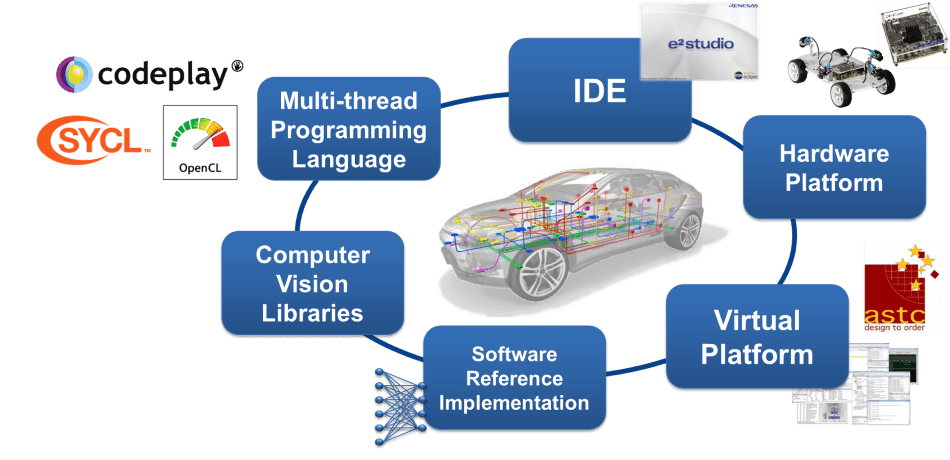
此产品称为 e² studio,基于 Eclipse 的集成式开发环境。Eclipse 是许多半导体公司使用的一种流行的可扩展式开源开发环境。

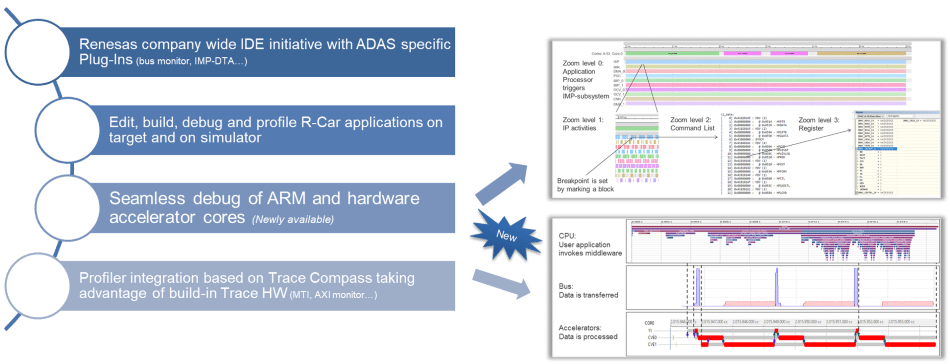
对于 R-Car V 系列,提供 e² studio 的特殊版本,其重点是为 ADAS 解决方案创建高性能计算机视觉应用程序。 R-Car SoC 具有先进的硬件架构:由专用的图像处理加速器内核加上高性能多核CPU。 加速器通过高速通信总线与 CPU 相连。

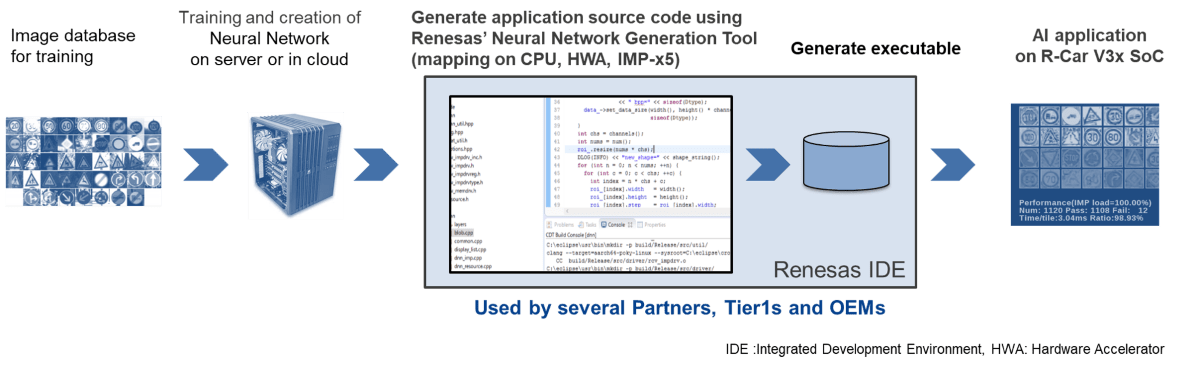
简化计算机视觉和深度学习算法的软件开发
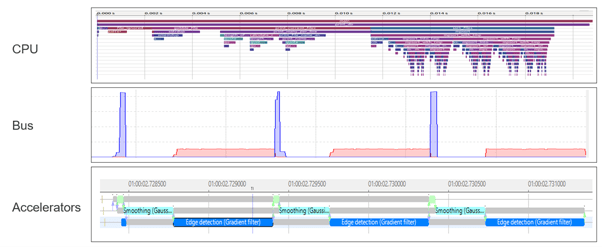
为调试和优化应用程序,需要可视化每个资源(CPU、总线、加速器 IP)的状态及其交互。 R-Car SoC 利用 Arm 的 CoreSight 技术进行跟踪和调试。 专用的 CoreSight 硬件元素允许以较低的消耗分析应用程序运行时间。

瑞萨电子的 IDE e² studio 连接到开发板上的 CoreSight 硬件,检索(并存储)跟踪数据,并提供各种查看结果的选项。 可视化方面,使用名为 Trace Compass 的开源跟踪框架。 这允许简单的集成可用的特定于操作系统的分析功能(例如,用于 Linux 的 LTTng)和用于总线和加速器监控的瑞萨电子特定功能。 根据使用情况,可以使用廉价的以太网电缆,通过 Lauterbach 的在线仿真器连接到 JTAG 或使用高速跟踪连接。

还可显示来自摄像头的输入和图像处理的中间步骤,如此开发人员便可以轻松地发现算法中可能存在的问题。

易于访问:下载完整的开发套件进行评估
新开发人员可以免费下载 e² studio 的评估许可证。 如需商业许可证,请联系瑞萨电子代表。
特性

  • 支持设备:R-Car V3HR-Car V3MR-Car S4
  • 增强了对 ADAS 软件开发的支持
  • 多线程编程环境:e² studio 包含由 Eclipse 提供的统一 GUI,支持 IMP-X5 内置 64 线程处理器的编程。 R-Car V3M 的 e² studio 采用了新开发的 IMP-X 5 专用 ccimp C 编译器,可通过统一的C语言进行开发。 此外,它还提供从 GUI 逐步调试线程操作的功能,可将程序开发所需工时大幅降至十分之一。
  • 图像查看器:具有简易 UI 配置的 IDE 能够让系统开发人员直接从 GUI 中检查由 IMP-X5 生成的图像。 无需存储图像进行图像验证,因此易于检查图像。
  • IP 跟踪器:e² studio 可显示 IMP-X5 中各子组件之间的交互,使软件开发人员能够在早期解决与特定 IP 相关联的复杂软件错误。 因此可缩短软件开发周期。
  • 总线流量监控器:IDE 可监控 SoC 中流经复杂总线结构的数据传输量。 在过去,数据传输延迟是通过试错法来确定。 而通过 e² studio,开发人员可以准确确定瓶颈,将软件调整所需的时间缩短一半。
  • 多核同步调试和跟踪:R-Car S4中集成的多个异构处理器内核(Arm内核/ RH850内核)可以同时调试和跟踪。 这允许在多个内核协同工作以实现功能的系统中更短的时间来识别原因和分析问题。
  • 多设备同步调试和跟踪工具:能够同时同步R-Car S4和RH850/U2A等多个设备,并进行调试和跟踪。这样,能够快速查明在多设备协同工作的SW上出现问题的原因。

功能支持矩阵

功能V 系列S 系列
多线程编程环境check-
图像查看器check-
IP 跟踪器check-
总线流量监控器checkcheck
多核同步调试和跟踪-check

目标设备

类型 文档标题 日期
升级 - IDE
登录后下载 RUN 1,571.90 MB 日本語
1 项目
类型 文档标题 日期
应用说明 PDF 1.68 MB 日本語
AI 生成的摘要: Synchronous debugging enables simultaneous control and evaluation of multiple Renesas devices using E2 Emulator, IE850A, and e2 studio. It supports system development for RH850-family MCUs and R-Car automotive SoCs by providing hardware configurations, synchronous adapters, and connection methods. The document details synchronous adapter types, setup procedures, and user system connections, alongside references to related manuals for comprehensive debugging support. It emphasizes correct usage, safety precautions, and responsibilities during development and disposal.
应用说明 PDF 1.57 MB 日本語
AI 生成的摘要: Synchronous debugging enables simultaneous control and analysis of multiple devices operating cooperatively within a system, addressing challenges in identifying software malfunctions across interconnected SoCs and MCUs. It supports tracing, synchronous execution, breaks, and tracing functions using the E2 emulator, IE850A, and e2 studio IDE. This approach simplifies debugging in complex electronic control units by providing a unified environment to pinpoint issues efficiently. The document also outlines the required hardware and software environments, terminology, and related manuals necessary for implementing synchronous debugging.
应用说明 PDF 2.16 MB 日本語
AI 生成的摘要: The document explains how to acquire and display trace data from Linux applications running on the R-Car V4H using e2 studio and the ETM analysis tool. It details setting up the environment, connecting the R-Car reference board to a host PC, starting Linux, and preparing executable files for trace data acquisition. The guide includes steps for configuring the Linux environment, loading necessary modules, and using e2 studio to capture and visualize trace data effectively.
应用说明 PDF 1.54 MB 日本語
AI 生成的摘要: The document explains how to acquire and analyze trace data from the R-Car V4H running Linux using the e2 studio IDE. It details setting up the environment, connecting the host PC to the reference board, and preparing executable files for trace data acquisition. The guide covers starting Linux on the R-Car, loading necessary modules, and operating ELF files for bus monitoring. It also describes creating tracing projects, setting profiling, importing, and displaying trace data using the bus monitor trace window for debugging purposes.
应用说明 PDF 1.49 MB 日本語
AI 生成的摘要: The document explains how to acquire and display trace data from Linux applications running on the R-Car V4H using the command-line interface and the Debug Trace Agent (DTA) within e2 studio. It covers environment setup, connection between the host PC and R-Car board, preparation of executable files for trace data acquisition, and debugging operations including project creation, trace profiling, and data visualization. Key files like perfmodule.ko and saperfmon.elf are used for trace data collection and analysis.
应用说明 PDF 1.02 MB 日本語
AI 生成的摘要: The document explains how to connect a debugger and target board to debug Linux applications running on R-Car S4 and V4H using e2 studio. It details the environment setup, including reference boards and host PC specifications, connection diagrams with IP configurations, project creation steps within e2 studio, and debugger connection procedures. Users learn to create a Renesas Debug Only Project, configure debug settings, and specify executable files for debugging. The guide supports efficient debugging of Linux applications on R-Car platforms.
6 项目
支持社区

支持社区

在线询问瑞萨电子工程社群的技术人员,快速获得技术支持。
浏览文章

知识库

浏览我们的知识库,获取文章、常见问题解答及其他实用资源。
提交工单

提交工单

需要咨询技术性问题或提供非公开信息吗?