
概述
描述
RH850 Smart Configurator can automatically generate control programs for peripheral modules (device driver programs). By generating needed source code in accordance with user settings, the plug-in shortens development terms and dramatically reduces costs.
特性
- Importing Middleware/Drivers
- Pin Settings
- Learn More
发布信息
| Supported IDEs and user guides (Note1) | Related documents | Latest Ver. Released | Operating Environment | |||
|---|---|---|---|---|---|---|
| e² studio | CS+ | IAR | GHS | |||
| — | Download RH850 Smart Configurator User's Guide: CS+ (PDF | English, 日本語) | Download RH850 Smart Configurator User's Guide: IAREW, MULTI (PDF | English, 日本語) | Download RH850 Smart Configurator User's Guide: IAREW, MULTI (PDF | English, 日本語) | Smart Configurator User's Manual: RH850 API Reference (PDF | English, 日本語) | V1.15.0 Jan 20, 2026 | Operating Environment |
— Not Supported
Note
- These user guides cover everything from installation to the setting of peripheral functions and the generation of code. Statements in each user guide are specific to the stated target integrated development environment.
Smart Configurator released after Dec. 2021 will support the 64-bit versions of Windows® only.
Microsoft® Windows® has shifted to the 64-bit environment. Therefore, Renesas will focus on supporting Smart Configurator for the 64-bit environment.
(Microsoft®, Windows® are registered trademarks of Microsoft Corporation in the United States and/or other countries. https://www.microsoft.com/legal/intellectualproperty/trademarks.aspx)
目标设备
Other Target Devices
视频和培训
本视频将介绍面向RH850系列的智能配置器。
Additional Details
Generating Driver Code
The Smart Configurator provides you with a GUI environment for generating driver code that handles the details of the settings of peripheral modules.
Clock settings
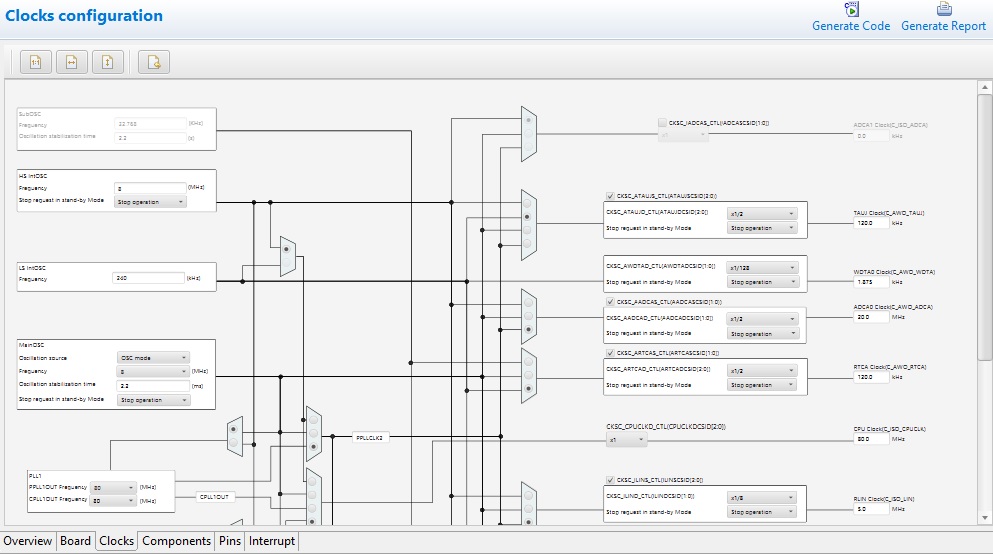
You can make clock settings by selecting a clock source and making connections in the block diagram in the [Clocks configuration] window.
Component settings
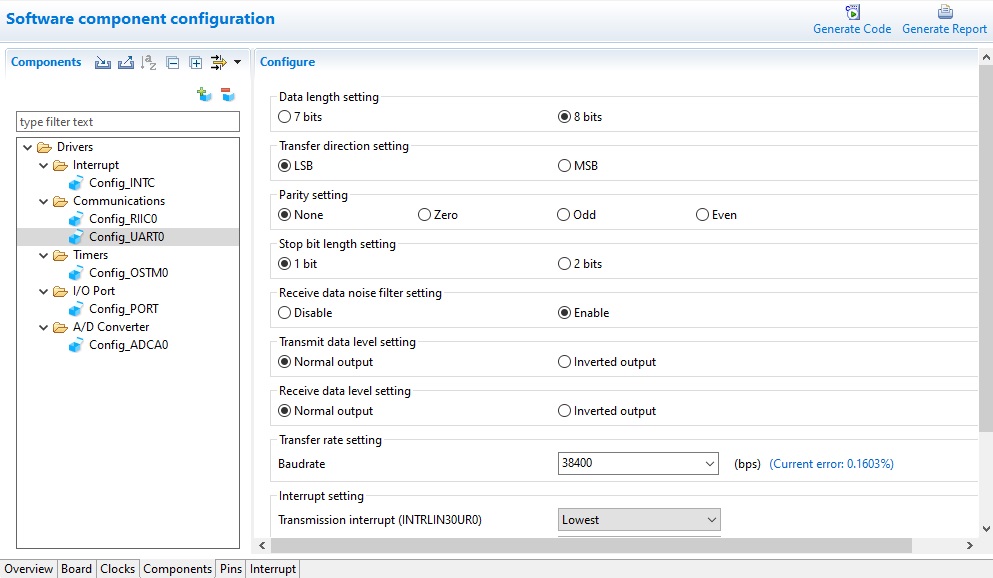
In the [Software component configuration] window, you can make settings for peripheral modules. After selecting the module you wish to set up for use, you can check for errors in settings (with some types indicated on the display) or switch the channels for use by drivers of multi-channel modules.
Pin Settings
The assignments of pins can be set up through a GUI, which also checks and offers solutions for cases of contention for the same pin by multiplexed functions.
The [Pins Configuration] window (displayed per peripheral module)
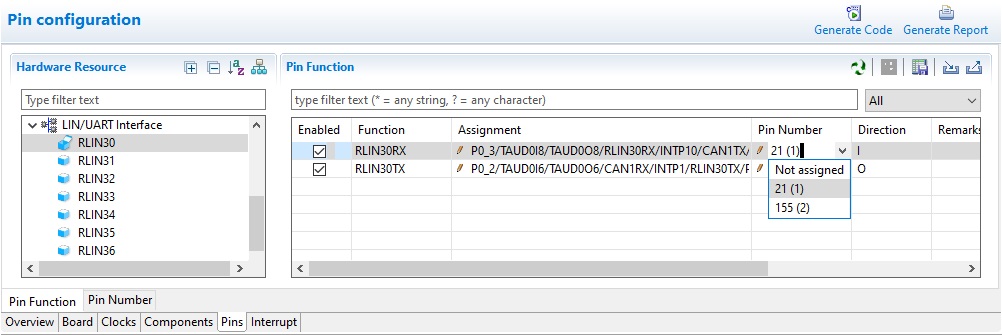
Specifying a peripheral module in the [Pins Configuration] window displays the pin functions for use by the module and allows you to set the assignment of the functions to pins.
[MCU Package] window
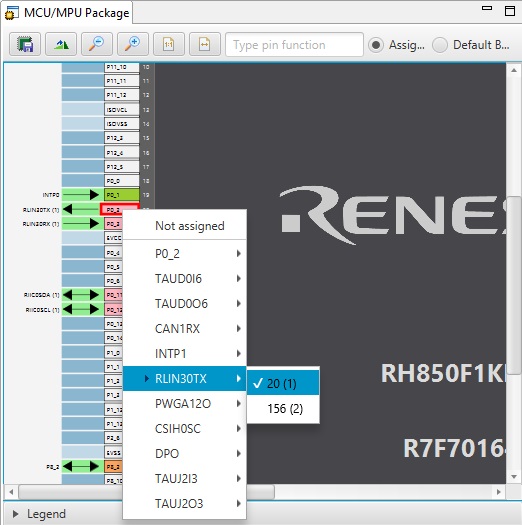
The [MCU Package] window displays a symbolic view of the pins, indicating by colors which pins are and are not in use, which have been assigned contending multiplexed functions, and so on. This makes it easy to check the overall situation.
Automatic resolution of contention between pin functions
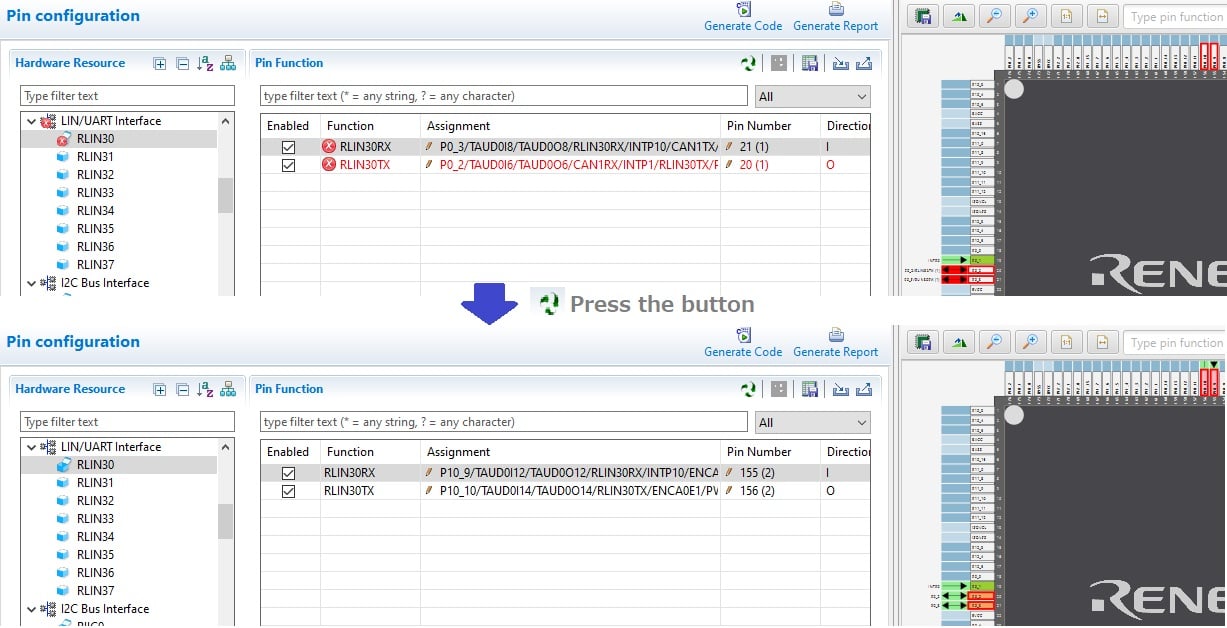
In cases of contention for a pin, clicking on the pin brings up a list allowing automatic changing of the assignment of the pin to resolve the contention.
How to migrate from Code Generator project to Smart Configurator project
Please refer to the following video for more information on code generation project migration.
How To Migrate From Code Generator Project to Smart Configurator Project
支持
支持社区
- RH850 UART DMA
MCU:R7F7016843 能否提供对应的UART DMA例程
2023年6月1日 - cs+的smart configurator是否能够配置rh850的hsm核,或者怎么才能获取到cs+的hsm核示例代码
cs+版本的hsm核示例代码如何获取
2025年9月9日 - E2 StudioIDE中Smart Configurator中断问题
我使用的IDE为E2 Studio, 在RH850平台上移植了FreeRTOS demo工程,工程中使用的中断方法为向量法,直接在0x100的中断函数中根据中断号软 ...
2026年5月15日
知识库
- 智能配置器 (Smart Configurator) FAQ汇总
... 被覆盖 How can I overwrite the values of the macro definition set by the Code Generator? Build Error Occurs in Project Created by Smart Configurator for RH850Selecting ‘Unused’ in Port Setting of Code Generator/Smart ConfiguratorCan I Specify Project File as Target of Version Management ...
2025年10月17日 - 在智能配置器(Smart Configurator)中使用ICU版本的设备文件出现错误[RH850]
智能配置器并不支持ICU版本的设备文件。请按照以下步骤使用智能配置器为ICU版本的设备文件创建和调试项目。 1. 使用 ...
2025年10月23日 - 如何通过智能配置器(Smart Configurator)进行CAN/LIN/Ethernet通信
... 置器将FIT模块的Ethernet驱动程序(r_ether_rx)轻松加入到项目中。此外,RH850系列MCU无法通过智能配置器加入CAN/LIN/Ethernet。请参照所使 ...
2025年12月19日


