
概览
描述
RX Smart Configurator V2.29.0 supports the new device RX14T.
RX Smart Configurator automatically generates initial-setting programs for MCUs.
It provides a quick and smart way of combining and configuring software to meet your needs, such as by configuring peripheral pins and importing middleware and drivers.
特性
- Importing Middleware/Drivers
- Generating Driver Code
- Pin Settings
- Learn More
发布信息
| Supported IDEs and user guides(Note1) | Related documents | Latest Ver. Released | Operating Environment | ||
|---|---|---|---|---|---|
| e² studio | CS+ | IAR | |||
| e² studio plug-in (Note2) RX Smart Configurator User's Guide: e² studio (PDF | English, 日本語) | Download RX Smart Configurator User's Guide: CS+ (PDF | English, 日本語) | Download RX Smart Configurator User's Guide: IAREW (PDF | English, 日本語) | Smart Configurator User's Manual RX API Reference (PDF | English, 日本語) | V2.29.0 Apr 20, 2026 | Operating Environment |
Note
- These user guides cover everything from installation to the setting of peripheral functions and the generation of code. Statements in each user guide are specific to the stated target integrated development environment.
- The package of the e² studio includes this plug-in.
End of Support for Windows 32-Bit Versions
- Smart Configurator released after Dec. 2021 will support the 64-bit versions of Windows® only.
Microsoft® Windows® has shifted to the 64-bit environment. Therefore, Renesas will focus on supporting Smart Configurator for the 64-bit environment.
(Microsoft®, Windows® are registered trademarks of Microsoft Corporation in the United States and/or other countries. https://www.microsoft.com/legal/intellectualproperty/trademarks.aspx)
FAQ
目标设备
下载
|
|
|
|
|---|---|---|
| 类型 | 文档标题 | 日期 |
| 软件和工具 - 软件 | Smart Configurator for RX V2.29.0
|
|
| 电路板信息文件 | ZIP 1 KB | |
| 电路板信息文件 | ZIP 1 KB | |
| 电路板信息文件 | ZIP 1 KB | |
| 电路板信息文件 | ZIP 1 KB | |
| 电路板信息文件 | ZIP 1 KB | |
| 电路板信息文件 | ZIP 1 KB | |
| 电路板信息文件 | ZIP 1 KB | |
| 电路板信息文件 | ZIP 1 KB | |
| 电路板信息文件 | ZIP 1 KB | |
| 电路板信息文件 | ZIP 1 KB | |
| 电路板信息文件 | ZIP | |
| 电路板信息文件 | ZIP | |
| 电路板信息文件 | ZIP | |
| 电路板信息文件 | ZIP 1 KB | |
| 电路板信息文件 | ZIP 1 KB | |
| 电路板信息文件 | ZIP 1 KB | |
| 电路板信息文件 | ZIP 1 KB | |
| 电路板信息文件 | ZIP 1 KB | |
| 电路板信息文件 | ZIP 2 KB | |
| 电路板信息文件 | ZIP 1 KB | |
| 电路板信息文件 | ZIP 2 KB | |
| 电路板信息文件 | ZIP 2 KB | |
| 电路板信息文件 | ZIP 1 KB | |
| 电路板信息文件 | ZIP 2 KB | |
| 电路板信息文件 | ZIP 2 KB | |
| 电路板信息文件 | ZIP 2 KB | |
| 电路板信息文件 | ZIP 2 KB | |
| 电路板信息文件 | ZIP 2 KB | |
| 电路板信息文件 | ZIP 1 KB | |
| 电路板信息文件 | ZIP 1 KB | |
| 电路板信息文件 | ZIP 2 KB | |
| 电路板信息文件 | ZIP 1 KB | |
| 电路板信息文件 | ZIP 1 KB | |
| 电路板信息文件 | ZIP | |
| 电路板信息文件 | ZIP 1 KB | |
| 电路板信息文件 | ZIP 1 KB | |
| 电路板信息文件 | ZIP | |
| 电路板信息文件 | ZIP 1 KB | |
| 电路板信息文件 | ZIP | |
| 电路板信息文件 | ZIP | |
| 电路板信息文件 | ZIP | |
| 电路板信息文件 | ZIP | |
| 电路板信息文件 | ZIP | |
| 电路板信息文件 | ZIP | |
| 电路板信息文件 | ZIP 1 KB | |
| 电路板信息文件 | ZIP | |
|
47 项目
|
||
文档
|
|
|
|
|---|---|---|
| 类型 | 文档标题 | 日期 |
| 发行说明 |
PDF
1.42 MB
日本語
This document describes support features and important notes for using the RX Smart Configurator, which automatically generates initial configuration programs for microcontrollers. It lists supported RX microcontrollers, changes, limitations, and precautions. Please read it before using the tool.
|
|
| 工具新闻 - 发布公告 |
PDF
162 KB
日本語
This is Renesas ToolNews announcement regarding the version upgrade to RX Smart Configurator V2.29.0, which enables automatic generation of initial configuration programs for microcontrollers.Several improvements have been made; please refer to the release notes for details.
|
|
| 发行说明 |
PDF
1.48 MB
日本語
This document describes support features and important notes for using the RX Smart Configurator, which automatically generates initial configuration programs for microcontrollers. It lists supported RX microcontrollers, changes, limitations, and precautions. Please read it before using the tool.
|
|
| 手册 - 开发工具 |
PDF
5.71 MB
日本語
This application note describes the basic usage of the RX Smart Configurator, and the procedure for adding its output files to CS+ projects.
|
|
| 手册 - 开发工具 |
PDF
4.97 MB
日本語
This application note describes the basic usage of the RX Smart Configurator, and the procedure for importing its output files to IAR Embedded Workbench.
|
|
| 手册 - 开发工具 |
PDF
8.23 MB
日本語
This application note describes the basic usage of the RX Smart Configurator which is an e² studio plug-in tool.
|
|
| 工具新闻 - 发布公告 |
PDF
224 KB
日本語
This is Renesas ToolNews announcement regarding the version upgrade to RX Smart Configurator V2.28.0, which enables automatic generation of initial configuration programs for microcontrollers.Several improvements have been made; please refer to the release notes for details.
|
|
| 传单 |
PDF
1004 KB
English
, 日本語
This is a flyer for the Smart Configurator, which can automatically generate initial setup programs for microcontrollers. It details the features and information about the Smart Configurator. Supported microcontrollers include RL78, RX, RH850, RISC-V, RA, and RZ.
|
|
| 发行说明 |
PDF
1.75 MB
日本語
This document describes support features and important notes for using the RX Smart Configurator, which automatically generates initial configuration programs for microcontrollers. It lists supported RX microcontrollers, changes, limitations, and precautions. Please read it before using the tool.
|
|
| 工具新闻 - 发布公告 |
PDF
168 KB
日本語
This is Renesas ToolNews announcement regarding the version upgrade to RX Smart Configurator V2.27.0, which enables automatic generation of initial configuration programs for microcontrollers. Key improvements include: Correct RTC code generation when using EXCIN, Correct RTC code generation when using EXCIN, Correct the code protection issue for DMAC callback function.
|
|
| 工具新闻 - 注意事项 | PDF 242 KB 日本語 | |
| 工具新闻 - 注意事项 | PDF 304 KB 日本語 | |
| 发行说明 | PDF 1.83 MB 日本語 | |
| 手册 - 开发工具 | PDF 2.39 MB 日本語 | |
| 工具新闻 - 发布公告 | PDF 439 KB 日本語 | |
| 发行说明 | PDF 1.68 MB 日本語 | |
| 工具新闻 - 发布公告 | PDF 417 KB 日本語 | |
| 发行说明 | PDF 2.14 MB 日本語 | |
| 工具新闻 - 发布公告 | PDF 468 KB 日本語 | |
| 发行说明 | PDF 1.58 MB 日本語 | |
| 工具新闻 - 发布公告 | PDF 165 KB 日本語 | |
| 工具新闻 - 注意事项 | PDF 145 KB 日本語 | |
| 工具新闻 - 注意事项 | PDF 290 KB 日本語 | |
| 工具新闻 - 发布公告 | PDF 156 KB 日本語 | |
| 发行说明 | PDF 1.24 MB 日本語 | |
| 工具新闻 - 发布公告 | PDF 166 KB 日本語 | |
| 发行说明 | PDF 1.84 MB 日本語 | |
| 工具新闻 - 发布公告 | PDF 161 KB 日本語 | |
| 发行说明 | PDF 1.29 MB 日本語 | |
| 工具新闻 - 发布公告 | PDF 157 KB 日本語 | |
| 发行说明 | PDF 1.67 MB 日本語 | |
| 工具新闻 - 发布公告 | PDF 159 KB 日本語 | |
| 指南 | PDF 1.43 MB 日本語 | |
| 发行说明 | PDF 1.45 MB 日本語 | |
| 工具新闻 - 发布公告 | PDF 158 KB 日本語 | |
| 工具新闻 - 注意事项 | PDF 192 KB 日本語 | |
| 工具新闻 - 注意事项 | PDF 183 KB 日本語 | |
| 发行说明 | PDF 1.64 MB 日本語 | |
| 工具新闻 - 发布公告 | PDF 158 KB 日本語 | |
| 工具新闻 - 推介工具 | PDF 864 KB 日本語 | |
| 发行说明 | PDF 1.64 MB 日本語 | |
| 工具新闻 - 发布公告 | PDF 208 KB 日本語 | |
| 工具新闻 - 发布公告 | PDF 197 KB 日本語 | |
| 工具新闻 - 发布公告 | PDF 160 KB 日本語 | |
| 工具新闻 - 注意事项 | PDF 373 KB 日本語 | |
| 工具新闻 - 发布公告 | PDF 159 KB 日本語 | |
| 工具新闻 - 注意事项 | PDF 155 KB 日本語 | |
| 工具新闻 - 发布公告 | PDF 115 KB 日本語 | |
| 工具新闻 - 注意事项 | PDF 223 KB 日本語 | |
| 工具新闻 - 发布公告 | PDF 344 KB 日本語 | |
| 工具新闻 - 注意事项 | PDF 169 KB 日本語 | |
| 工具新闻 - 发布公告 | PDF 153 KB 日本語 | |
| 工具新闻 - 发布公告 | PDF 206 KB 日本語 | |
| 工具新闻 - 发布公告 | PDF 155 KB 日本語 | |
| 工具新闻 - 注意事项 | PDF 263 KB 日本語 | |
| 工具新闻 - 发布公告 | PDF 95 KB 日本語 | |
| 工具新闻 - 注意事项 | PDF 269 KB 日本語 | |
| 工具新闻 - 注意事项 | PDF 65 KB 日本語 | |
| 工具新闻 - 注意事项 | PDF 504 KB 日本語 | |
| 工具新闻 - 注意事项 | PDF 154 KB 日本語 | |
| 工具新闻 - 注意事项 | PDF 732 KB 日本語 | |
| 工具新闻 - 注意事项 | PDF 246 KB 日本語 | |
| 工具新闻 - 注意事项 | PDF 1.66 MB 日本語 | |
| 工具新闻 - 注意事项 | PDF 160 KB 日本語 | |
| 应用说明 |
PDF
2.71 MB
日本語
AI 生成的摘要:
The document explains how to download and run Amazon FreeRTOS on the Renesas RX family using e2 studio. It guides users through preparing and configuring the demo project, selecting the demo, setting up AWS and hardware, configuring the debug serial port, and building and running the demo. It also details downloading the source code from Renesas GitHub, highlighting that e2 studio version 7.5 and above supports importing Amazon FreeRTOS projects directly within the IDE, simplifying the process.
|
|
| 应用说明 |
PDF
5.08 MB
日本語
AI 生成的摘要:
The document provides step-by-step guidance on using Smart Configurator with Renesas RX microcontrollers, covering device selection, clock settings, driver addition, and pin configuration. It includes application examples for peripherals like CMT, A/D, SCI, DMA, and USB. The guide details code generation, adding application codes, building, and running on hardware, along with debugging support tools.
|
|
| 应用说明 |
PDF
1.88 MB
日本語
AI 生成的摘要:
This guide explains how to create an Ethernet echo server program using FIT modules in Smart Configurator for RX64M, RX6SN, and RX651 groups. It outlines the operating environment, including evaluation boards, debuggers, IDE, and toolchains. The basic steps involve selecting devices, configuring clocks, drivers, and pins, generating code, and adding application code. The module structure includes middleware, interface conversion, device drivers, system timer, and BSP, with specific versions listed for each FIT module.
|
|
|
67 项目
|
||
探索
视频和培训
视频演示安装 Smart Configurator 和 IAR Embedded Workbench for RX (EWRX)。
下一个视频
相关资源
Additional details
Importing Middleware/Drivers
Importing FIT Modules
Renesas offers a range of FIT (Firmware Integration Technology) modules which you can import and then modify their settings, such as pin assignments. You can also use them with code from the driver code generator.
Details of FIT >>
List of FIT Modules >>
Generating Driver Code
The Smart Configurator provides you with a GUI environment for generating driver code that handles the details of the settings of peripheral modules.
Clock settings
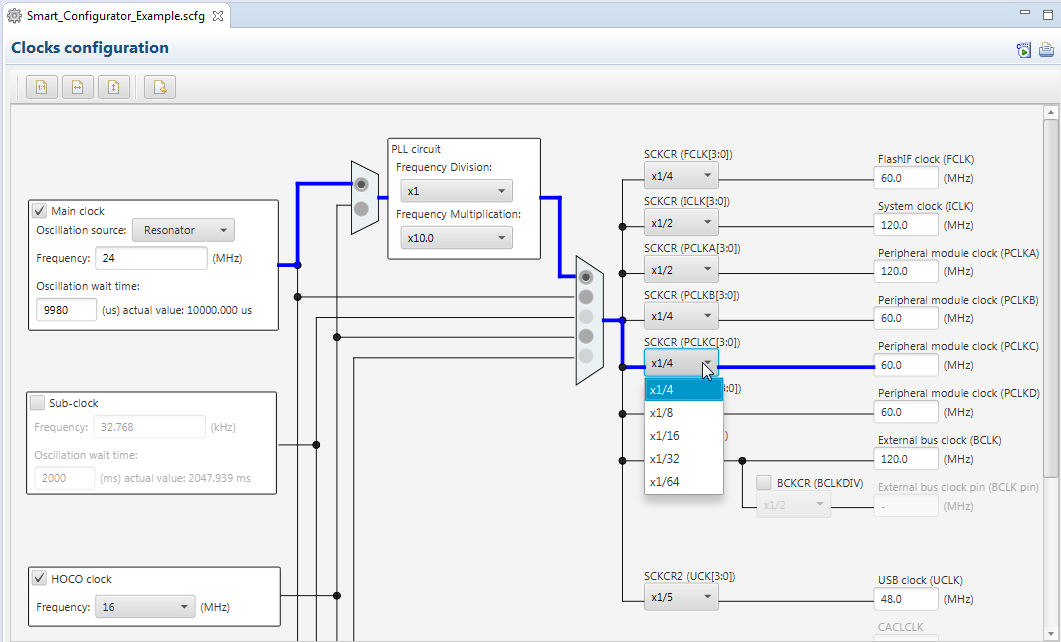
You can make clock settings by selecting a clock source and making connections in the block diagram in the [Clocks configuration] window.
Component settings
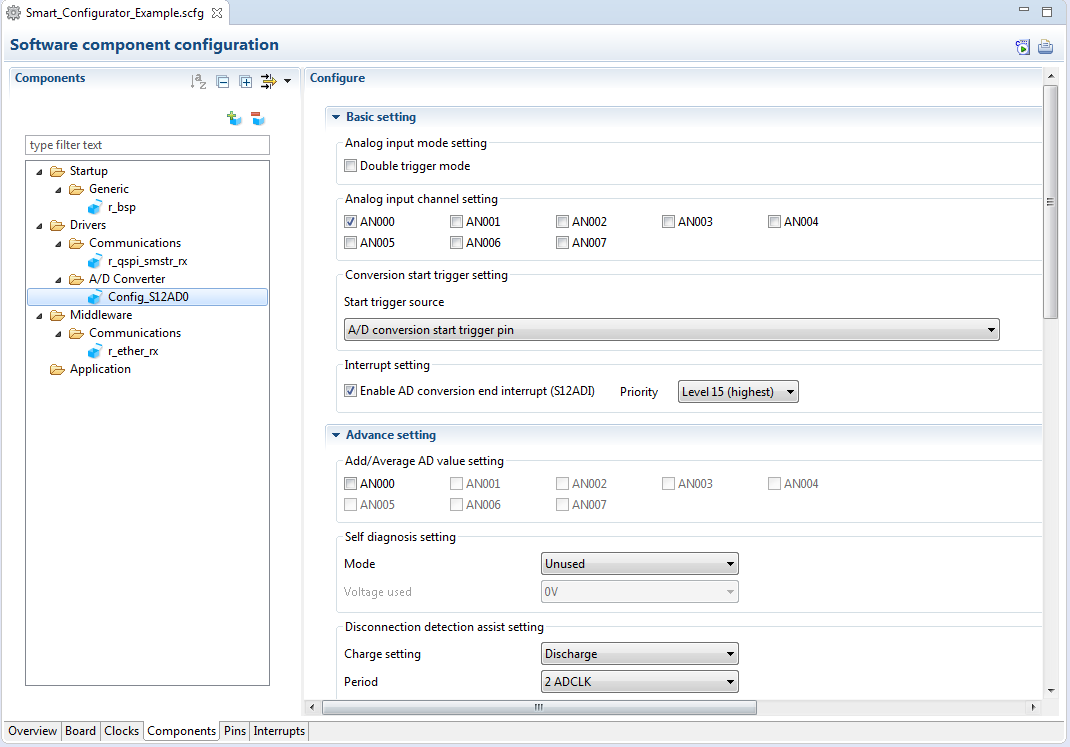
In the [Software component configuration] window, you can embed sample code and make settings for peripheral modules. After selecting the module you wish to set up for use, you can check for errors in settings (with some types indicated on the display) or switch the channels for use by drivers of multi-channel modules.
Pin Settings
The assignments of pins can be set up through a GUI, which also checks and offers solutions for cases of contention for the same pin by multiplexed functions.
The [Pins Configuration] window (displayed per peripheral module)
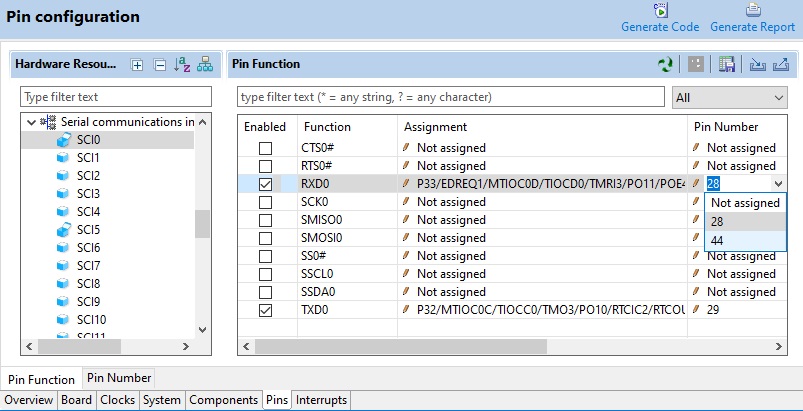
Specifying a peripheral module in the [Pins Configuration] window displays the pin functions for use by the module and allows you to set the assignment of the functions to pins.
[MCU Package] window
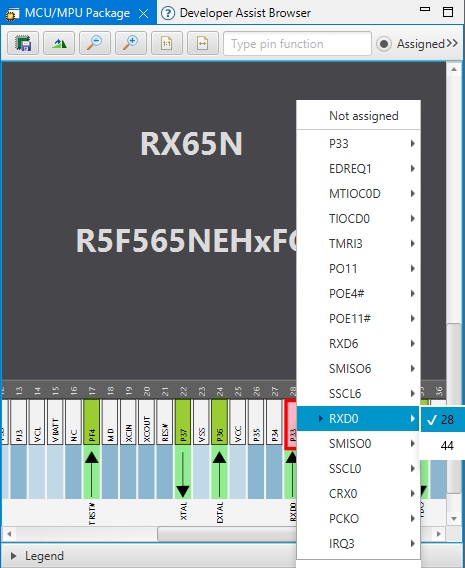
The [MCU Package] window displays a symbolic view of the pins, indicating by colors which pins are and are not in use, which have been assigned contending multiplexed functions, and so on. This makes it easy to check the overall situation.
Automatic resolution of contention between pin functions
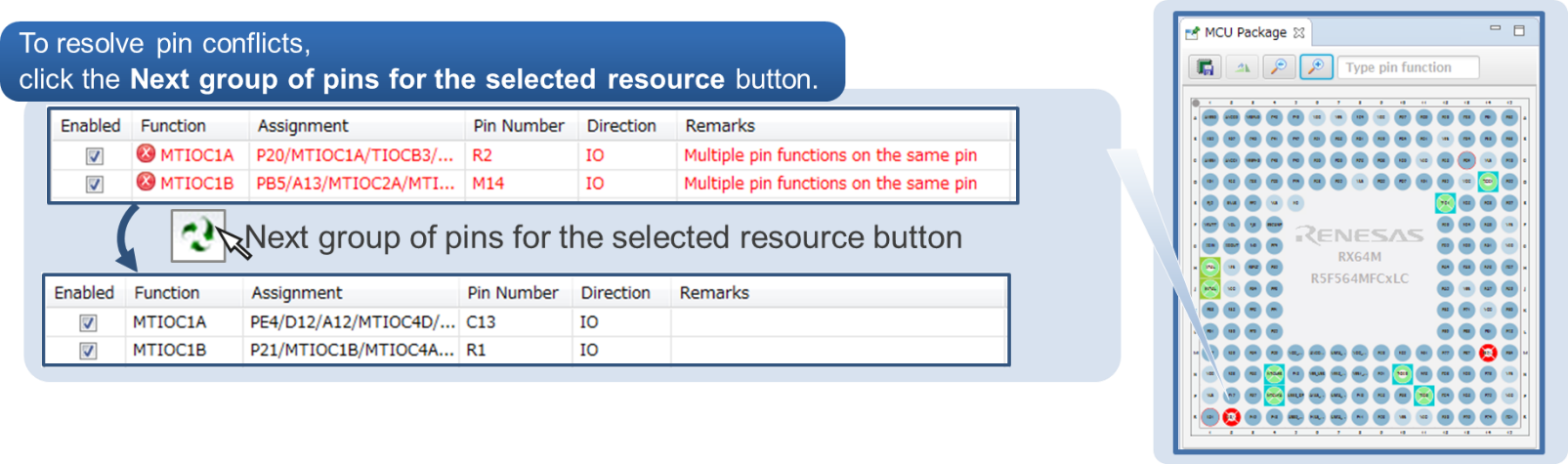
In cases of contention for a pin, clicking on the pin brings up a list allowing automatic changing of the assignment of the pin to resolve the contention.
How to migrate from Code Generator project to Smart Configurator project
Please refer to the following video for more information on code generation project migration.
How To Migrate From Code Generator Project to Smart Configurator Project
支持
支持社区
- RX72M Smart configurator 并口配置报错
请帮忙看下RX72M 并口配置的报错:
2021年8月23日 - RX72M 在Smart configurator EXDMA Controller 生成不了代码怎么办?
RX72M 在Smart configurator 配置中EXDMACa 生成不了代码,还有其它方式可以使用?
2022年1月19日 - RX72M 在Smart configurator 配置问题咨询
RX72M 在Smart configurator 配置软件中断勾选Software interrupt 就出现红色x, 为什么会出现这样的错误? 给勾选Software interrupt 就不会出现红色x
2021年12月23日
知识库
- 如何在IAR EW中创建RX Azure RTOS示例工程
... 以下瑞萨网站。https://www.renesas.com/software-tool/smart-configurator请确认您使用的RX智能配置器的版本。不同版本的创建方法有所不同。 [使用RX ...
2025年10月24日 - 智能配置器(Smart Configurator) FAQ汇总
... 什么? 通信 Why Does I²C Baud Rate Set by Smart Configurator for RX Differ from Actual Value 在智能配置器 (Smart Configurator) 中出现中断向量分配错误 使用RX智能配置器 (Smart Configurator) 的I2C ...
- 在智能配置器(Smart Configurator)中出现中断向量分配错误
在Smart Configurator for RX中,部分可选中断在初始状态下并未分配到中断向量。请按照以下步骤进行中断向量的分配。1) 在显示的可选 ...
2025年10月20日


