
概述
描述
RL78 Smart Configurator automatically generates initial-setting programs for MCUs.
It provides a quick and smart way of combining and configuring software to meet your needs, such as by configuring peripheral pins and importing middleware and drivers.
特性
- Importing Middleware/Drivers
- Pin Settings
- Learn More
发布信息
| Supported IDEs and user guides(Note1) | Related documents | Latest Ver. Released | Operating Environment | ||
|---|---|---|---|---|---|
| e² studio | CS+ | IAR | |||
| e² studio plug-in (Note2) RL78 Smart Configurator User's Guide: e² studio (PDF | English, 日本語) | Download RL78 Smart Configurator User's Guide: CS+ (PDF | English, 日本語) | Download RL78 Smart Configurator User's Guide: IAREW (PDF | English, 日本語) | Smart Configurator User's Manual: RL78 API Reference (PDF | English, 日本語) | V1.18.0 Jul 21, 2026 | Operating Environment |
— Not Supported
Note
- These user guides cover everything from installation to the setting of peripheral functions and the generation of code. Statements in each user guide are specific to the stated target integrated development environment.
- The package of the e² studio includes this plug-in.
Smart Configurator released after Dec. 2021 will support the 64-bit versions of Windows® only.
Microsoft® Windows® has shifted to the 64-bit environment. Therefore, Renesas will focus on supporting Smart Configurator for the 64-bit environment.
(Microsoft®, Windows® are registered trademarks of Microsoft Corporation in the United States and/or other countries. https://www.microsoft.com/legal/intellectualproperty/trademarks.aspx)
目标设备
探索
视频和培训
该视频介绍了 RL78 器件内置的 ELCL 功能。使用智能配置器(e2 studio 插件)可以轻松地进行ELCL 功能的设计。
Additional Details
Importing Middleware/Drivers
RL78/G23 Group: Importing middleware (e.g. capacitive touch sensing middleware)
You can also use such middleware in conjunction with code from the driver code generator.
How to Use the RL78/G23 peripheral functions
- How to Use the SnoozeModeSequencer (SMS)
- Watch the video.
Create Project | Configure Project | Add User Code and Run Project - See the application note
- Watch the video.
- How to Use the Logic and Event Link Controller (ELCL)
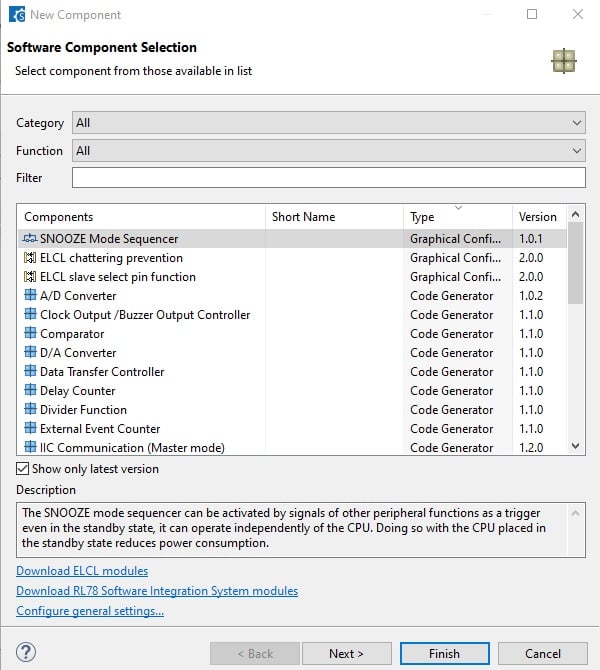
Generating Driver Code
The Smart Configurator provides you with a GUI environment for generating driver code that handles the details of the settings of peripheral modules.。
Clock settings
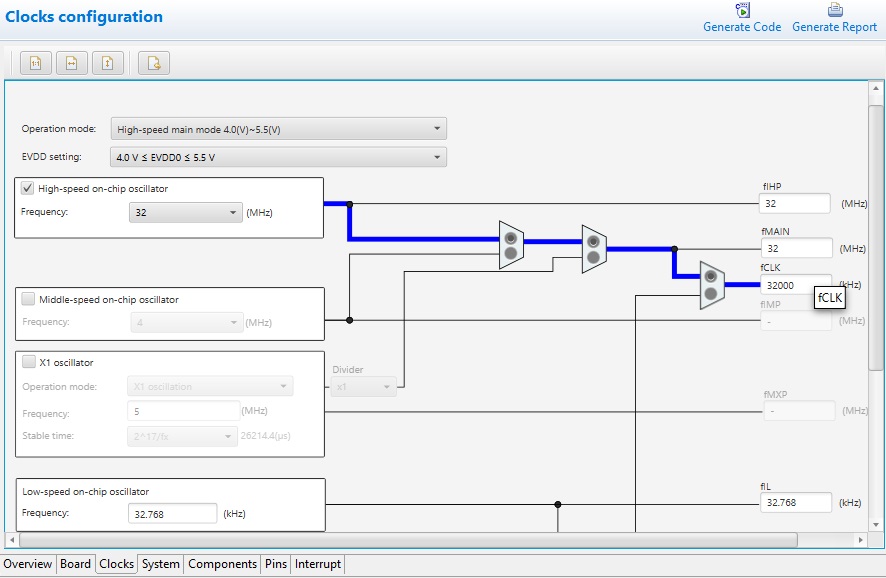
You can make clock settings by selecting a clock source and making connections in the block diagram in the [Clocks configuration] window.
Component settings
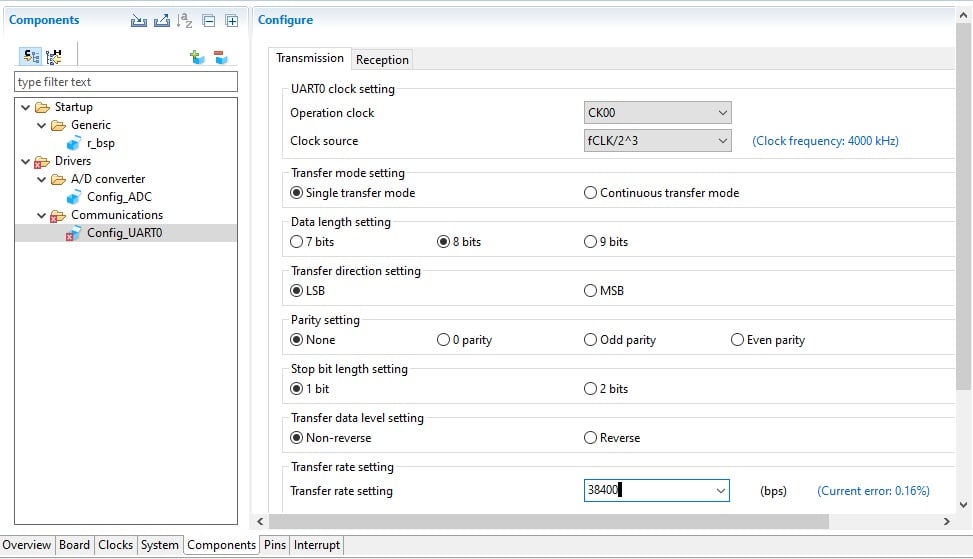
In the [Software component configuration] window, you can make settings for peripheral modules. After selecting the module you wish to set up for use, you can check for errors in settings (with some types indicated on the display) or switch the channels for use by drivers of multi-channel modules.
Pin Settings
The assignments of pins can be set up through a GUI, which also checks and offers solutions for cases of contention for the same pin by multiplexed functions.
The [Pins Configuration] window (displayed per peripheral module)
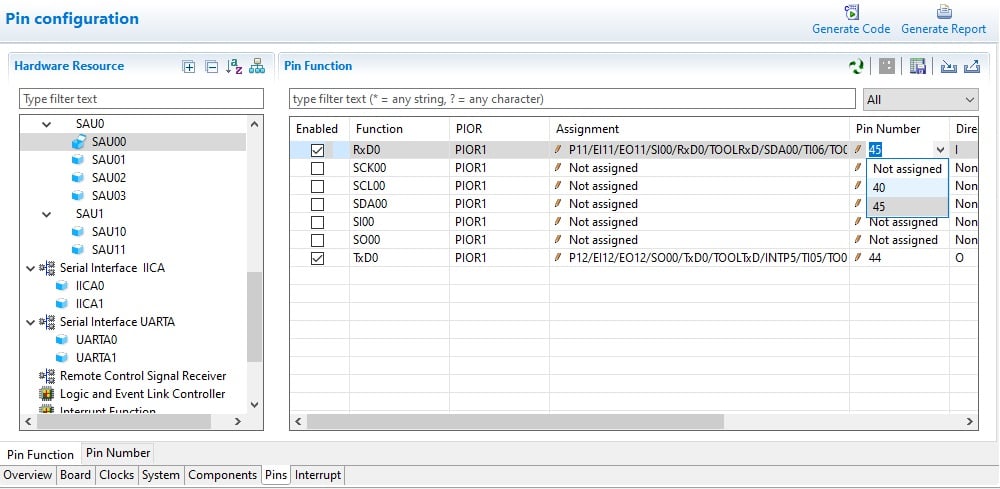
Specifying a peripheral module in the [Pins Configuration] window displays the pin functions for use by the module and allows you to set the assignment of the functions to pins.
[MCU Package] window
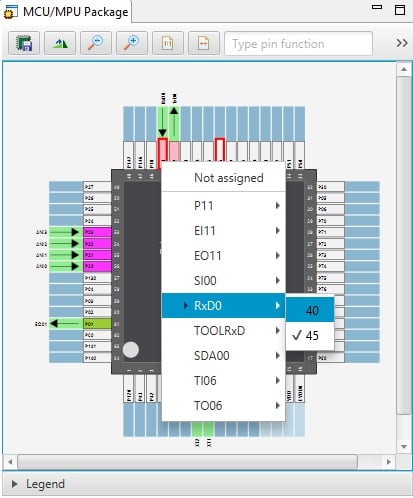
The [MCU Package] window displays a symbolic view of the pins, indicating by colors which pins are and are not in use, which have been assigned contending multiplexed functions, and so on. This makes it easy to check the overall situation.
Automatic resolution of contention between pin functions
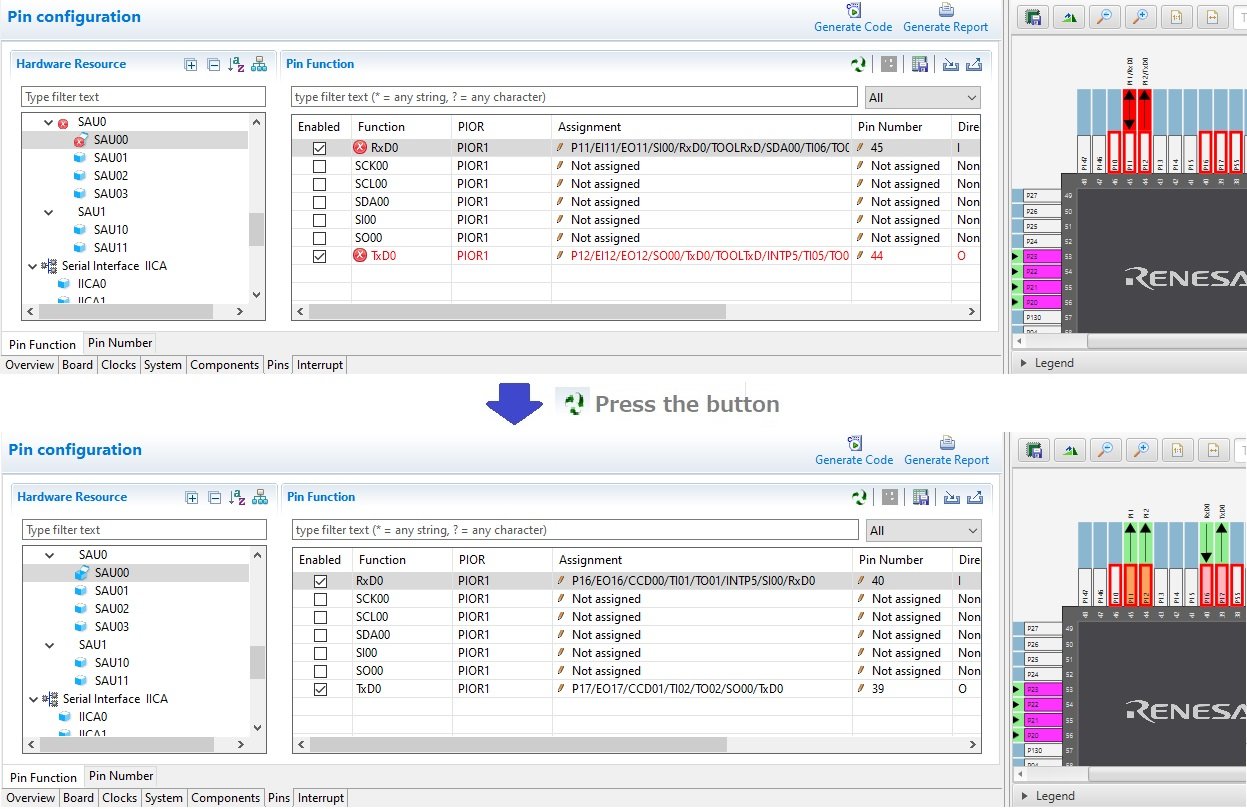
In cases of contention for a pin, clicking on the pin brings up a list allowing automatic changing of the assignment of the pin to resolve the contention.
How to migrate from Code Generator project to Smart Configurator project
Please refer to the following video for more information on code generation project migration.
How To Migrate From Code Generator Project to Smart Configurator Project
支持
支持社区
- RL78 Smart Configurator问题
请问为什么在新建项目时无法选择Smart Configurator,如果需要安装的话在哪里可以安装,具体怎么操作(用的RL78I1B芯片) 之前看到有人问 ...
2025年5月23日 - RL78F24的smart Configurator的 使用
可以提供一个配置RL78F24的smart Configurator的PWM和ADC的例程吗?IDE:e2studio
2025年6月17日 - Smart Configurator的使用
在Smart Configurator中怎么配置时钟、uart、spi等,有配置教程么,芯片为R7F122FGF3xFB,能否提供下参数文档。谢谢
2025年8月22日
知识库
- RL78 MCU: 使用CS+时,为什么需要添加 RL78 Smart Configurator 生成的头文件?
... 23/2026 Question 使用CS+时,为什么需要添加 RL78 Smart Configurator 生成的头文件? AnswerRL78 Smart Configurator 可用于生成 C 源代码,以简化开发过程。RL78 Smart Configurator 会针对 ...
- RL78微控制器触控开发
... /cs ※利用CS+时,也请安装智能配置器:https://www.renesas.com/software-tool/rl78-smart-configurator要安装QE for Capacitive Touch,请点击此处:https://www.renesas.com/software-tool/ ...
2025年8月27日 - [RL78] 导入示例代码后,Smart Configurator 的 [Components] 选项卡中的模块显示为灰色
最新更新: 05/25/2026 Question: 导入示例代码后,Smart Configurator 的 [Components] 选项卡中某些模块显示为灰色。这是为什么? Answer: 出现此现象的原因是您 ...


