
概述
描述
瑞萨 RX Flexible Software Package(FSP)是一款增强型软件包,旨在为基于瑞萨电子 RX 系列微控制器的嵌入式系统设计提供用户友好、可扩展的高质量软件。 RX FSP 提供一种快速、通用的方式,使用量产级驱动程序、FreeRTOS™、Azure® RTOS 和其他中间件协议栈来构建安全、互联的物联网设备。
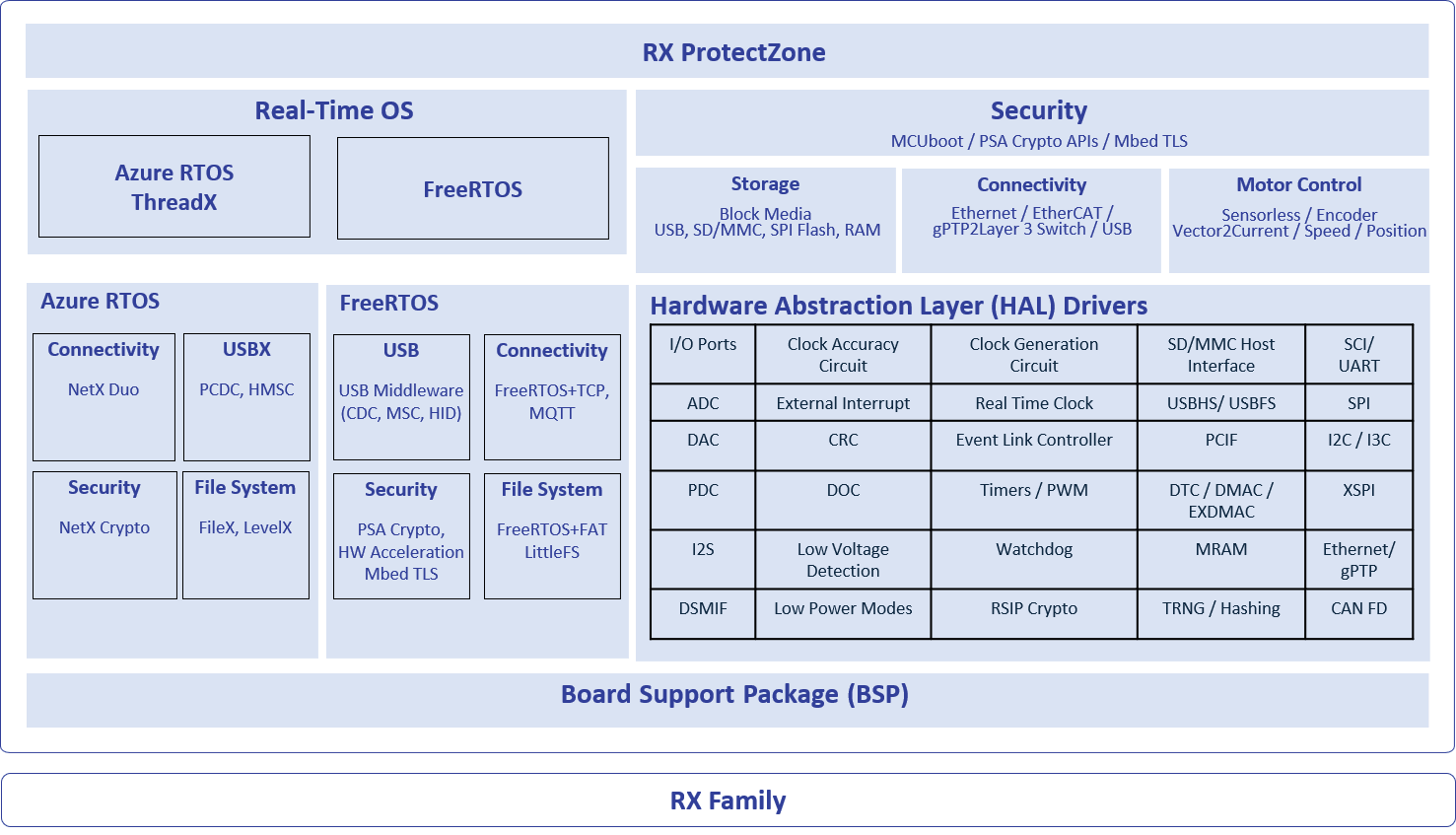
特性
- HAL 驱动程序只占用少量内存
- 图形化配置工具和代码生成器
- 使用行业标准工具进行静态和动态分析
- 支持使用 RTOS 和 非 RTOS 环境的应用程序
- Azure RTOS 及其配备了 Flexible Software Package 的中间件堆栈
- Azure RTOS ThreadX、NetX Duo 及附加组件、USBX、NetX Duo Secure 和 NetX Crypto(硬件加速)
- 支持 FreeRTOS – 包括 Kernel 和一组软件库
- FreeRTOS Kernel、FreeRTOS Plus TCP、核心 MQTT、核心 HTTP/HTTPS
- 可使用工具配置的 RTOS 资源(线程、互斥量等)
- 来自瑞萨电子和第三方的中间件协议栈
- 包含 MQTT 的 TCP/IP 及其他连接协议栈
- USB 中间件,支持 CDC、HID 和 MSC
- 支持 FreeRTOS+FAT 和 LittleFS 文件系统
- 支持 SDMMC、SPI 和 USB 存储(块媒体)
- 闪存虚拟 EEPROM
- 电机控制算法
- 通过 MCUboot 实现安全引导加载程序
- 支持 ProtectZone
- 支持 ProtectZone 的驱动程序和中间件
- 简单易用的 ProtectZone 配置工具
- 可以连接到主要的云提供商
- 通过 NetX Duo Secure 和 Mbed TLS 保护连接
- Cryptographic API,支持集成硬件加速
- 安全调试功能
- 由瑞萨电子及其他领先的第三方解决方案提供完善的工具支持
- 包含所有必要组件的集成式开发软件包,能够快速配置并启动开发(带有 e2 studio 的安装程序、CMSIS 包、工具链和 SEGGER J-Link 驱动程序)
- 可在 GitHub 上找到完整的源代码
发布信息
有关更多信息和链接,请访问 GitHub。
v1.0.0
Release Notes
Flexible Software Package (FSP) for Renesas RX MCU Series, version 1.0.0.
Download the FSP with e2 studio Installer for this release, setup_rxfsp_v1_0_0_e2s_v2026-07.exe, from here.
If using IAR Embedded Workbench for RX, download the RX Smart Configurator for this release, setup_rxfsp_v1_0_0_sc_v2026-07.exe, from here.
All installers are available in the Assets section of this release.
Refer to the README.md in the FSP root folder for setup instructions, hardware details, and related links.
New Features
- Added support for the RX74M and RX74N MCU groups.
- Includes support for the EK-RX74M, EK-RX74N, MCK-RX74M, and MCK-RX74N boards.
- Key features:
- Comprehensive set of drivers, middleware, industrial networking, motor control, security, storage, and RTOS components.
- Industrial networking support including EtherCAT, lwIP TCP/IP, gPTP, and Ethernet connectivity.
- Motor control middleware support including vector, current, speed, and position control.
- Security support including Protect Zone, MCUboot, secure key injection, and PSA Crypto.
- FreeRTOS support including kernel integration and middleware ecosystem support for embedded applications.
- Azure RTOS support including ThreadX, NetX Duo, NetX Duo Crypto, and USBX.
- Little/Big-endian and SBOM support for platform compatibility and software transparency.
- Refer to the SUPPORTED_SOFTWARE.md for the complete list of supported modules and features.
Planned Support
- J-Link will be supported in e2 studio 2026-10 version.
- Visual Studio Code extension support for RX FSP projects will be available in 2026-10.
- IAR Embedded Workbench support for RX74M/N will be available in 2026-10.
Unsupported Configurations or Features
- CC-RX C++ projects are not supported.
- Big-endian is not supported for Azure RTOS, FreeRTOS+FAT, rm_block_media_usb and ProtectZone.
- Ethernet:
- r_layer3_switch doesn't support C++.
- MCUboot:
- When MCUboot is configured with MbedTLS as the crypto stack, the following signature types are not supported: ECDSA-P384, RSA3072, ML-DSA44, and ML-DSA65.
- MCUboot does not support operation when MCUboot Custom Crypto is selected as the crypto stack.
- MCUboot does not support the booting images from external flash memory, Measured Boot, Data Sharing, or Boot Record.
- MCUboot does not support multiple images.
- MCUboot is not supported in IAR projects.
- NetX Duo:
- rm_netxduo_ether is not supported in IAR projects.
- Multiple NetX Duo IP instances not supported by rm_netxduo_ether.
- When repeatedly establishing connections using rm_netxduo_ether, support is currently limited to a single Azure RTOS NetX Duo IP instance.
- TFU:
- The IAR compiler does not support TFU intrinsic functions for RX74M and RX74N. Therefore, the TFU feature is not available when using the IAR compiler.
Configuration Notes
- Callback function must be created manually.
- Ensure the Main Clock Source in the debugger Connection Settings matches the clock configuration in FSP.
- In FreeRTOS projects:
- The default FreeRTOS blinky speed is too fast for visual observation; adjust the timer period (e.g., to 1 ms) after adding the timer driver.
Known Issues
- In CC-RX projects:
- Build errors related to anonymous structs/unions may occur when using CC-RX V3.08.00. Please refer to the Tool News for details and the recommended workaround.
- In GCC projects:
- Removing a motor module that uses a library, for example rm_motor_estimate, after a successful build may leave its linker archive settings in the project.
- This may cause the build error “cannot find -lrm_motor_estimate: No such file or directory.”
- To resolve this issue, manually remove rm_motor_estimate from C/C++ Build > Settings > Tool Settings > Linker > Archives > User defined archive, and remove its path from User defined archive search directories, then rebuild the project.
- When using IAR Embedded Workbench for RX:
- Third-party codes warnings are not suppressed. E.g., Variable xx was set but never used.
- By default, enum types are packed as uint8_t. For interrupt vectors greater than 127, set "enum_is_int" option (Project>Options>C/C++ Compiler>Extra Options) to enforce a minimum enum size of 4 bytes.
- Builds may hang when a high optimization level is selected.
目标设备
下载
| 类型 | 文档标题 | 日期 |
|---|---|---|
| 软件和工具 - 软件 | RUN 1,316.68 MB Includes e² studio integrated development environment, toolchain, and FSP packs. | |
| 软件和工具 - 软件 | RUN 1,134.98 MB RX FSP and RX Smart Configurator (RXSC) installer package to use with third-party integrated development environments. | |
| 软件和工具 - 软件 | EXE 1,245.11 MB RX FSP and RX Smart Configurator (RXSC) installer package to use with third-party integrated development environments. | |
| 软件和工具 - 软件 | EXE 1,605.34 MB Includes e² studio integrated development environment, toolchain, and FSP packs. | |
4 项目 | ||
文档
| 类型 | 文档标题 | 日期 |
|---|---|---|
| 手册 - 软件 | PDF 38.19 MB The Renesas RX Flexible Software Package (FSP) is an optimized software package designed to provide easy-to-use, scalable, high-quality software for embedded system design. The package includes lightweight peripheral drivers, middleware, RTOS integration, industrial networking, motor control, and security solutions for RX microcontrollers. This manual describes how to use the RX FSP for developing applications for RX microcontrollers. | |
| 手册 - 软件 | ||
| 应用说明 | PDF 279 KB Shows how to write code using various RX Renesas Flexible Software Package (FSP) modules supported by the EK-RX74M kit. The Flexible Software Package is an optimized software package designed to provide easy-to-use, scalable, high-quality software for embedded system design. | |
| 应用说明 | PDF 276 KB Shows how to write code using various RX Renesas Flexible Software Package (FSP) modules supported by the EK-RX74M kit. The Flexible Software Package is an optimized software package designed to provide easy-to-use, scalable, high-quality software for embedded system design. | |
| 应用说明 | PDF 8.31 MB 日本語 This application note gives an overview of the RX Flexible Software Package (RX FSP) from Renesas and describes how to port a project that was created by using FIT modules and the code generation feature of the Smart Configurator, both of which are software tools provided by Renesas, to a project generated by using the newer RX FSP. | |
5 项目 | ||
设计和开发
样例程序
样例程序
筛选 | ||
|---|---|---|
| 类型 | 文档标题 | 日期 日期 |
| 示例代码 | EK-RX74M Example Project Bundle The EK-RX74M example project shows how to write code using various RX Renesas Flexible Software Package (FSP) modules supported by the EK-RX74M kit. The Flexible Software Package is an optimized software package designed to provide easy-to-use, scalable, high-quality software for embedded system design. | |
| 示例代码 | EK-RX74N Example Project Bundle The EK-RX74N example project shows how to write code using various RX Renesas Flexible Software Package (FSP) modules supported by the EK-RX74M kit. The Flexible Software Package is an optimized software package designed to provide easy-to-use, scalable, high-quality software for embedded system design. | |
| 示例代码 | Quick-Start Example Project for EK-RX74M Demonstrates some of the capabilities of the EK and FSP by using multiple peripherals. The project initializes the OSPI, UART various timers and GPIO modules along with various supporting stacks to create an interactive user demo. | |
| 示例代码 | Quick-Start Example Project for EK-RX74N Demonstrates some of the capabilities of the EK and FSP by using multiple peripherals. The project initializes the OSPI, UART various timers and GPIO modules along with various supporting stacks to create an interactive user demo. | |
4 项目 | ||
相关评估板和套件
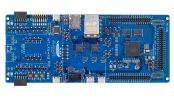
RX74M MCU 系列评估套件
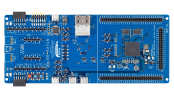
RX74N MCU 系列评估套件
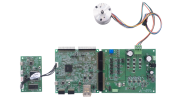
瑞萨电子 RX74M MCU 灵活电机控制套件
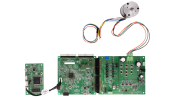
瑞萨电子 RX74N MCU 灵活电机控制套件
视频和培训
本视频概述了灵活软件包(Flexible Software Package,简称 FSP)。FSP 是一款增强型软件包,旨在为基于 Renesas RA 和 RZ 系列 Arm® 微控制器的嵌入式系统设计提供软件支持。
更多详情
组件
- 适用于 e2 studio 集成开发环境的 CMSIS 兼容文件包
- 适用于 RX MCU 及板卡的 BSP
- 用于访问外围设备的HAL 驱动程序
- 实时操作系统(RTOS)
- 中间件协议栈
- 模块配置工具和代码生成器
- 提供源文件,可以与任何开发环境及第三方工具集成
支持的工具链
FSP 中的软件组件支持以下工具链:
- e2 studio 集成开发环境,支持用于 RX 系列 [CC-RX] 的 C/C++ 编译器包以及瑞萨 RX GCC 工具链
- IAR Embedded Workbench
软件安装说明
请参考 FSP GitHub 页面上的安装和使用说明:FSP GitHub 说明
e2 studio 集成开发环境
FSP 提供了众多可提高效率的工具,用于开发针对瑞萨 RX 系列 MCU 设备的项目。 e2 studio 集成开发环境(IDE)提供一个熟悉的开发控制台,从该控制台中,可以管理项目创建、模块选择和配置、代码开发、代码生成以及调试等关键步骤。 FSP 使用图形用户界面(GUI)来简化高级模块及其关联应用程序接口(API)的选择、配置、代码生成和代码开发,从而显著加速开发过程。
e2 studio 配备了一组选项,用于配置应用程序项目的各个方面。 其中一些选项包括:
BSP 配置
从初始项目选择中配置或更改 MCU 和板卡的特定参数。
时钟配置
为您的项目配置 MCU 时钟设置。 时钟配置显示 MCU 时钟树的图形视图,允许修改各种时钟分频器和时钟脉冲源。
引脚配置
引脚配置提供 MCU 引脚的灵活配置。 这样可以配置每个端口引脚的电气特性和功能。 由于许多引脚能够提供多种功能,引脚配置器使您可以轻松地在外围设备上配置引脚。 引脚配置工具通过突出显示错误并为每个引脚或每个外围设备提供选项,简化了带有高度复用引脚的大型封装的配置。
模块配置
模块配置为基于 RTOS 和非 RTOS 的应用程序添加 FSP 模块(HAL 驱动程序、中间件堆栈和 RTOS)提供了选项,并配置了模块的各种参数。 对于每个所选的模块,属性窗口提供对配置参数、中断优先权、引脚选择等的访问。
中断配置
中断配置允许添加新的用户中断或事件,并设置中断优先权。 它还将允许用户绕过外围设备中断,并为外围设备中断提供用户定义的 ISR。
组件配置
“组件配置”可用于选择或删除应用程序所需的单个模块。 针对添加到应用程序中的模块,会自动选择所有必要的模块。 您可以勾选所需组件旁的方框,轻松选择或删除其他模块。
其他工具功能
- 上下文感知自动补全功能,能够为完成编程元素提供智能选项
- 开发辅助工具,用于直接在应用程序代码中选择和拖放 API 函数的位置
- 智能手册,在代码中以正确的工具提示形式提供驱动程序和设备文档
- 编辑悬停功能,在编辑时显示代码元素的详细说明
- 欢迎窗口,提供示例项目、应用说明和各种其他自助支持资源的链接
- 信息图标,图形配置查看器提供每个模型的信息图标,该查看器在用户手册中可链接到该模块的特定设计资源。
第三方工具支持
除了瑞萨 e2 studio IDE,FSP 还支持第三方工具和 IDE。 这些支持工具支持均通过 RX 智能配置器(RXSC)应用程序提供。 瑞萨 RX 智能配置器是一个桌面应用程序,让您能够在使用第三方 IDE 和工具链时为瑞萨 RX 微控制器配置软件系统(BSP、驱动程序、RTOS 和中间件)。 RX 智能配置器目前可与 IAR Embedded Workbench 一起使用。
支持
支持社区
- E2studio 各个系列FSP如何更新
E2studio各个系列如RA,RX等是否每个都需要装一个e2studio,使用集成版本的e2studio如何更新编译器GUM和FSP库,在线更新经常失败,是否使 ...
2025年11月24日 - RA6M3G REN_r11an0463eu0100-fsp-graphics-app_SCD_20200713例程编译报错
想请问有没有例程使用的更详细的指导文档。
2021年7月22日 - RX130 仿真的时候,IWDT 看门狗 是否工作?
使用E1在RX130上仿真的时候, IWDT 是不是不工作的?在RA6T2芯片上试了下使用IWDT作为唤醒源唤醒software stanby模式,发现在jlink仿真的时候 ...
2024年7月1日
知识库
- RA MCU: 不同工具的正确ID Code格式
... LSB,高地址存放 MSB。 1. e2 studio 在 e2 studio 中,可以在Smart Configurator(适用于RX MCU)或 FSP Configurator(适用于RA MCU)的 BSP 配置中设置MCU的 ID Code。 1.1 使用 FSP Configurator 为 ...
- 您是否将 FSP 与功能安全解决方案结合使用?
不。 FuSa解决方案不支持FSP。 FSP本身不支持功能安全,因此不能按原样使用。
2023年10月11日 - 如何在e² studio中导入工程
... 可以通过“Rename & Import Existing C/C++ Project into Workspace” 重命名现有工程。 注2: 通过 FSP(Flexible Software Package)Configurator 或Smart Configurator创建的样例工程,需在Build之前先执行代码 ...
2024年5月24日


