
概述
描述
Smart Configurator automatically generates initial-setting programs for MCUs.
It provides a quick and smart way of combining and configuring software to meet your needs, such as by configuring peripheral pins and importing middleware and drivers.
For RX Family users, platform installers are available that include both the Smart Configurator functionality described above and the Flexible Software Package (FSP). Please download the appropriate installer from the RX FSP page below.
RX Flexible Software Package (FSP)
Note. Refer to the RX Smart Configurator if you are using RX devices that are unsupported by FSP. (Refer to 'Target Devices')
特性
- Importing Middleware/Drivers
- Generating Driver Code
- Pin Settings
- Learn More
发布信息
| Supported IDEs | Delivery Format | Naming format of platform installer |
|---|---|---|
| e² studio | As plug-in of e² studio (Note1) | setup_rxfsp_v<version of RX FSP>_e2s_v<version of e² studio>.exe ex) setup_rxfsp_v1_0_0_e2s_v2026-07.exe |
| IDE of Partners (IAR, Visual Studio Code, etc..) | As standalone application (Note2) | setup_rxfsp_v<version of RX FSP>_sc_v<version of RX FSP Smart Configurator>.exe ex) setup_rxfsp_v1_0_0_sc_v2026-07.exe |
For detailed release information and how to get platform installers, go to RX Flexible Software Package (FSP) and refer 'Release Information' tab of Overview section.
Note
- The package of the e² studio includes this plug-in.
- This is delivered as platform installer included RX FSP.
目标设备
下载
| 类型 | 文档标题 | 日期 |
|---|---|---|
| 软件和工具 - 软件 | EXE 1,245.11 MB RX FSP and RX Smart Configurator (RXSC) installer package to use with third-party integrated development environments. | |
| 软件和工具 - 软件 | EXE 1,605.34 MB Includes e² studio integrated development environment, toolchain, and FSP packs. | |
2 项目 | ||
文档
| 类型 | 文档标题 | 日期 |
|---|---|---|
| 传单 | PDF 1004 KB 日本語 , English This is a flyer for the Smart Configurator, which can automatically generate initial setup programs for microcontrollers. It details the features and information about the Smart Configurator. Supported microcontrollers include RL78, RX, RH850, RISC-V, RA, and RZ. | |
1 项目 | ||
视频和培训
本视频概述了灵活软件包(Flexible Software Package,简称 FSP)。FSP 是一款增强型软件包,旨在为基于 Renesas RA 和 RZ 系列 Arm® 微控制器的嵌入式系统设计提供软件支持。
Additional details
Importing Middleware/Drivers
Flexible Software Package(FSP)
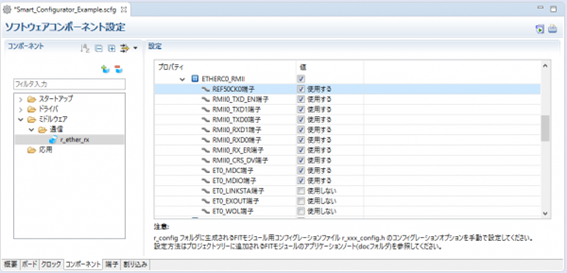
You can change the settings of FSP pins and components by using the Smart Configurator GUI.
Generating Driver Code
The Smart Configurator provides you with a GUI environment for generating driver code that handles the details of the settings of peripheral modules.
Clock settings
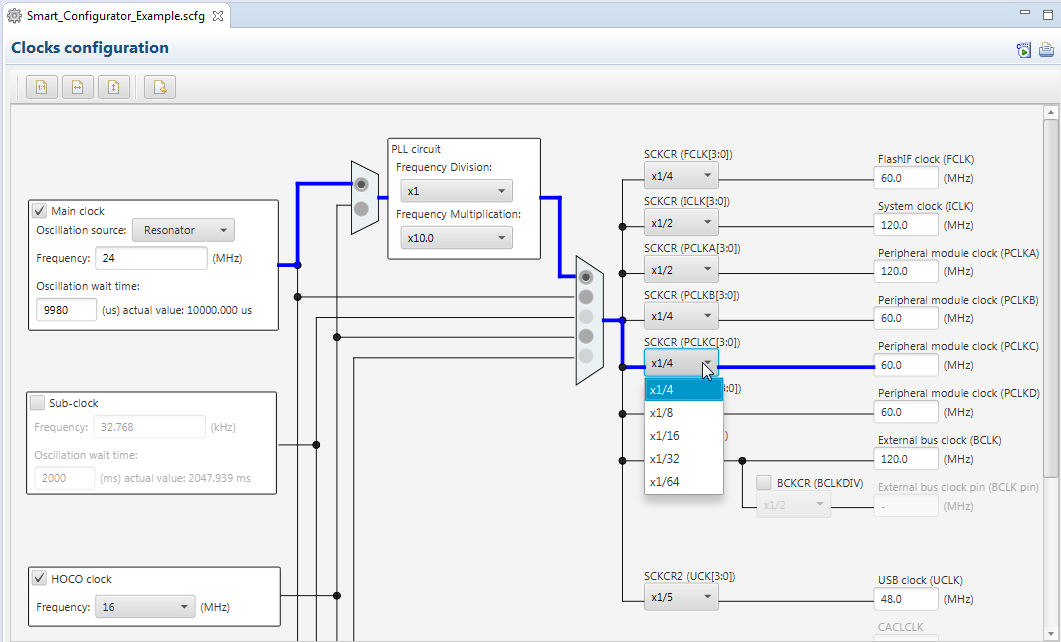
You can make clock settings by selecting a clock source and making connections in the block diagram in the [Clocks configuration] window.
Component settings
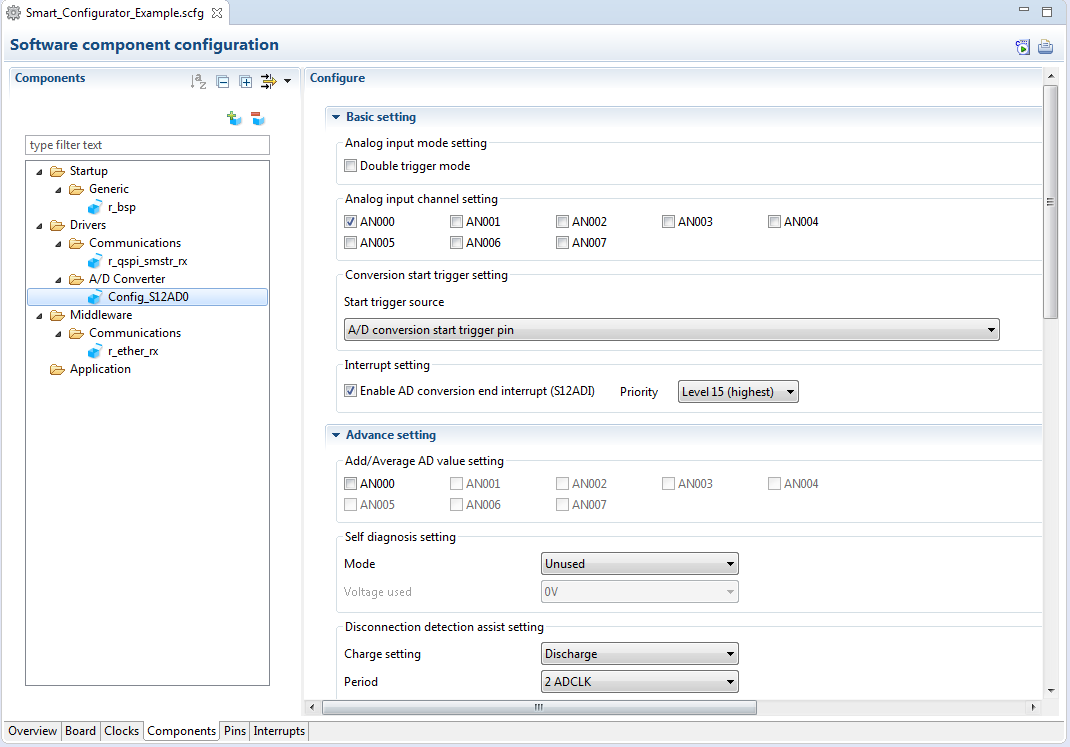
In the [Software component configuration] window, you can embed sample code and make settings for peripheral modules. After selecting the module you wish to set up for use, you can check for errors in settings (with some types indicated on the display) or switch the channels for use by drivers of multi-channel modules.
Pin Settings
The assignments of pins can be set up through a GUI, which also checks and offers solutions for cases of contention for the same pin by multiplexed functions.
The [Pins Configuration] window (displayed per peripheral module)
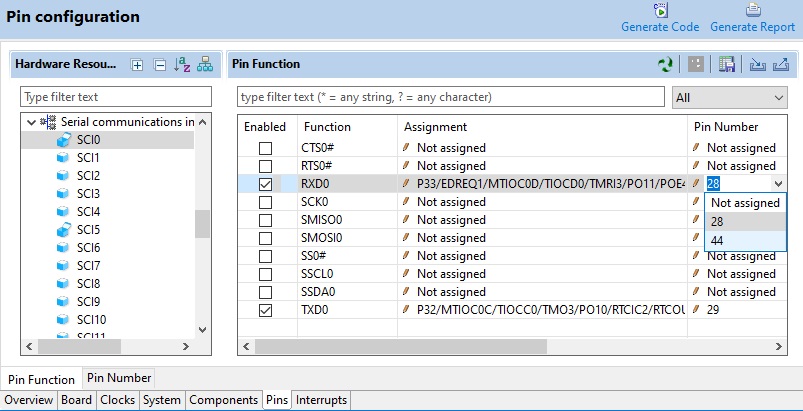
Specifying a peripheral module in the [Pins Configuration] window displays the pin functions for use by the module and allows you to set the assignment of the functions to pins.
[MCU Package] window
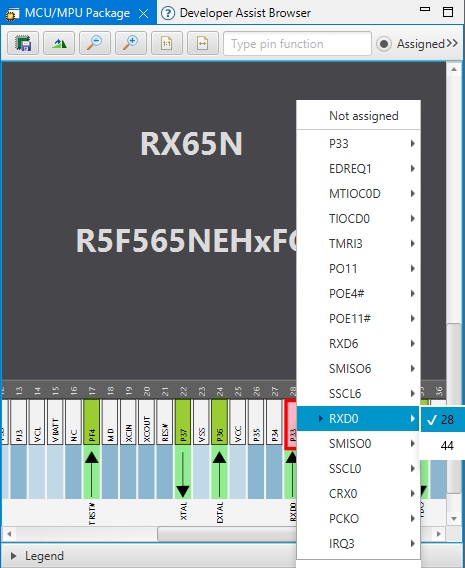
The [MCU Package] window displays a symbolic view of the pins, indicating by colors which pins are and are not in use, which have been assigned contending multiplexed functions, and so on. This makes it easy to check the overall situation.
Automatic resolution of contention between pin functions
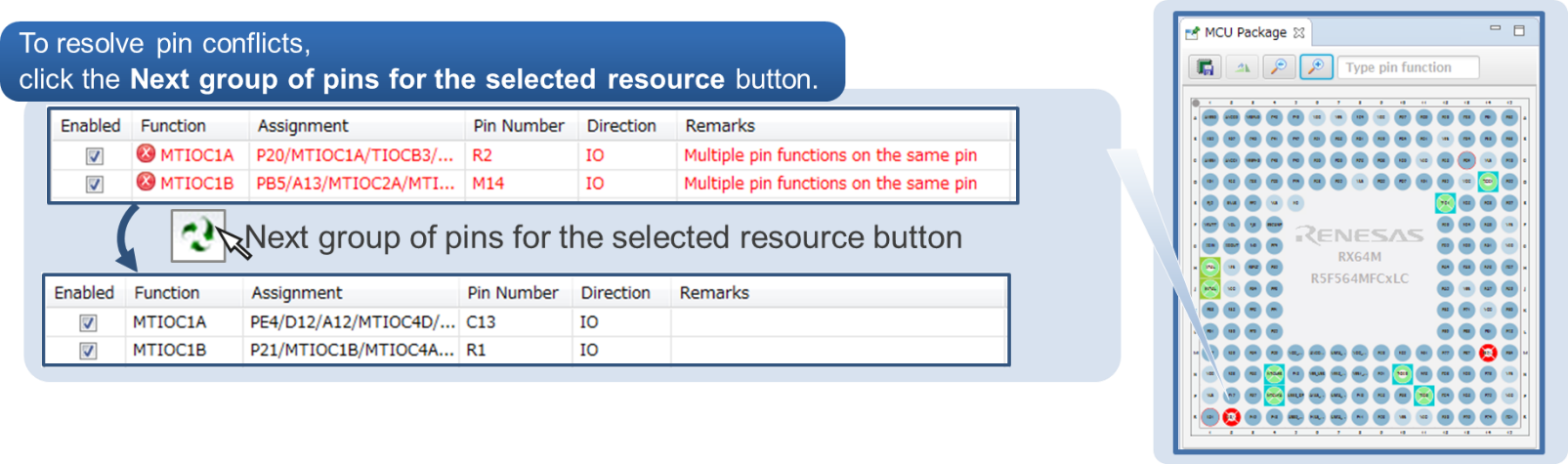
In cases of contention for a pin, clicking on the pin brings up a list allowing automatic changing of the assignment of the pin to resolve the contention.
支持
支持社区
- E2增加对RX的支持
为什么我安装的E2(version 2020.10 FSP2.2 and 2021.04 FSP3.0),只支持RA系列芯片。 1.如何增加对RX系列的支持? 2. 增加Smart configurator功能? 3. Smart configurator 与 FSP ...
2021年10月25日 - RX72M 编译报错
RX72M 在E2stdio 上面编译出现下面问题: 1, E0562142:Interrupt number "28" of "C$VECT" has multiple definition 2. remaining 41 days 是指Licence?
2021年8月3日 - E2studiofsp问题
RX系列芯片可以在E2studiofsp上开发吗
2025年4月30日
知识库
- RA MCU: 不同工具的正确ID Code格式
... LSB,高地址存放 MSB。 1. e2 studio 在 e2 studio 中,可以在Smart Configurator(适用于RX MCU)或 FSP Configurator(适用于RA MCU)的 BSP 配置中设置MCU的 ID Code。 1.1 使用 FSP Configurator 为 ...
- RA MCU: FSP链接脚本中的用户段定义(FSPv6.3.0)
... gen.
memory_regions. FSP 工程被配置为引用 script 文件夹下的 fsp. 。fsp. 只引用(include)了 fsp_gen. 和 memory_regions. ,这两个文件由 Smart Configurator ... - 如何在e² studio中导入工程
... 在Build之前先执行代码生成操作。 这是因为 样例工程中不包含 FSP 或 FIT 模块的源文件。 双击 configuration.xml(FSP 工程) 或 *.scfg (Smart Configurator 工程) 启动Configurator ...
2024年5月24日


