
概述
描述
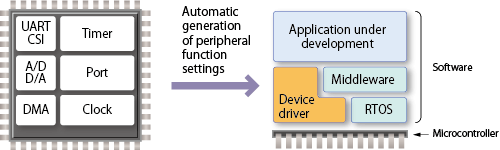
The code generator plug-in can automatically generate control programs for peripheral modules (device driver programs). By generating needed source code in accordance with user settings, the plug-in shortens development terms and dramatically reduces costs.
Important: A Note to Users of the Code Generator Plug-in for RX and the RL78/G23 group: We recommend that you consider migrating to the Smart Configurator, as it supports the following three functions: importing middleware in the form of FIT modules, generating driver code, and setting pins from the Code Generator Plug-in.
特性
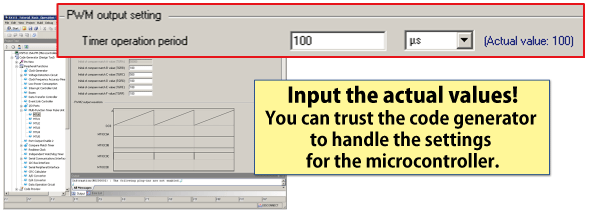
- Simple operation of all processes through an easy-to-understand GUI
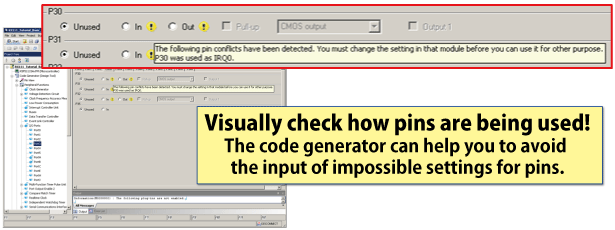
- Handles checking for cases where multiple peripheral modules are contending for the same pins
- An API provides functions to make the peripheral functions operate
- Since this tool is included in the CS+ and e² studio integrated development environments from Renesas, all processes from editing and building code to debugging can be smoothly executed from the same integrated environment
- Many application notes and sample code [Learn More]
- Learn More
发布信息
CS+ Code Generator:
- RL78 (CS+ for CA,CX)
- RL78 (CS+ for CC)
- RX (Some RX200 and RX600 Series MCUs are supported by Peripheral Driver Generator (a free tool), which operates independently of the integrated development environment.)
- RH850
- V850
- 78K
Details of upgrade (See Tool News)
FAQ
目标设备
下载
|
|
|
|
|---|---|---|
| 类型 | 文档标题 | 日期 |
| 软件和工具 - 软件 | Code Generator Common (CS+ for CA,CX) V1.19.00
|
|
| 软件和工具 - 软件 | Code Generator Common (CS+ for CC) V1.22.00
|
|
| 软件和工具 - 软件 | CS+ Code Generator for RL78 (CS+ for CA,CX) V2.22.00
|
|
| 软件和工具 - 软件 | CS+ Code Generator for RL78 (CS+ for CC) V2.22.00
|
|
| 软件和工具 - 软件 | Code Generator Common (CS+ for CC) V1.21.00
|
|
| 升级 - IDE | CS+ Code Generator for RL78 (CS+ for CA,CX) V2.21.00
|
|
| 升级 - IDE | CS+ Code Generator for RL78 (CS+ for CC) V2.21.00
|
|
| 升级 - IDE | Code Generator Common (CS+ for CA,CX) V1.16.00
|
|
| 升级 - IDE | Code Generator Common (CS+ for CC) V1.19.00
|
|
| 升级 - IDE | CS+ Code Generator for RH850 V1.04.00
|
|
| 升级 - IDE | CS+ Code Generator for RX V1.16.00
|
|
11 项目
|
||
文档
|
|
|
|
|---|---|---|
| 类型 | 文档标题 | 日期 |
| 发行说明 |
PDF
2.56 MB
日本語
This document describes support features and important notes for using the RL78 Code Generator, which automatically generates initial configuration programs for microcontrollers. It lists supported RL78 microcontrollers, changes, limitations, and precautions. Please read it before using the tool.
|
|
| 发行说明 | PDF 1.64 MB 日本語 | |
| 发行说明 | PDF 1.54 MB 日本語 | |
| 手册 - 开发工具 | PDF 7.07 MB 日本語 | |
| 发行说明 | PDF 1.51 MB 日本語 | |
| 指南 | PDF 1.43 MB 日本語 | |
| 发行说明 | PDF 884 KB 日本語 | |
| 工具新闻 - 注意事项 | PDF 183 KB 日本語 | |
| 发行说明 | PDF 1.08 MB 日本語 | |
| 应用说明 |
PDF
745 KB
日本語
AI 生成的摘要:
The RL78/G10 controls the ESP-WROOM-02 Wi-Fi module via UART at 115200 bps using AT commands. It connects as a TCP/IP client to a server, supporting IEEE 802.11 b/g/n (2.4GHz), IPv4 TCP, WPA/WPA2 security, and AES encryption. The ESP-WROOM-02 operates in Flash Boot Mode executing firmware from flash memory, controlled through UART commands. The module supports Station, SoftAP, and SoftAP + Station modes, with this content focusing on Station mode where the module acts as a wireless client connected to an access point.
|
|
| 应用说明 |
PDF
1.50 MB
日本語
AI 生成的摘要:
The document details the Virtual UART Application using Bluetooth Low Energy on RL78/G1D devices. It explains software configuration, functions, and operation checks, including simple AT commands for Bluetooth LE connection control. The application supports character and binary data transmission with options for communication with or without response. It describes the setup using two evaluation boards connected via USB and controlled through terminal software, enabling bidirectional data exchange over Bluetooth LE.
|
|
| 工具新闻 - 发布公告 | PDF 187 KB 日本語 | |
| 发行说明 | PDF 1.06 MB 日本語 | |
| 工具新闻 - 注意事项 | PDF 168 KB 日本語 | |
| 工具新闻 - 注意事项 | PDF 250 KB 日本語 | |
| 应用说明 |
PDF
571 KB
日本語
AI 生成的摘要:
The document explains the use of the A/D test function for the RL78/G13 microcontroller, converting internal voltages (0 V, VDD, 1.45 V) to digital values. LED1 lights up if conversion results fall within an allowable range; otherwise, it blinks, halting the test. It details peripheral functions, operation conditions, hardware configuration, and pin usage for outputting A/D results to LED1. The hardware circuit example includes connection notes to ensure proper electrical specifications.
|
|
| 工具新闻 - 注意事项 | PDF 106 KB 日本語 | |
| 应用说明 |
PDF
588 KB
日本語
AI 生成的摘要:
The RL78/G13 serial interface IICA supports master-slave communication using a 7-bit slave address (0b1010000). The slave device handles data transmission and reception within a 128-byte serial RAM area (registers 0x80 to 0xFF). Communication follows IIC protocol timing, including start conditions, address transmission, ACK/NACK responses, and data transfer. The master initiates communication, and the slave acknowledges matching addresses. Interrupts signal address matches and transmission completion. Address mismatches result in NACK responses and no slave interrupts.
|
|
| 工具新闻 - 发布公告 | PDF 178 KB 日本語 | |
| 工具新闻 - 发布公告 | PDF 87 KB 日本語 | |
| 发行说明 | PDF 708 KB 日本語 | |
| 发行说明 | PDF 438 KB 日本語 | |
| 工具新闻 - 注意事项 | PDF 130 KB 日本語 | |
| 工具新闻 - 注意事项 | PDF 93 KB 日本語 | |
| 工具新闻 - 注意事项 | PDF 237 KB 日本語 | |
| 手册 - 开发工具 | PDF 1.24 MB 日本語 | |
| 工具新闻 - 注意事项 | PDF 168 KB 日本語 | |
| 工具新闻 - 注意事项 | PDF 173 KB 日本語 | |
| 工具新闻 - 注意事项 | PDF 227 KB 日本語 | |
| 工具新闻 - 注意事项 | PDF 129 KB 日本語 | |
| 工具新闻 - 注意事项 | PDF 120 KB 日本語 | |
| 工具新闻 - 注意事项 | PDF 122 KB 日本語 | |
| 应用说明 |
PDF
681 KB
日本語
AI 生成的摘要:
The RL78/G10 microcontroller controls an automatic hand soap dispenser by entering STOP mode and waking every 50ms to check the human sensor. If a hand is detected and the battery voltage is above 4.8V, the LED blinks and the motor dispenses soap for 2 seconds. The system uses a PWM-controlled DC motor with a power MOSFET for efficient operation and a pyroelectric infrared sensor for human detection. Hardware configuration includes specific pin assignments for sensor input, motor control, LED, buzzer, and battery voltage measurement. The operation is verified under specific clock and voltage conditions using Renesas development tools.
|
|
| 工具新闻 - 注意事项 | PDF 202 KB 日本語 | |
| 应用说明 |
PDF
536 KB
日本語
AI 生成的摘要:
The software controls environmental sensors via I2C communication on the RL78/G13 microcontroller, acquiring temperature, humidity, CO2, and PM2.5 data from SHTC1, SGP30, SCD30, and SPS30 sensors. It displays sensor data on the RSK LCD and supports sensor initialization, data retrieval, flash memory read/write, and SCD30 calibration. Connection setup requires modifying pull-up resistors and wiring sensor modules to the RSK JA1 connector. The software calculates humidity-corrected gas sensor data and converts raw sensor outputs to temperature and humidity values using specified formulas.
|
|
| 发行说明 | PDF 467 KB 日本語 | |
| 应用说明 |
PDF
496 KB
日本語
AI 生成的摘要:
The document details a hand dryer system controlled by the RL78/G10 microcontroller. It uses a human sensor to detect hands, activating a fan and heater based on room temperature. The heater turns on below 20°C and off above 20°C. The temperature sensor outputs voltage proportional to temperature, and both fan and heater are controlled via photo triac couplers connected to AC power. The human sensor uses a pyroelectric infrared module to detect motion. Operation conditions specify the microcontroller model, clock frequency, voltage range, and development tools used.
|
|
| 应用说明 |
PDF
443 KB
日本語
AI 生成的摘要:
The document explains the implementation of software UART communication using external interrupts and timer array units on the RL78/G13. It details peripheral functions for detecting start bits and timing data transmission and reception. Communication settings such as data order, parity, and data inversion are configured via #define statements in the r_cg_userdefine.h file. Baud rate timing calculations adjust for latch timing delays. Reception involves detecting edges, latching data bits, checking errors, and storing valid 8-bit data in RAM.
|
|
| 应用说明 |
PDF
820 KB
日本語
AI 生成的摘要:
The document details a thermometer system using an RL78/L12 microcontroller with UART communication. It continuously measures temperature via a sensor, displays it on an LCD, and triggers an alarm if temperatures fall outside 17°C to 28°C. The sensor outputs voltage proportional to temperature, and the system transmits data via UART when alarms activate. Hardware configuration and operating conditions for the MCU and LCD module are specified.
|
|
| 工具新闻 - 注意事项 | PDF 418 KB 日本語 | |
| 发行说明 | PDF 146 KB 日本語 | |
| 手册 - 开发工具 | PDF 1.99 MB 日本語 | |
| 手册 - 开发工具 | PDF 2.03 MB 日本語 | |
| 手册 - 开发工具 | PDF 1.57 MB 日本語 | |
| 应用说明 |
PDF
989 KB
English
, 日本語
AI 生成的摘要:
本文介绍了RL78/G13微控制器的CPU时钟切换和待机设置,采用汇编语言实现。通过按键触发系统工作模式的状态转换,控制CPU时钟和工作模式,并管理四个LED灯的点亮。文中说明了端口输出控制LED、用于开关输入检测的外部中断、12位间隔定时器中断及特定引脚的A/D转换等外围功能。包含工作模式状态转移图及LED显示对应表。
|
|
| 应用说明 |
PDF
976 KB
English
, 日本語
AI 生成的摘要:
本文介绍了RL78/G13微控制器的CPU时钟切换和待机设置,采用C语言实现。详细说明了正常工作、HALT、SNOOZE和STOP等工作模式之间的状态转换及其对应的LED指示。文档还描述了包括LED灯端口输出控制、开关输入检测的外部中断、12位间隔定时器中断和A/D转换器操作等外围功能。通过状态转换图和表格展示CPU时钟状态、工作模式与LED显示的关系。
|
|
| 手册 - 开发工具 | PDF 1.09 MB 日本語 | |
| 工具新闻 - 注意事项 | PDF 60 KB 日本語 | |
| 工具新闻 - 注意事项 | PDF 62 KB 日本語 | |
| 手册 - 开发工具 | PDF 817 KB 日本語 | |
|
50 项目
|
||
设计和开发
Additional Details
Microcontrollers for Code Generation
| Target Device | IDE | |||
|---|---|---|---|---|
| MCU | Series | Group | CS+ | e² studio |
| RL78 | RL78/F1x | RL78/F12, RL78/F13, RL78/F14, RL78/F15, RL78/F1E | lens | lens |
| RL78/G1x | RL78/G10, RL78/G11, RL78/G12, RL78/G13, RL78/G13A, RL78/G14, RL78/G1A, RL78/G1C, RL78/G1D, RL78/G1E, RL78/G1F, RL78/G1G, RL78/G1H | |||
| RL78/H1x | RL78/H1D | |||
| RL78/I1x | RL78/I1A, RL78/I1C, RL78/I1D, RL78/I1E | |||
| RL78/L1x | RL78/L12, RL78/L13, RL78/L1A, RL78/L1C | |||
| RX | RX100 | RX110 (Note1), RX111 (Note1), RX113 (Note1), RX130 (Note1) | lens | lens |
| RX200 | RX230 (Note1), RX231 (Note1), RX23T (Note1), RX24T (Note1), RX24U (Note1) | |||
| RX600 | RX64M (Note1), RX651 (Note1), RX65N (Note1) | |||
| RX700 | RX71M (Note1) | |||
| RZ | RZ/T | RZ/T1 | — | lens |
| RH850 | RH850/E1x | RH850/E1M-S (Please contact us.), RH850/E1L (Please contact us.) | lens | — |
| RH850/F1x | RH850/F1K | lens | — | |
| 78K0R | 78K0R/Kx | 78K0R/Kx3, 78K0R/Kx3-A, 78K0R/Kx3-L | lens | — |
| 78K0R/Lx | 78K0R/Lx3 | |||
| 78K0R/Ix | 78K0R/Ix3 | |||
| 78K0R/Fx | 78K0R/Fx3 | |||
| 78K0 | 78K0/Kx | 78K0/Kx2-L | ||
| 78K0/Ix | 78K0/Ix2 | |||
| V850 | V850E/Sx | V850E/Sx3-H | ||
| V850ES/Jx | V850ES/Jx3, V850ES/Jx3-L, V850ES/Jx3-H, V850ES/Jx3-E | |||
lens Available | — Not Available
Note
- You cannot use the code generator plug-in when creating a new project for devices of this group with CS+ or the e² studio since they are supported by the Smart Configurator.
Regarding the Smart Configurator >>
支持
支持社区
- e2 studio建立RL78项目无法选择 Code Generator
e2 studio建立RL78项目无法选择 Code Generator。 已经按照其他帖子的方法操作,还是不可以。 帮忙提供一下解决方法,谢谢。 [email protected]
2023年2月27日 - RX130的工程 移植到 RL78,怎么做方便点?
请教下,目前公司的RX130的开发环境是 CS+和CC-RX,现在为了降成本,选了一颗RL78的MCU,用 CS+和CC-RL开发,因为没用过RL78,现在其实 ...
2024年7月5日 - RL78F24 使用 CS+ IDE 在Win11環境下 編譯卡住問題
... 2024] Build tool plug-in to use GHS CCRH850 compiler for RH850.Debugger Collection Plug-in V8.13.00.04 [26 Nov 2024] Debug tool plug-in to use RH850, RX, RL78 Emulator/Simulator. Debugger Library V8.13.00.04 [26 Nov 2024]Code Generator Plug-in V4.08 ...
2025年8月14日
知识库
- CS+项目树中未显示“代码生成器(code generator)”和“引脚配置器(pin configurator)”
... 建项目时,会使用智能配置器(Smart Configurator)。如果希望在新项目中使用Code Generator plug-in,请在插件管理画面中取消勾选“[Smart Configurator Communication Plug-in]”。(同样适 ...
- 如何在代码生成器插件中使用小数点/数字分组分隔符
为了让代码生成器插件正确运行,小数点请使用“.”(点号),数字分组分隔符请使用“,”(逗号)。小数点和数字分组分隔符可能是“.”(点号 ...
- 在RL78的代码生成器插件中设置选项字节
... studio的示例。如果使用e2 studio,请确认以下注意事项。【注意事项】e2 studio Code Generator插件https://www.renesas.com/search?keywords=R20TS0408生成代码的编译器设置为 ...


