
概述
描述
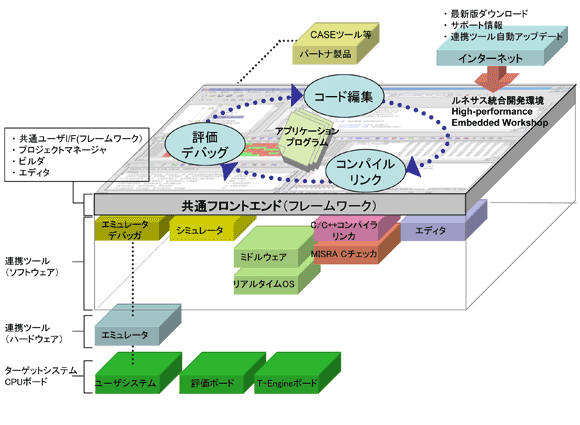
The High-performance Embedded Workshop (HEW) provides a GUI-based integrated development environment for the development and debugging of embedded applications for Renesas microcontrollers.
The High-performance Embedded Workshop, a powerful yet easy to use tool suite, features an industry standard user interface and is designed using a modular approach seamlessly incorporating device family-specific C/C++ compilers and the debugger elements for various debugging platforms including emulators and evaluation boards.
This provides the user with a single interface to fully exploit the advanced capabilities of the development tools for the entire development cycle from evaluation of a device through to completion of code development.
The High-performance Embedded Workshop enables the use of the right tool for each process. The High-performance Embedded Workshop supports multiple toolchain integration enabling development for any number of projects under a single user interface.
The High-performance Embedded Workshop eliminates the need to switch environments between coding and debugging operations or between targets as all Renesas software and hardware development tools are supported under the same single user interface.
Compiler packages for the target products include High-performance Embedded Workshop.
特性
- Code and debugging support for SuperH, M32R, M16C, R8C, H8SX, H8S, and H8
- Single environment for toolchain and debug component support
- Choice of Network or Node-locked toolchain for Renesas and IAR compilers
- Automatically generates start-up code for every supported CPU
- Double click on build error and warnings to jump into the integrated editor
- User definable custom build steps to integrate your own additional command line based tools
- Full simulation capability
- Supports advanced debugging features such as code profiling, performance analysis, code coverage, and trace features
- Integrated Editor with color keyword functionality.
- Visual display of CPU hardware set-up
- Graphical display for the number of execution cycles per function
- Display of Cache hit-rate and pipeline state
- Comprehensive breakpoint functionality
- Visual debug functions including picture and waveform display
- Single session save for build and debug
- Macro-Recording Support function [Learn More]
- Test Support function [Learn More]
- Auto Update Utility [Learn More]
- Integration with third-party tools
- Learn More
发布信息
Latest Ver.: v.4.09.01
Released: June 16, 2012
Details of upgrade (See Tool News)
Operating Environment
Tool Suite
FAQ
| Title |
|---|
| Migration from HEW to CS+_RX MCU |
目标设备
设计和开发
Additional Details
Successor
In the case of CS+ or e² studio, the build speed is improved by the rapid build function compared to High-performance Embedded Workshop.
Porting from the High-performance Embedded Workshop to CS+
Porting from High-performance Embedded Workshop to the e² studio
Functions
Project Management
- Individually manage multiple Projects containing associated source files under a common workspace
- Fast setup of new projects using the Project generator wizard
- Automatic generation of startup routines for each microcomputer type
- Create multiple projects and set the dependency relationship between projects
- Scan/display file dependency relationships
- Save tool option settings for each project
- Register multiple option sets to the same project
Editor
- Edit, search, replace and automatic indent
- Display editable disassembly code (when a target is connected)
- Simultaneously display source code and its corresponding disassembled code (when a target is connected)
- Set book marks (enabling instantaneous move to the set line by a key operation)
- Customizable syntax coloring
- Puts repeatedly used routine code descriptions into a template for reuse
- Parenthesis checks
- Display the value of a variable when the cursor pauses at that variable (Tooltip Watch)
- Expression evaluation function for prior confirmation of calculation results
- Smart editor that permits you to select a C++ function or parameter for accurate and quick input
Builder
- Compile, assemble and link at high speed with the press of one build button
- Selection of a build style, e.g. whole, differential, single build
- Automatic selection of source files that need to be compiled (differential build)
- Setting up for an external user's tool
Integrated Debugger
- Profile data acquisition and function-unit performance measurement
- Comprehensive set of break functions (Pseudo interrupts are also possible)
- Stop or continue execution on error during user program execution
- Set or edit memory maps
- Display function call history
- Coverage information at the assembly-source level
- Data displayed as images or waveforms with visual debugging functions
- Breakpoint, memory map, performance, and trace set through a dialogue box under Windows®
Other Development Support Functions
- Comparing files and showing the differences
- Linked operation with a version control system (e.g., Microsoft® Visual SourceSafe)
- File comparison (comparison of local files or version-managed files)
- C source file #define / ANSI-C function navigation
- C++ source file class / function / member navigation
- Graphical display of various maps (memory map, memory resource, linker map, section map)
- Generates and runs a macro (command batch file) [Macro-Recording Support function]
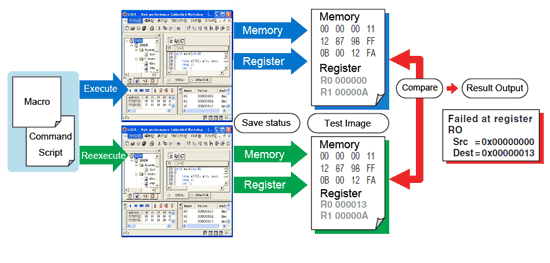
- Saves contents (results of execution) of the selected windows and compares them as test-image files [Test Support function]
- Executes a batch file or saves a log as input from the command line
- Customizes toolbars and keyboard shortcuts
- Linked operation with ZIPC, a CASE tool from CATS Co., Ltd
Test Support Function
A new function named the "Test Support Function" has been incorporated (in V.4.01.00) that permits the execution result shown in the window to be saved in an image file and the test image files to be compared with each other.
[Conceptual Image of the Test Support Function]
The test support function, if combined with the macro generation support function, becomes even more convenient. For example, if you have a test procedure prepared in a macro file and the expected value of test prepared in a test image file available, a series of repeat tests comprised of test execution and comparison of test result can be performed efficiently.
[What is the Macro Generation Support Function?]
This function permits a series of repeat work comprised of project control, building and debugging to be recorded in a macro file (command batch file). The macro can be recorded and replayed simply by using a macro toolbar. For details about the commands that can be recorded in a macro, please refer to a section of the High-performance Embedded Workshop User's Manual in which "Using the Macro-Recording Support Facility" is described.
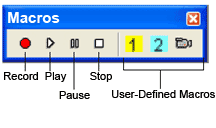
Macros Toolbar
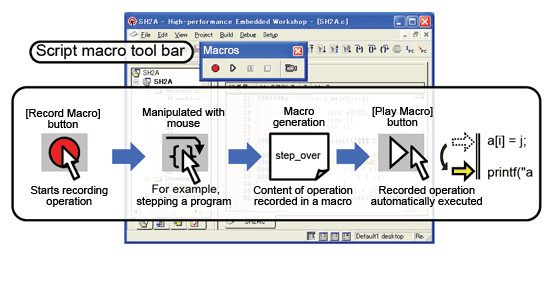
Conceptual Image of Macro Execution
Customization
The Renesas development environment, or the High-performance Embedded Workshop, is designed to be customized by users. Not just for use with the standard interface, it can have its functions extended according to the purposes of use or preferences of each individual user, for further increased ease of use. To customize the High-performance Embedded Workshop, use the facilities and tools described below, which permit you to program it freely as desired.
Various methods prepared by TargetServer make many and varied extensions possible by taking advantage of Microsoft COM technology. This includes creating user-exclusive control windows, control the execution of test pattern and other repeat work, and outputting the execution result to Excel spreadsheets. All these can be programmed using Visual C++ from Microsoft Corporation.
The versatile widgets (GUI components) offered by Tk make it possible to add exclusive buttons, menus and setup windows. Since Tcl/Tk is a simple and open-source tool, handy programming is possible.
This utility permits the simulation of complicated peripheral I/O operations to be defined in user-exclusive DLL form. Use of the IO DLL Kit eliminates the need to learn I/O script language, and makes programming with Visual C++ from Microsoft Corporation possible.
Notes
- COM: Component Object Model
- Tcl/Tk: Tool Command Language/Tool Kit
- DLL: Dynamic Link Library
Tool Suites
High-performance Embedded Workshop is packaged in various configurations dependent upon the tools it is supporting.
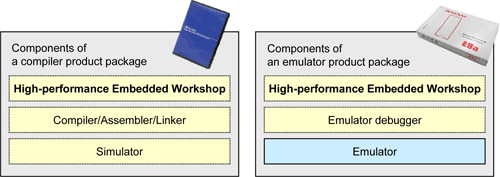
Cooperating Tools
It can be purchased with a specific tool suite, compiler, assembler, linker, simulator debugger, etc., for a particular Microcontroller family such as:
| Product Package | "High-performance Embedded Workshop"-supported version |
|---|---|
| C/C++ compiler package for SuperH RISC engine Family | V.5.1 or later (Note2) |
| C/C++ compiler package for M32R Family [M3T-CC32R] | V.4.20 Release 1 or later |
| C/C++ compiler package for RX Family | V.1.00 Release 00 or later |
| C compiler package for R32C/100 Series (Note1) | V.1.01 Release 00 or later |
| C compiler package for M32C/90, M32C/80 and M16C/80 Series [M3T-NC308WA] (Note1) | V.5.20 Release 1 or later |
| C/C++ compiler package for M16C/60, M16C/50, M16C/30, M16C/20, M16C/10, M16C/Tiny Series and R8C Family [M3T-NC30WA] (Note1) | V.5.20 Release 1 or later |
| C/C++ compiler package for H8SX, H8S and H8 Families | V.3.0A or later (Note3) |
| C compiler package for 740 Family [M3T-ICC740] | V.1.01 Release 01 or later |
| Assembler package for 740 Family [M3T-SRA74] | V.4.10 Release 02 or later |
Notes
- Packaged with C/C++ Compiler Package for R8C and M16C Families
- V.7.1.01 or later allows you to upgrade the High-performance Embedded Workshop
- V.5.0.03 or later allows you to upgrade the High-performance Embedded Workshop
Or be supplied with the emulator debugger as with an emulator product such as:
- E200F emulator
- E100 emulator
- E6000H emulator
- E6000 emulator
- PC7501 emulator
- PC4701 emulator
- M30850T3-CPE (for M32C/80, /84, /85, /86, /8A Groups) * M30850T2-CPE's successor
- M30870T2-CPE (for M32C/87 Series)
- M3062PT3-CPE (for M16C/62P, M16C/30P, M16C/6S Groups)
- M3028BT2-CPE (for M16C/Tiny Series) * M30290T2-CPE's successor
- R0E521000CPE00 (for R8C/2x, R8C/1x Series)
- R0E436640CPE00 (for H8/300H Tiny Series)
- M38000T2-CPE (for 740 Family)
- E10A-USB emulator
- E10A emulator
- E1 Emulator *Click here for the list according to the device group.
- E20 Emulator *Click here for the list according to the device group.
- E10T-USB emulator
- E10T emulator
- E30A emulator
- E8a emulator
- E8 emulator (The successor is E8a.)
- E7 emulator (The successor is E8a.)
- M3A-0665 FoUSB emulator (The successor is E8a.)
Monitor Debuggers
- M32C M16C UART Monitor Program (M32C/83, M16C/62A, M16C/62M Group)
- R8C UART Monitor Program (for R8C/2x, R8C/1x Series)
Note: For M3A-0665 and the monitor debuggers, please download the High-performance Embedded Workshop environment.
E1/E20 supported device list for using High-performance Embedded Workshop (Click here to see the list using other IDEs.)
| Family | Series | Group |
|---|---|---|
| R8C | R8C/Lx Series | R8C/L35C, L36C, L38C, L3AC Groups |
| R8C/L35M, L36M, L38M, L3AM Groups | ||
| R8C/LA3A, LA5A Groups R8C/LA6A, LA8A Groups R8C/LAPS Groups | ||
| R8C/5x Series | R8C/54E, 54F, 54G, 54H Groups R8C/56E, 56F, 56G, 56H Groups | |
| R8C/3xT-A Series | R8C/36T-A Group R8C/38T-A Group | |
| R8C/3x Series | R8C/32C, 33C, 34C, 35C, 36C, 38C, 3GC, 3JC Groups | |
| R8C/32M, 33M, 34M, 35M, 36M, 38M Groups R8C/3JM, 3GM Groups | ||
| R8C/3MQ Group R8C/34U, 34K, 3MU, 3MK Groups | ||
| R8C/3NT Group R8C/3JT Group R8C/33T Group | ||
| R8C/32G, 32H, 33G, 33H, 34P, 34R Groups R8C/34W, 34X, 34Y, 34Z Groups | ||
| R8C/36W, 36X, 36Y, 36Z Groups R8C/38W, 38X, 38Y, 38Z Groups |
Notes on Updating
[When Adding a Linked Product]
When adding a linked compiler/simulator
You need to purchase the relevant compiler package and install it in your computer.
When adding a linked emulator debugger
You need to install the latest version of the emulator debugger which can be downloaded free of charge from the Renesas Web site.
[When Upgrading a Linked Product]
When upgrading a compiler or emulator debugger
In order to use the functions of the new version of a compiler or emulator debugger, each software must be upgraded (for a fee) or its revision must be updated (free of charge). Update data can be downloaded from the Renesas Web site. Please note that updating only the High-performance Embedded Workshop (only the framework) does not update your software.
Option Products(Utilities for High-performance Embedded Workshop)
Keep your Renesas IDE up-to-date via the Internet. (Periodic automatic check for available software updates.)
Add new CPU types to the compiler package (for High-performance Embedded Workshop V4 or later)
High-performance Embedded Workshop environment build/management tool (standard install [recommended] and multi-install selectable)
Customization for the High-performance Embedded Workshop by using the COM interface
Customization for the High-performance Embedded Workshop by using the Tcl/Tk extension function
Simulator Debugger Customizing Kit (for High-performance Embedded Workshop environment)
Collaboration with Partners
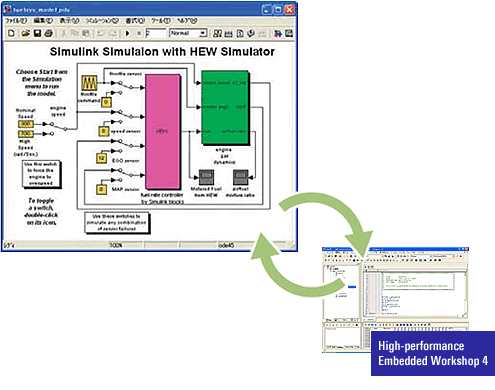
[Collaboration with MATLAB]
MATLAB is a technical computing software application developed by The MathWorks Inc. It can be used in engineering and many other fields.
- Interaction with RTW-EC: Modeling by MATLAB, and code generated by Real Time Workshop-Embedded Coder (RTW-EC), are automatically exported to High-performance Embedded Workshop.
- Co-simulation is supported between MATLAB/Simulink and High-performance Embedded Workshop.
Notes
- MATLAB is a modeling tool by The MathWorks Inc. (U.S.).
- Simulink is a model verification tool by The MathWorks Inc. (U.S.).
- The Real-Time Workshop Embedded Coder (RTW-EC) is a C source code generation tool by The MathWorks Inc. (U.S.).
- This tool is supported by Renesas and The MathWorks, Inc.
- Please contact a Renesas sales office to request the tool.
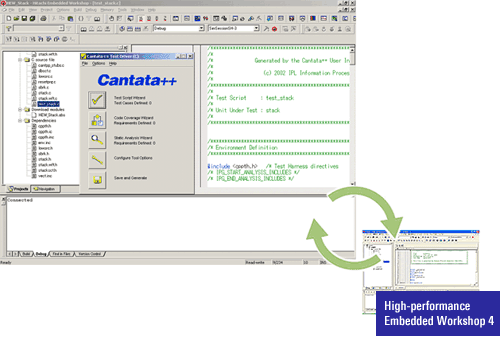
[Collaboration with Cantata++]
Cantata++ is a unit/integration test support tool that makes unit tests more efficient and reduces the number of man hours for testing software.
- A Cantata++ wizard (TestDriver) can be started and programs tested directly from Renesas' High-performance Embedded Workshop integrated development environment.
- A high-precision test can be performed using the same CPU instruction set as the system.
- This tool can be customized for application to various CPUs or compiler versions.
Target Devices
- SuperH Family
- M32R Family (Note1)
- RX Family RX600, RX200 Series
- M16C Family R32C/100 Series
- M16C Family M32C/80, M16C/80 Series
- M16C Family M16C/60, M16C/50, M16C/30, M16C/20, M16C/10, M16C/Tiny Series
- R8C Family
- H8SX Family
- H8S Family
- H8 Family
- 740 Family
Note
- The M32R family differ from other microcomputer families in that their emulator system is connected as an external tool.
支持
支持社区
- 需要High-performance Embedded Workshop的安装包,[email protected]
用于H8SX/1648H维护,另外还有其他的开发方式吗?
2026年2月27日 - 请问是否有专门针对SuperH系列芯片如何应用HEW软件编写C或者汇编语言程序的相关文档
你好,请问是否有专门针对SuperH系列芯片如何应用HEW软件编写C或者汇编语言程序的相关文档
2025年4月30日 - M16C系列芯片M3030RFCPGP开发环境
我在使用M3030RFCPGP,请问该芯片能否使用E2S进行开发?如果能,在安装E2S时选择Device Family时没有对应的选项,如下图,应该如何解决。若不 ...
2024年4月9日
知识库
- E8a仿真器用USB驱动程序及USB启动(USB Direct)用驱动程序无法识别 (RFP, FDT, HEW, E8a)
当Windows的安全功能“核心隔离和内存完整性”启用时,会发生此问题。目前尚未提供支持“核心隔离和内存完整性”的驱动程序。因 ...
2026年1月23日 - E0562310 (使用的符号名)
当“符号”是C标准库函数名时(非客户使用的符号名时)1-1. 使用High-performance Embedded Workshop时(1) 在High-performance Embedded Workshop菜单中选择[构建]→[RX Standard Toolchain...](2) 打开 ...
- e² studio的FAQ集
... Debug GNU ARM Embedded toolchain project in e² studio Build errors in converted RZ project for GNU ARM Embedded toolchain (e² studio) Project Migration from HEW to e² studio (RX) Project Migration from CS to e² studio Converting GNUARM-NONE-EABI toolchain project into GCC ARM Embedded_e² studio Registering ...
2026年7月30日


