
概述
描述
Smart Configurator for RZ supports the new device RZ/G3E.
RZ Smart Configurator automatically generates initial-setting programs for MPUs.
It provides a quick and smart way of combining and configuring software to meet your needs, such as by configuring peripheral pins and importing middleware and drivers.
*The installer format differs depending on the device. For details, refer to Release Information.
特性
- Importing Middleware/Drivers
- Pin Settings
- Learn More
发布信息
Smart Configurator supports RZ family devices as different form, functions by series or groups.
Types of Smart Configurator distributions for RZ family devices
Plug-in type of e² studio
This type of Smart Configurator is included in e² studio as plug-in.
- Plug-in type of e² studio for Flexible Software Package (FSP)
- Plug-in type of e² studio for RZ/A2M Software Package
Standalone type
Standalone type of Smart configurator supports IDE (Integrated Development Environment) of Partners or generation configuration files of Linux for target devices.
- Standalone version of FSP Smart configurator for RZ family device groups
- Smart Configurator for RZ
Refer to the table below to determine suitable type of Smart Configurator for RZ family devices and required features.
<Table> Smart Configurator types for each RZ family device group
Note
- Only supports pin setting and automatic resolution of contention between pin functions
- Only supports some devices with Sub CPU
How to get it
You can get each type of Smart Configurator from the following routes:
Plug-in type of e² studio for Flexible Software Package (FSP)
This type of Smart Configurator can be obtained as a platform installer from the FSP page for each RZ family series. Click a ‘Flexible Software Package (FSP) Platform Installer of e² studio (and Smart Configurator)’ on ’Downloads’ list.
Plug-in type of e² studio for RZ/A2M Software Package
Download e2 studio installer from ‘e² studio – inforamtion for RZ Family’.
Standalone version of FSP Smart configurator for RZ family device groups
This type of Smart Configurator can be obtained as a platform installer from the FSP page for each RZ family series. Click a ‘Flexible Software Package (FSP) Platform Installer of e² studio and Smart Configurator’ on ’Downloads’ list.
Smart Configurator for RZ
Download an installer from ’Downloads’ list. (e.g. Smart Configurator for RZ V1.19.0)
References
Please refer to the following Smart Configurator related materials.
| Device groups | Related documents, Related product pages |
|---|---|
| RZ/A2M | RZ/A2M Smart Configurator User Guide: e² studio (PDF | English, 日本語) Details of the RZ/A2M Software Package |
| RZ/A3UL, RZ/A3M | RZ/A Getting Started with Flexible Software Package V3.61 (Deprecated) (PDF) RZ/A Flexible Software Package (FSP) |
| RZ/T2M, RZ/T2ME, RZ/T2L, RZ/N2L, RZ/T2H, RZ/N2H | RZ/T2, RZ/N2 Getting Started with Flexible Software Package V3.10 (Deprecated) (PDF) |
| RZ/G2L, RZ/G2LC, RZ/G2UL, RZ/G3S | RZ/G Multi-OS Package |
| RZ/V2H, RZ/V2N, RZ/V2L | RZ/V Multi-OS Package |
Smart Configurator released after Dec. 2021 will support the 64-bit versions of Windows® only.
Microsoft® Windows® has shifted to the 64-bit environment. Therefore, Renesas will focus on supporting Smart Configurator for the 64-bit environment.
(Microsoft®, Windows® are registered trademarks of Microsoft Corporation in the United States and/or other countries. https://www.microsoft.com/legal/intellectualproperty/trademarks.aspx)
目标设备
下载
|
|
|
|
|---|---|---|
| 类型 | 文档标题 | 日期 |
| 软件和工具 - 软件 | Smart Configurator for RZ V2.1.0 installer for Linux
|
|
| 软件和工具 - 软件 | Smart Configurator for RZ V2.1.0 installer for Windows
|
|
| 软件和工具 - 软件 | Smart Configurator for RZ V2.1.0 installer for macOS
|
|
| 软件和工具 - 其他 | ||
|
4 项目
|
||
文档
|
|
|
|
|---|---|---|
| 类型 | 文档标题 | 日期 |
| 应用说明 |
PDF
5.90 MB
This document shows how to prepare programs for "DDR Tools" and softwares for "Install Utility". Also it shows how to operate "DDR Tools" and easy usage of "Install Utility" on Windows PC. It provides functionality for tuning and validating DDR memory parameters and a GUI that enables writing these configured images to the development board, ensuring a streamlined deployment process.
|
|
| 发行说明 | PDF 911 KB | |
| 工具新闻 - 发布公告 |
PDF
185 KB
日本語
Smart Configurator for RZ has been updated from V2.0.1 to V2.1.0. DDR Configurator, Install Utility, and DDR Tools have been updated to include support for the RZ/G3E and RZ/G2L devices. Additionally, enhancements have been implemented across each tool to improve functionality and usability.
|
|
| 手册 - 开发工具 |
PDF
2.32 MB
This application note describes the basic usage of the RZ Smart Configurator. Smart Configurator for RZ supports funcionalities for Pin configurator enables pin assignment, and DDR Configurator enables configuration of DDR memory-related pins and parameters.
|
|
| 发行说明 | PDF 1.25 MB | |
| 工具新闻 - 发布公告 |
PDF
226 KB
日本語
Smart Configurator for RZ has been updated from V1.21.0 to V2.00.0. We’ve added three new utilities to simplify DDR memory setup and optimization. DDR Configurator enables configuration of DDR memory-related pins and parameters.
Install Utility enables writing these configured images to the development board. DDR Tools provides functionality for tuning and validating DDR memory parameters.
|
|
| 传单 |
PDF
1004 KB
English
, 日本語
This is a flyer for the Smart Configurator, which can automatically generate initial setup programs for microcontrollers. It details the features and information about the Smart Configurator. Supported microcontrollers include RL78, RX, RH850, RISC-V, RA, and RZ.
|
|
| 发行说明 | PDF 1017 KB 日本語 | |
| 工具新闻 - 发布公告 | PDF 143 KB 日本語 | |
| 工具新闻 - 发布公告 | PDF 144 KB 日本語 | |
| 手册 - 开发工具 | PDF 1021 KB 日本語 | |
| 应用说明 | PDF 1.29 MB 日本語 | |
| 工具新闻 - 发布公告 | PDF 149 KB 日本語 | |
| 发行说明 | PDF 1.08 MB 日本語 | |
| 发行说明 | PDF 1.08 MB 日本語 | |
| 工具新闻 - 发布公告 | PDF 150 KB 日本語 | |
| 发行说明 | PDF 1.09 MB 日本語 | |
| 发行说明 | PDF 1.60 MB 日本語 | |
| 工具新闻 - 发布公告 | PDF 304 KB 日本語 | |
| 工具新闻 - 发布公告 | PDF 156 KB 日本語 | |
| 工具新闻 - 发布公告 | PDF 231 KB 日本語 | |
| 手册 - 开发工具 | PDF 1.39 MB 日本語 | |
| 工具新闻 - 注意事项 | PDF 201 KB 日本語 | |
| 发行说明 | PDF 1.30 MB | |
| 工具新闻 - 注意事项 | PDF 73 KB 日本語 | |
| 手册 - 开发工具 | PDF 2.14 MB 日本語 | |
| 应用说明 |
PDF
5.08 MB
日本語
AI 生成的摘要:
The document provides step-by-step guidance on using Smart Configurator with Renesas RX microcontrollers, covering device selection, clock settings, driver addition, and pin configuration. It includes application examples for peripherals like CMT, A/D, SCI, DMA, and USB. The guide details code generation, adding application codes, building, and running on hardware, along with debugging support tools.
|
|
| 应用说明 |
PDF
1.88 MB
日本語
AI 生成的摘要:
This guide explains how to create an Ethernet echo server program using FIT modules in Smart Configurator for RX64M, RX6SN, and RX651 groups. It outlines the operating environment, including evaluation boards, debuggers, IDE, and toolchains. The basic steps involve selecting devices, configuring clocks, drivers, and pins, generating code, and adding application code. The module structure includes middleware, interface conversion, device drivers, system timer, and BSP, with specific versions listed for each FIT module.
|
|
|
28 项目
|
||
视频和培训
Follow this step-by-step tutorial to configure DDR with Smart Configurator for RZ devices. As an example, you will work with an RZ/G3S project that supports DDR configuration, learning how to set up and adjust key parameters. By the end, you will understand the basic flow for applying DDR settings in your own RZ-based projects.
Additional Details
Pin Settings
The assignments of pins can be set up through a GUI, which also checks and offers solutions for cases of contention for the same pin by multiplexed functions.
The [Pins Configuration] window (displayed per peripheral module)
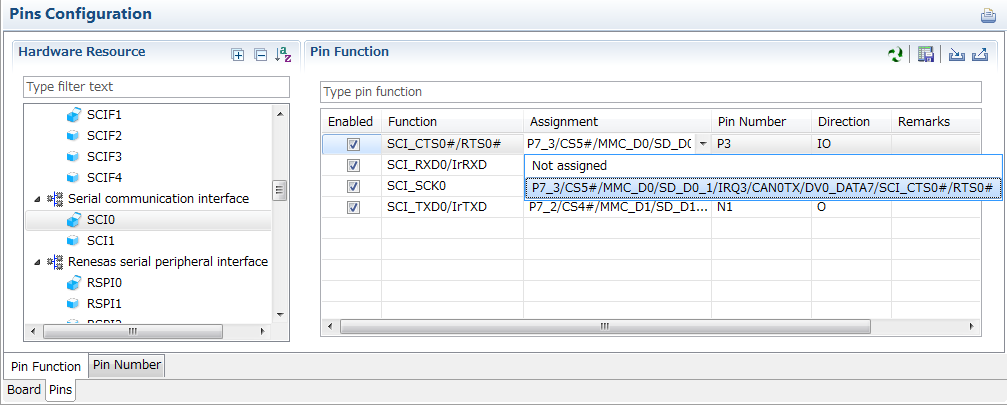
Specifying a peripheral module in the [Pins Configuration] window displays the pin functions for use by the module and allows you to set the assignment of the functions to pins.
[MCU/MPU Package] window
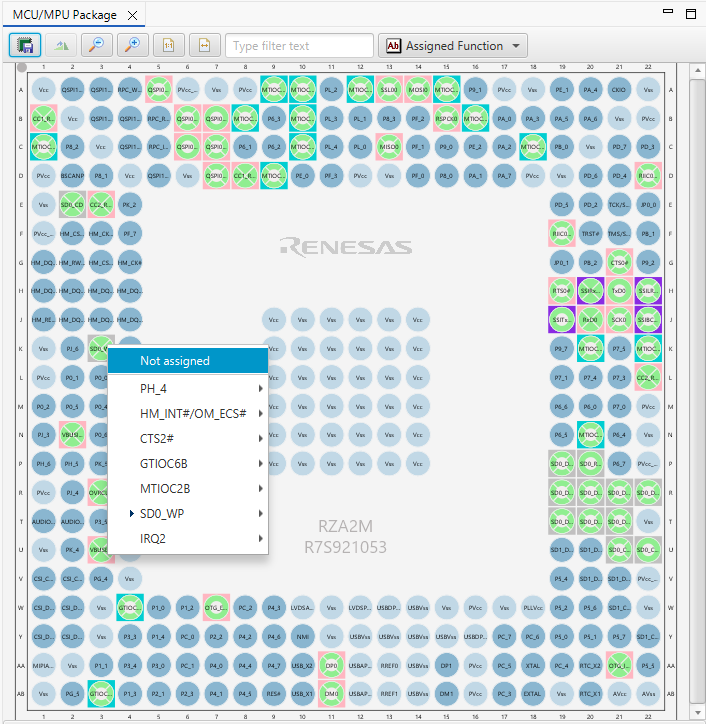
The [MCU/MPU Package] window displays a symbolic view of the pins, indicating by colors which pins are and are not in use, which have been assigned contending multiplexed functions, and so on. This makes it easy to check the overall situation.
Automatic resolution of contention between pin functions
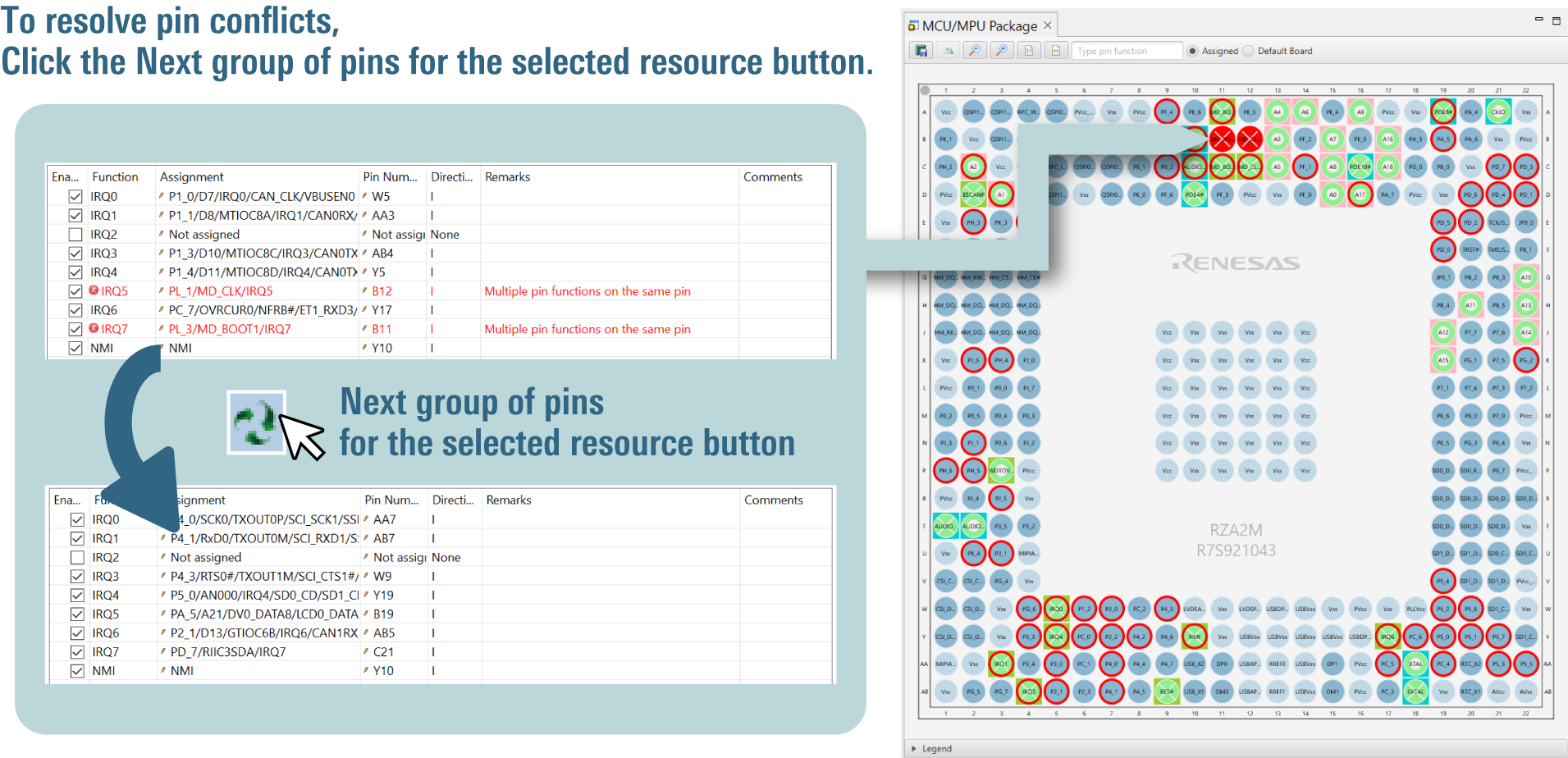
In cases of contention for a pin, clicking on the pin brings up a list allowing automatic changing of the assignment of the pin to resolve the contention.
Output a Device Settings File for Linux (Note1)
Output a DTS file that contains pin settings. You can readily apply device settings to Linux.
Importing Middleware/Drivers
Flexible Software Package(FSP)(Note2)
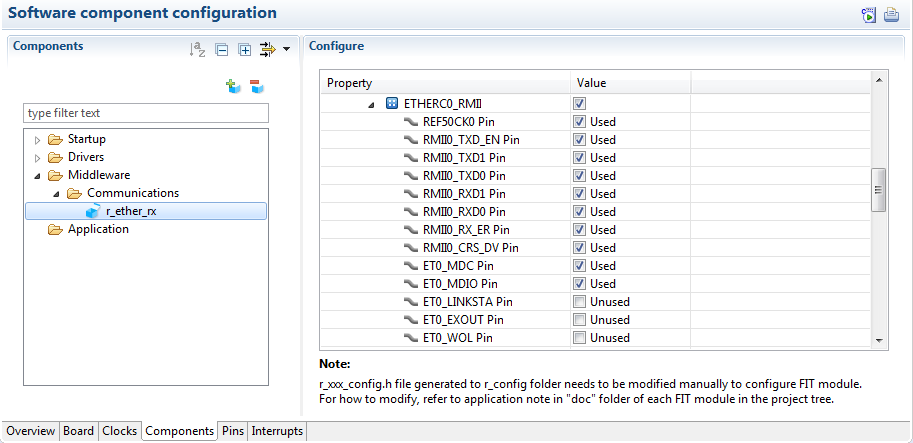
You can change the settings of FSP pins and components by using the Smart Configurator GUI.
RZ/A2M Software Package (Note3)
The RZ/A2M Software Package consists of a range of middleware and drivers, which you can import and then modify settings such as pin assignments as required.
Details of the RZ/A2M Software Package >>
DDR memory setup and optimization (Note4)
You can use the GUI to configure DDR memory settings, resolve parameter conflicts, apply changes to the hardware, and perform tuning easily.
Configuration of DDR memory-related pins and parameters (DDR Configurator)
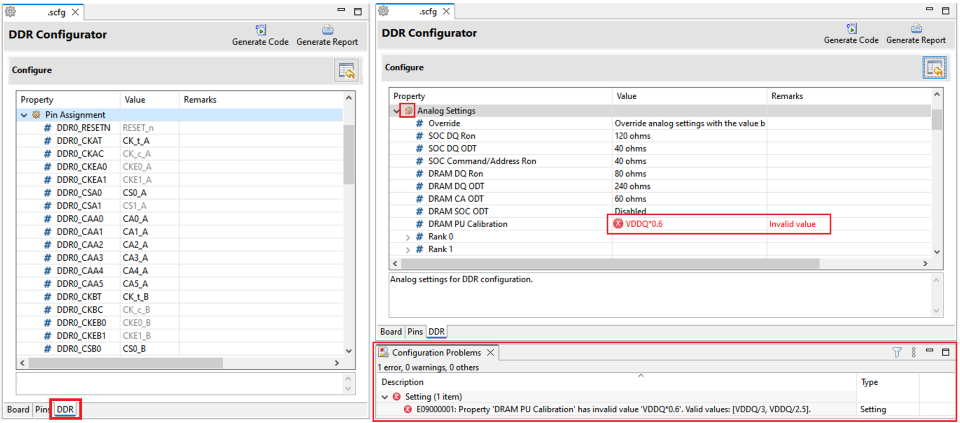
It allows seamless setup of DDR memory pins. All entered parameters are automatically validated and if any conflicts with other parameters are detected, the tool will display a warning to ensure proper configuration integrity.
Applying DDR memory configurations to the bootloader and OS disk image files (Install Utility)
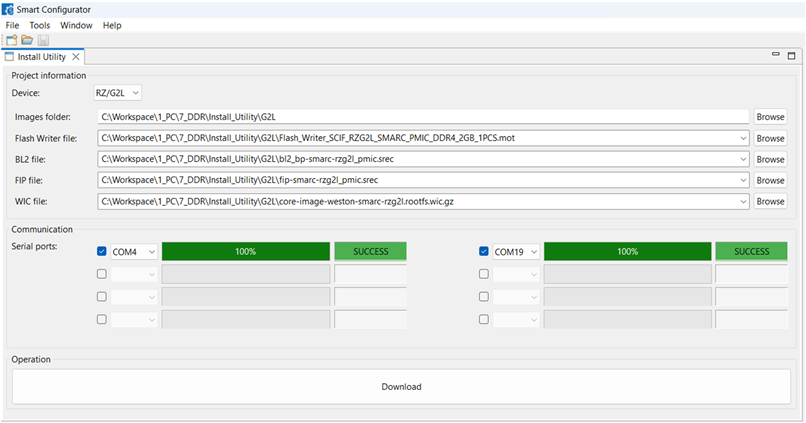
It provides a GUI that applies configurations by DDR Configurator to the bootloader and operating system disk image files for RZ Family devices and enables writing these configured images to the development board, ensuring a streamlined deployment process.
Tuning and Validating DDR memory parameters
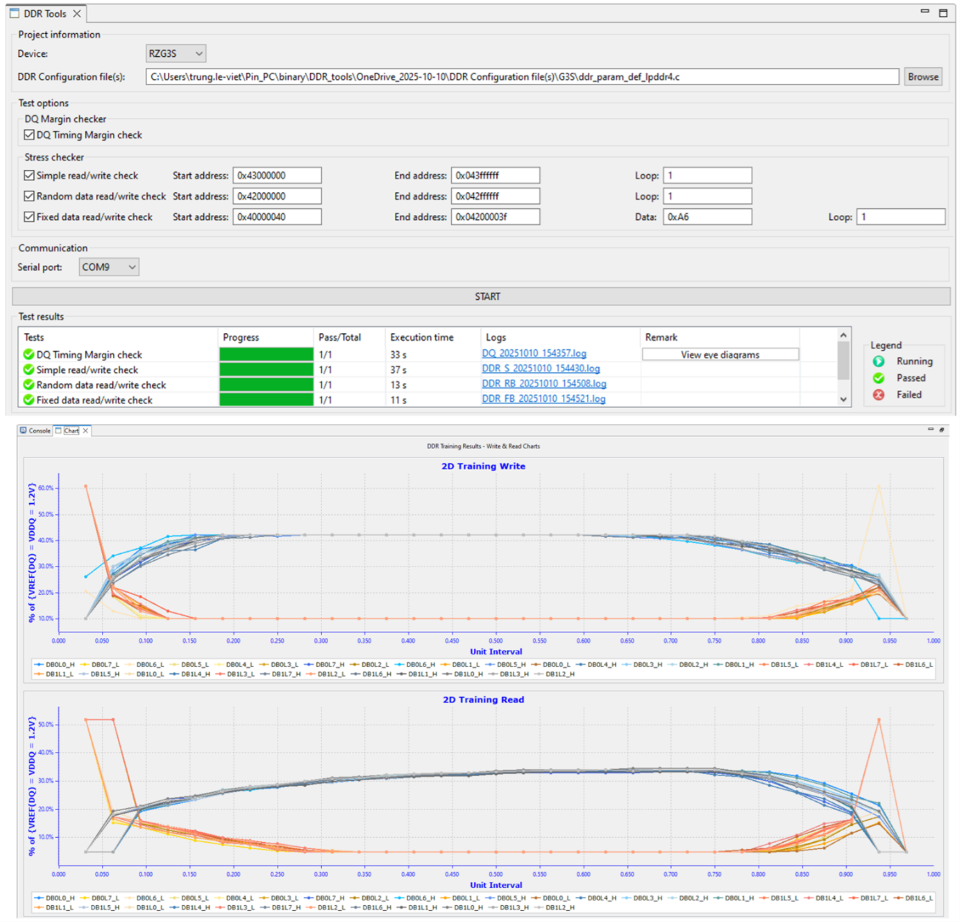
This offers a GUI that enables parameter modification, writing updated parameters to the actual hardware, and performing load tests to ensure system stability and performance.
Supported Features
| Type of Smart Configurator | Flexible Software Package support | Importing middleware | Generating driver code | Pin settings |
|---|---|---|---|---|
| Smart Configurator for RZ | — | — | — | lens |
| Plug-in type of e² studio for RZ/A2M Software Package | — | lens | lens | lens |
| Plug-in type of e² studio for Flexible Software Package (FSP) Standalone version of FSP Smart configurator for RZ family device groups | lens | lens | lens | lens |
— : Not Supported
Refer to ‘Release Information’ for detailed information on each type of Smart Configurator.
Note
- The Smart Configurator only generates Device Tree Specification (DTS) include files (dtsi), which are only usable in the development environment of the Linux platform. Manually merge the device-setting code in the generated dtsi files with the default dtsi files included in your source code produced under Linux. For details of the DTS, refer to the links on https://www.devicetree.org .
- Available only for the RZ Family devices supported by the FSP.
- We currently support version 2.0.0 and later versions of the RZ/A2M Software Package.
- It supports RZ/G2L, RZ/G3S.
支持
支持社区
- RZT2M_RSK_usb_hmsc_Rev200 or RZN2L_RSK_usb_hmsc_Rev200例程 实际测试进入Default_Handle问题
... 上U盘后程序进入Default_Handle。 二、相关测试 环境:IAR 9.60.1 、I-Jet、RSK-T2M、RZT2M_RSK_usb_hmsc_Rev200 、U盘(FAT32)--接RSK CN10 2.1 按照例程Readme.txt 中设置 工程正 ...
2025年9月10日 - RZ/N2L MII模式下如何禁用TXER, 用smart Configurator 如何来配置
RZ/N2L MII模式下如何禁用TXER, 用smart Configurator 如何来配置
2025年3月5日 - cs+的smart configurator是否能够配置rh850的hsm核,或者怎么才能获取到cs+的hsm核示例代码
cs+版本的hsm核示例代码如何获取
2025年9月9日
知识库
- e² studio的FAQ集
... I generate code after importing a project, the source file version changes 3000725 How to convert an e² studio FSP project into an RA or RZ Smart Configurator project that can be built in a partner IDE 3000751 Importing DA SDK project into e² studio GNU编译器与 ...
- 智能配置器(Smart Configurator) FAQ汇总
... If I generate code after importing a project, the source file version changes 创建报告 Characters are garbled in CSV file read by Smart Configurator for RZGUI操作 Setting Items Changed by Mouse Wheel_ Code Generator, PDG 適用製品Smart Configurator English 日本 ...
- RL78 MCU: 低电压检测 (LVD)
... 检测电压与供电电压进行比较,以监测异常电压状况。 Code Generator/Smart Configurator的配置: 这些配置有助于设定工作模式和检测电压。 复位 ...


