
概述
描述
[Updated: Jul. 21, 2026 Rev. 1.10] [Notes] Emulator and Flash Memory Programmer Products Notice Regarding Changes to Windows Driver Policy (PDF | English, 日本語)
The E1 emulator is an on-chip debugging emulator and flash programmer which supports the major Renesas MCUs. This economical development tool provides basic debugging functionality. Available optional products, such as the hot-plug-in adaptor, allow you to extend debugging functionality or adjust connections.
Successor
| Item | Description |
|---|---|
| For RX or RL78 Family MCU Users | E2 emulator or E2 emulator Lite |
| For RH850 Family MCU Users | E2 emulator |
Note:
- No successors to E1 for V850、78K0R、78K0 or R8C* Family MCU Users.
*E8a emulator supports R8C/3x or R8C/Lx Series MCU.
![E1 emulator [R0E000010KCE00]](/sites/default/files/e1.jpg "E1 emulator [R0E000010KCE00]")
特性
- Affordable yet powerful debugging device that can meet the actual development needs.
Learn more (On-chip Debuggers Performance Property) >> - Enhanced functions for faster debugging
In addition to basic debugging functions, the E1 supports execution time measurement and hot plug-in functionality (dependent on the MCU) that allows connection to the user system while the program is running. - Also functions as an on-board programmer.
Can be used as an on-board programming tool after the debugging, enabling smooth evaluation of the MCU. - Optimally suited for evaluating analogue functions such as A/D and D/A properties.
Electrical characteristics are the same as those of the actual MCU, since the actual MCU is used for debugging. - Serial, JTAG and LPD connections are supported.
For the communication system, serial, JTAG or LPD connection can be selected as required by the type of the target MCU. - Simple connection
Connection requires only a connector mounted on the user system, thus significantly reducing the possibility of loose connection. - Environmentally friendly material
The casing is made of plant-derived polylactide (PLA). - Learn More
发布信息
| Purpose of use | Software to be supported | Target devicesNote1 | Operating Environment |
|---|---|---|---|
| On-chip Debugging | CS+ *Evaluation Software Download | RX, RL78, RH850 [Details] Functions Supported by CS+ (XLSX) (XLSX | English, 日本語) | Operating Environment |
| e² studio *Download | RX, RL78, RH850 [Details] Release notes | ||
| IAR Embedded WorkbenchNote2 | RX, RL78, RH850 | Contact IAR Systems. | |
| Green Hills MultiNote2 | RH850 | Contact Green Hills Software. | |
| iSYSTEM winIDEANote2 | RL78, RH850 | Contact iSYSTEM. | |
| Flash Programming | Renesas Flash Programmer V3 *Evaluation Software Download | RL78, RX, RH850 [Details] List of MCUs supported by Renesas Flash Programmer V3 (PDF | English, 日本語) | Operating Environment |
Notes:
1. For details when using devices of V850 family, 78K0R, 78K0, or R8C family, see E1/E20 software for V850, 78K0R, 78K0, or R8C MCU >>.
2. As for tools produced by partners, contact them directly.
目标设备
Target Family
- RX Family
- RL78 Family
- RH850 Family
Note: The E1 does not support RH850-family MCUs with the next-generation G4MH core, such as those of the RH850/E2x series. The E2 emulator is available for use with them. - V850 Family
- 78K Family
- R8C Family
设计和开发
Additional Details
Specifications
Note that some functions shown here may not be supported under the IDE you use. Performance property and Connection system also vary depending on the MCU type.
| Item | Description |
|---|---|
| See On-Chip Debugger Functional Overview (PDF | English, 日本語). |
| On-board programming | Supported |
| User interface | 14-way cable [7614-6002 (product of 3M Co., Ltd.) and 2514-6002 (product of 3M Limited)] |
| PC Interface | USB 2.0, full speed and high speed |
| Target board connection | Via attached user I/F cable (Connection signals vary by the target MCU type.) |
| Operating voltage range | 1.8V to 5.5V (depends on the target MCU) |
| Power supply from Emulator | Supply current: Up to 200mA, Supply voltage: 3.3V or 5V |
| External dimension (Except the protruding parts) | 109.4 mm×53.2 mm×18.6 mm |
| Conformance with overseas standards | European Standards: EN 55022 Class A, EN 55024 US FCC Standard: FCC part 15 Class A |
Components
- E1 Emulator main unit
- USB cable
- User's system I/F cable
- Software CD-ROM
- Installation guide
- Self-Checking Program
- USB driver
- E1/E20 Emulator User's Manual
System Configuration
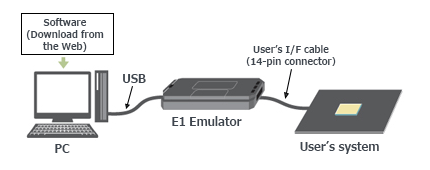
Optional Products
Following optional products are provided to facilitate the use of the E1 emulators. Please make sure to choose the products that match MCUs you use.
Conversion Adapter
Converts the number and pitch of the pins in the connector for the connection with the emulator.
| MCUs | ||||||
|---|---|---|---|---|---|---|
| RX | RL78 | RH850 | V850 | 78K | R8C | |
| 14-Pin to 38-Pin Conversion Adapter for the E1 Emulator R0E000010CKZ00 R0E000010CKZ00 User's Manual (14-Pin to 38-Pin Conversion Adapter for E1 Emulator) (PDF | English, 日本語) An adapter for converting the 14-pin/2.54-mm pitch connector on the head of the emulator user interface cable to a 38-pin/0.5-mm pitch connector | lens | — | — | — | — | — |
| 38-Pin Conversion Adapter for the E1 Emulator QB-F14T38V850-01 QB-F14T38V850-01 ユーザーズ・マニュアル (E1エミュレータ用14ピン/38ピン変換アダプタ) / QB-F14T38V850-01 User's Manual (14-Pin to 38-Pin Conversion Adapter for E1 Emulator) (PDF) An adapter for changing to a 14-pin user interface for connection to a Mictor connector mounted on a V850-based target system | — | — | — | lens | — | — |
| Small Connector Conversion Adapter for the E1 Emulator R0E000010CKZ11 R0E000010CKZ11 User's Manual (Small Connector Conversion Adapter for E1 Emulator) (PDF | English, 日本語) An adapter for converting the 14-pin/2.54-mm pitch connector on the head of the emulator user interface cable to a 14-pin/1.27-mm pitch connector | lens | lens | lens | lens | lens | lens |
| 14-Pin to 16-Pin Conversion Adapter for the E1 Emulator QB-F14T16-01 QB-F14T16-01 ユーザーズマニュアル(E1エミュレータ用14ピン/16ピン変換アダプタ) / QB-F14T16-01 User's Manual (14-Pin to 16-Pin Conversion Adapter for E1 Emulator) (PDF) An adapter for changing the 14-pin/2.54-mm pitch connector on the head of the E1 emulator user interface cable to a MINICUBE2-compliant 16-pin/2.54-mm pitch connector | — | — | — | lens | lens | — |
lens Available | — Not Available
Hot-plug Adapter
Allows you to connect the emulator without having to turn off the system (Hot Plugin).
| MCUs | ||||||
|---|---|---|---|---|---|---|
| RX | RL78 | RH850 | V850 | 78K | R8C | |
| Hot-plug Adapter for the E1 Emulator R0E000010ACB00 R0E000010ACB00 User's Manual (Hot-plug Adapter for E1 Emulator) Rev.1.01 (PDF | English, 日本語) An adapter that allows connection of an emulator to a running user system without turning the power off | lens Note1 | lens Note1 | lens Note1 | lens Note1 | — | — |
lens Available | — Not Available
Note:
- Refer to On-Chip Debugger Functional Overview (PDF | English, 日本語) for the applicable MCU groups.
Isolator
Enables debugging in an environment where there is a difference in potential between the user system GND and the host PC GND.
| MCUs | ||||||
|---|---|---|---|---|---|---|
| RX | RL78 | RH850 | V850 | 78K | R8C | |
| Isolator for the E1 Emulator R0E000010ACB10 R0E000010ACB10 User's Manual (Isolator for E1 Emulator) (PDF | English, 日本語) (For the RX or the R8C family) | lens | — | — | — | — | lens |
| Isolator for the E1 Emulator R0E000010ACB20 R0E000010ACB20 User's Manual (Isolator for E1 Emulator) (PDF | English, 日本語) (For the RL78 or the RH850 family) | — | lens | lens | — | — | — |
lens Available | — Not Available
Low voltage OCD Board
Enables you to debug the target MCU, even if the adapter voltage is not high enough to reprogram internal Flash ROM. This product is used between the emulator and a user's system, and is united by the in-circuit connection with the user's system.
| MCUs | |
|---|---|
| RL78/G10 | |
| Low voltage OCD Board for RL78/G10 (10-pin/16-pin) R0E510Y47LVB00 Low voltage OCD Board for RL78/G10 (10pin, 16pin) Rev.1.00 (PDF | English, 日本語) An OCD board for debugging an RL78/G10 MCU (10-pin or 16-pin) with an adapter voltage below 4.5 V | lens |
lens Available | — Not Available
Debug MCU Board
Enables the in-circuit connection of the emulator with the user's system. This board allows you to use enhanced debugging functions. The applicable debugging function varies depending on the MCU type.
| MCUs | |
|---|---|
| RH850 | |
Debug MCU Board for RH850 Note: The package of the Debug MCU Board does not include the MCU. Please purchase it separately. For details, contact either a Renesas Electronics Corporation representative (responsible for sales) or distributor. | lens |
lens Available | — Not Available
System configuration
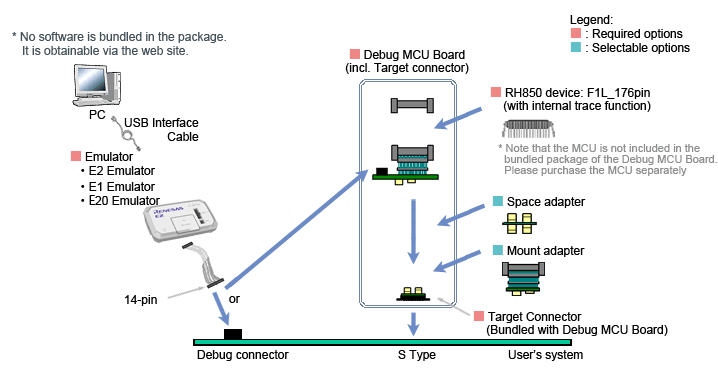
Design Support
E1 emulator [R0E000010KCE00] Information for Users
Information on the discontinuation of E1 emulator production and on its successor products
We have already discontinued production of the E1 emulator due to components of the product having reached their EOL (end of life, i.e. end of production). Please click on the following link to confirm the details and our successor products.
>> Tool News: [Notification] End of Life (EOL) Notice for E1 Emulator (PDF | English, 日本語)
支持
支持社区
- E1 仿真器 还支持78K0R烧录吗
E1 仿真器 还支持78K0R烧录吗
2024年11月26日
知识库
- RX系列的FINE连接与JTAG连接的区别
FINE连接是一种针对少引脚微机开发的接口,其特点是在调试时占用的端子较少。调试功能上的主要区别是是否支持热插 ...
- E0210002, E0204001, C0602202 (调试工具启动失败) [RH850]
... 全ID。删除闪存后,安全ID将全部为F("FFFFFFFFFFFFFFFFFFFFFFFFFFFFFFFF"(32位))。 ※ 此回答在适用产品中记载的仿真器也相同。 Suitable Products CS+ (formerly CubeSuite+) E2 Emulator [RTE0T00020KCE00000R] E20 [R0E000200KCT00]E1 [R0E000010KCE00] Discontinued product
- E1200416 (仿真CPU没有响应。) [RL78]
... 系列时,需要将连接器转换适配器的开关设置更改为“3”侧。(E2仿真器Lite没有此开关) Suitable Products CS+ (formerly CubeSuite+) E2 [RTE0T00020KCE00000R] E2 Lite [RTE0T0002LKCE00000R] E20 [R0E000200KCT00]E1 [R0E000010KCE00] Discontinued product


