
概述
描述
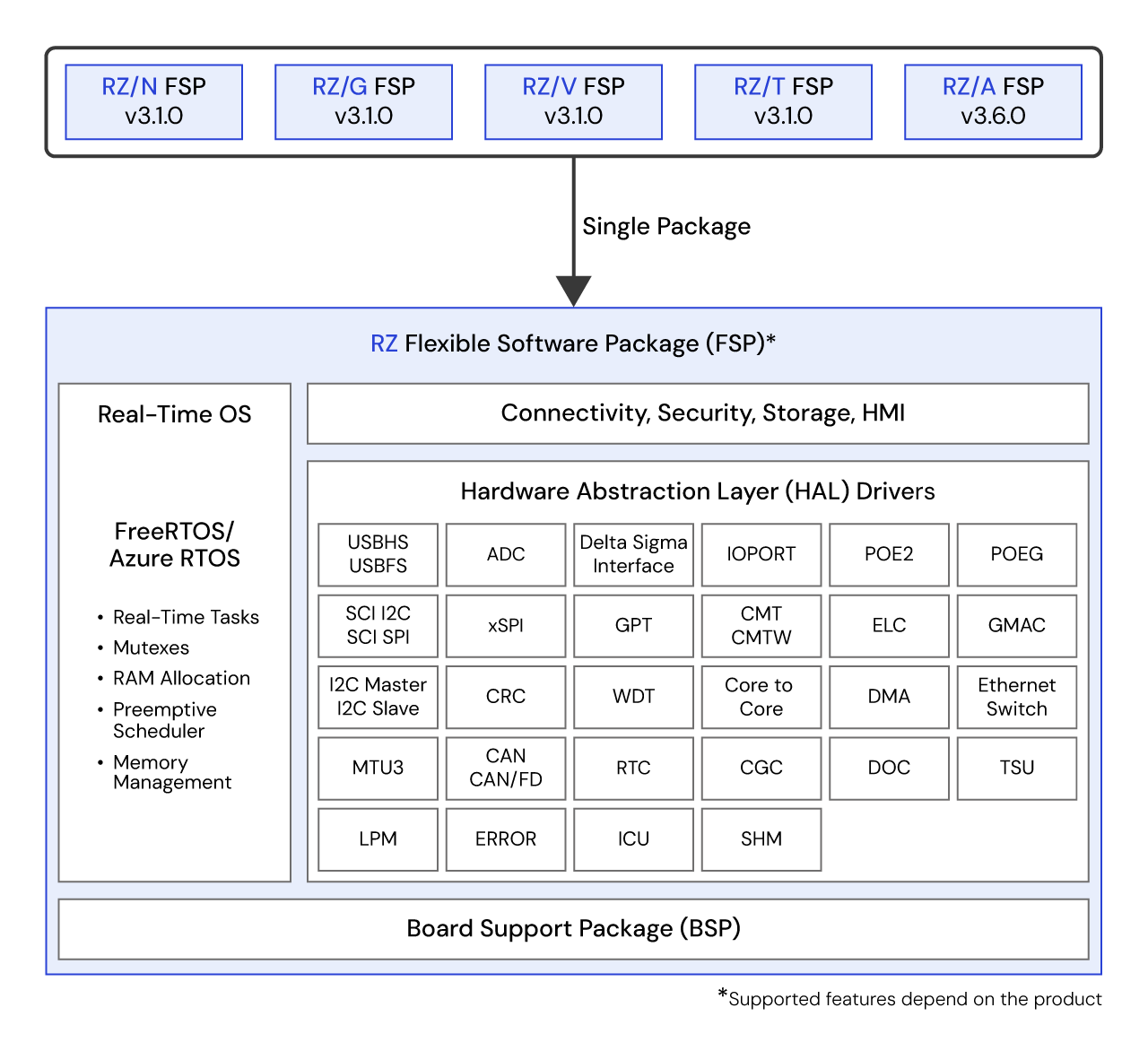
瑞萨电子 RZ Flexible Software Package (FSP) 是一款增强型软件包,旨在为基于瑞萨电子 RZ 系列 Arm® 微处理器的嵌入式系统设计提供用户友好、可扩展的高质量软件。 FSP 提供一种快速、通用的方式,使用量产级驱动程序、FreeRTOS™、Azure® RTOS 和其他中间件协议栈来构建安全、互联的物联网设备。
重要通知
我们已正式发布 RZ FSP,该版本将现有的 RZ/A FSP、RZ/G FSP、RZ/N FSP、RZ/T FSP 及 RZ/V FSP 整合为单一软件包。 通过将这些软件包整合归一,不同产品系列间原有的差异化用户体验得以统一,从而提升客户的开发与维护效率。 现有 RZ/A、G、N、T、V 系列 FSP 将持续支持至 2027 年 1 月底,但新功能和错误修复仅在后续 RZ FSP 版本提供。
强烈建议将使用现有 RZ/A、G、N、T 和 V FSP 创建的项目迁移至 RZ FSP。 有关迁移说明,请参阅相关迁移指南。
下载最新的 FSP (v4.1.0):
FSP 平台安装程序(包括 e2 studio IDE、工具链和 FSP 包):
RZ Smart Configurator (RZSC) 安装程序(适用于与第三方 IDE 配合使用的 FSP 软件包,含 IAR Embedded):
*自 RZ FSP v4.x.x 起,仅支持 RZ/T 和 RZ/N 系列。
FSP 独立安装程序(FSP 包适用于只更新 FSP 而不更新 e2 studio 的用户):
- 从 GitHub 的 Assets(资源)单元下载
安装说明。 所有 FSP 版本和补丁均可在 GitHub上找到。
使用现有 FSP(RZ/A FSP、RZ/G FSP、RZ/V FSP、RZ/T FSP、RZ/N FSP)构建项目 RZ/FSP v4.x.x 的迁移指南:
特性
- 通过与软件集成开发环境 e2 studio 的直观配置器及代码生成功能相结合,用户可以高效快速地进行实时系统开发。
- 同时支持 RTOS 应用程序和裸机应用程序。
目标设备
下载
|
|
|
|
|---|---|---|
| 类型 | 文档标题 | 日期 |
| 软件和工具 - 软件 | RZ FSP Windows Platform Installer
|
|
| 软件和工具 - 软件 | RZ FSP Linux Platform Installer
|
|
| 软件和工具 - 软件 | RZ FSP RZSC Windows Installer
|
|
| 软件和工具 - 软件 | RZ FSP RZSC Linux Installer
|
|
4 项目
|
||
文档
|
|
|
|
|---|---|---|
| 类型 | 文档标题 | 日期 |
| 手册 - 软件 | ||
| 应用说明 |
PDF
4.91 MB
Learn how to migrate projects based on the legacy RZ/A, RZ/G, RZ/N, RZ/T, and RZ/V Flexible Software Packages (FSPs) to the unified RZ FSP v4.x.x. The unified RZ FSP consolidates all previous family-specific FSPs into a single package, providing a consistent development experience across all RZ product series. This integration simplifies project maintenance and improves development efficiency by removing differences between individual RZ series FSPs.
|
|
| 应用说明 |
PDF
10.34 MB
Learn how to use the Renesas RZ Flexible Software Package (FSP) for developing applications for the RZ microprocessor series. This document explains the usage of the RZ FSP running on the Cortex-A55 (CA55) core incorporated in the RZ/A3UL and RZ/A3M devices, including the development environment, software configuration, and application development workflow.
|
|
| 应用说明 |
PDF
9.95 MB
Learn how to develop applications for the RZ microprocessor series using the Renesas Flexible Software Package (FSP). This application note explains how to use the FSP on the Cortex®-M33 (CM33) core integrated into RZ/G2L, RZ/G2LC, RZ/G2UL, RZ/G3S, and RZ/G3E devices, providing guidance for software development and application implementation on supported RZ MPUs.
|
|
| 应用说明 |
PDF
17.85 MB
Learn how to develop applications on the Renesas RZ MPU series using the Flexible Software Package (FSP). This application note covers FSP usage on Arm Cortex‑R52 and Arm Cortex‑A55 cores in RZ/T2 and RZ/N2 MPUs, outlining software architecture, development flow, and application implementation considerations.
|
|
| 应用说明 |
PDF
9.54 MB
Learn how to use the Renesas Flexible Software Package (FSP) running on the Cortex-M33 (CM33) and Cortex-R8 (CR8) cores integrated in the RZ/V2L, RZ/V2H, and RZ/V2N devices. This document explains the development environment, software configuration, and usage of the FSP for these RZ/V series devices. Support for the CR8 core is available on the RZ/V2H only.
|
|
| 应用说明 |
PDF
164 KB
Introduces practical examples projects for the EK-RZ/A3M kit. The example projects contained within the bundle show how to write code for the various Renesas Flexible Software Package (FSP) modules supported by the EK-RZ/A3M kit.
|
|
| 应用说明 |
PDF
357 KB
Introduces practical example projects for the RZN2L-RSK kit. The example projects contained within the bundle show how to write code for the various Renesas Flexible Software Package (FSP) modules supported by the RZN2L-RSK kit.
|
|
| 应用说明 |
PDF
359 KB
Introduces practical example projects for the RZT2L-RSK kit. The example projects contained within the bundle show how to write code for the various Renesas Flexible Software Package (FSP) modules supported by the RZT2L-RSK kit.
|
|
| 应用说明 |
PDF
356 KB
Introduces practical example projects for the RZG2L-EVK kit. The example projects contained within the bundle show how to write code for the various Renesas Flexible Software Package (FSP) modules supported by the RZG2L-EVK kit.
|
|
| 应用说明 |
PDF
357 KB
Introduces practical example projects for the RZT2M-RSK kit. The example projects contained within the bundle show how to write code for the various Renesas Flexible Software Package (FSP) modules supported by the RZT2M-RSK kit.
|
|
| 应用说明 |
PDF
356 KB
Introduces practical example projects for the RZT2ME-RSK kit. The example projects contained within the bundle show how to write code for the various Renesas Flexible Software Package (FSP) modules supported by the RZT2ME-RSK kit.
|
|
| 应用说明 |
PDF
356 KB
Introduces practical example projects for the RZV2H-EVK kit. The example projects contained within the bundle show how to write code for the various Renesas Flexible Software Package (FSP) modules supported by the RZV2H-EVK kit.
|
|
| 应用说明 |
PDF
356 KB
Introduces practical example projects for the RZV2N-EVK kit. The example projects contained within the bundle show how to write code for the various Renesas Flexible Software Package (FSP) modules supported by the RZV2N-EVK kit.
|
|
| 应用说明 |
PDF
164 KB
Introduces practical example projects for the RZA3UL-EVK kit. The example projects contained within the bundle show how to write code for the various Renesas Flexible Software Package (FSP) modules supported by the RZA3UL-EVK kit.
|
|
| 应用说明 |
PDF
356 KB
Introduces practical example projects for the RZG2LC-EVK kit. The example projects contained within the bundle show how to write code for the various Renesas Flexible Software Package (FSP) modules supported by the RZG2LC-EVK kit.
|
|
| 应用说明 |
PDF
356 KB
Introduces practical example projects for the RZG2UL-EVK kit. The example projects contained within the bundle show how to write code for the various Renesas Flexible Software Package (FSP) modules supported by the RZG2UL-EVK kit.
|
|
| 应用说明 |
PDF
359 KB
Introduces practical example projects for the RZG3E-EVK kit. The example projects contained within the bundle show how to write code for the various Renesas Flexible Software Package (FSP) modules supported by the RZG3E-EVK kit.
|
|
| 应用说明 |
PDF
356 KB
Introduces practical example projects for the RZG3S-EVK kit. The example projects contained within the bundle show how to write code for the various Renesas Flexible Software Package (FSP) modules supported by the RZG3S-EVK kit.
|
|
| 应用说明 |
PDF
453 KB
Introduces practical example projects for the RZN2H-EVK kit. The example projects contained within the bundle show how to write code for the various Renesas Flexible Software Package (FSP) modules supported by the RZN2H-EVK kit.
|
|
| 应用说明 |
PDF
453 KB
Introduces practical example projects for the RZT2H-EVK kit. The example projects contained within the bundle show how to write code for the various Renesas Flexible Software Package (FSP) modules supported by the RZT2H-EVK kit.
|
|
| 应用说明 |
PDF
356 KB
Introduces practical example projects for the RZV2L-EVK kit. The example projects contained within the bundle show how to write code for the various Renesas Flexible Software Package (FSP) modules supported by the RZV2L-EVK kit.
|
|
22 项目
|
||
设计和开发
样例程序
样例程序
筛选
|
||
|---|---|---|
| 类型 | 文档标题 | 日期 日期 |
| 示例代码 | EK-RZ/A3M Example Project Bundle
Demonstrates how to write code using various unified Renesas RZ Flexible Software Package (FSP) v4.x.x modules supported by the EK-RZ/A3M. The unified RZ FSP consolidates all previous family‑specific FSPs into a single package and provides an optimized, easy‑to‑use, scalable, high‑quality software solution for embedded system design.
|
|
| 示例代码 |
ZIP
3.94 MB
Demonstrates how to write code using various unified Renesas RZ Flexible Software Package (FSP) v4.x.x modules supported by the RZN2L-RSK. The unified RZ FSP consolidates all previous family‑specific FSPs into a single package and provides an optimized, easy‑to‑use, scalable, high‑quality software solution for embedded system design.
|
|
| 示例代码 | RZ/T2L-RSK Example Project Bundle
Demonstrates how to write code using various unified Renesas RZ Flexible Software Package (FSP) v4.x.x modules supported by the RZT2L-RSK. The unified RZ FSP consolidates all previous family‑specific FSPs into a single package and provides an optimized, easy‑to‑use, scalable, high‑quality software solution for embedded system design.
|
|
| 示例代码 | RZG2L-EVK Example Project Bundle
Demonstrates how to write code using various unified Renesas RZ Flexible Software Package (FSP) v4.x.x modules supported by the RZG2L-EVK. The unified RZ FSP consolidates all previous family‑specific FSPs into a single package and provides an optimized, easy‑to‑use, scalable, high‑quality software solution for embedded system design.
|
|
| 示例代码 | RZ/T2M-RSK Example Project Bundle
Demonstrates how to write code using various unified Renesas RZ Flexible Software Package (FSP) v4.x.x modules supported by the RZT2M-RSK. The unified RZ FSP consolidates all previous family‑specific FSPs into a single package and provides an optimized, easy‑to‑use, scalable, high‑quality software solution for embedded system design.
|
|
| 示例代码 | RZ/T2ME-RSK Example Project Bundle
Demonstrates how to write code using various unified Renesas RZ Flexible Software Package (FSP) v4.x.x modules supported by the RZT2ME-RSK. The unified RZ FSP consolidates all previous family‑specific FSPs into a single package and provides an optimized, easy‑to‑use, scalable, high‑quality software solution for embedded system design.
|
|
| 示例代码 | RZ/V2H-EVK Example Project Bundle
Demonstrates how to write code using various unified Renesas RZ Flexible Software Package (FSP) v4.x.x modules supported by the RZV2H-EVK. The unified RZ FSP consolidates all previous family‑specific FSPs into a single package and provides an optimized, easy‑to‑use, scalable, high‑quality software solution for embedded system design.
|
|
| 示例代码 | RZ/V2N-EVK Example Project Bundle
Demonstrates how to write code using various unified Renesas RZ Flexible Software Package (FSP) v4.x.x modules supported by the RZV2N-EVK. The unified RZ FSP consolidates all previous family‑specific FSPs into a single package and provides an optimized, easy‑to‑use, scalable, high‑quality software solution for embedded system design.
|
|
| 示例代码 | RZA3UL-EVK Example Project Bundle
Demonstrates how to write code using various unified Renesas RZ Flexible Software Package (FSP) v4.x.x modules supported by the RZA3UL-EVK. The unified RZ FSP consolidates all previous family‑specific FSPs into a single package and provides an optimized, easy‑to‑use, scalable, high‑quality software solution for embedded system design.
|
|
| 示例代码 | RZG2LC-EVK Example Project Bundle
Demonstrates how to write code using various unified Renesas RZ Flexible Software Package (FSP) v4.x.x modules supported by the RZG2LC-EVK. The unified RZ FSP consolidates all previous family‑specific FSPs into a single package and provides an optimized, easy‑to‑use, scalable, high‑quality software solution for embedded system design.
|
|
| 示例代码 | RZG2UL-EVK Example Project Bundle
Demonstrates how to write code using various unified Renesas RZ Flexible Software Package (FSP) v4.x.x modules supported by the RZG2UL-EVK. The unified RZ FSP consolidates all previous family‑specific FSPs into a single package and provides an optimized, easy‑to‑use, scalable, high‑quality software solution for embedded system design.
|
|
| 示例代码 | RZG3E-EVK Example Project Bundle
Demonstrates how to write code using various unified Renesas RZ Flexible Software Package (FSP) v4.x.x modules supported by the RZG3E-EVK. The unified RZ FSP consolidates all previous family‑specific FSPs into a single package and provides an optimized, easy‑to‑use, scalable, high‑quality software solution for embedded system design.
|
|
| 示例代码 | RZG3S-EVK Example Project Bundle
Demonstrates how to write code using various unified Renesas RZ Flexible Software Package (FSP) v4.x.x modules supported by the RZG3S-EVK. The unified RZ FSP consolidates all previous family‑specific FSPs into a single package and provides an optimized, easy‑to‑use, scalable, high‑quality software solution for embedded system design.
|
|
| 示例代码 | RZN2H-EVK Example Project Bundle
Demonstrates how to write code using various unified Renesas RZ Flexible Software Package (FSP) v4.x.x modules supported by the RZN2H-EVK. The unified RZ FSP consolidates all previous family‑specific FSPs into a single package and provides an optimized, easy‑to‑use, scalable, high‑quality software solution for embedded system design.
|
|
| 示例代码 | RZT2H-EVK Example Project Bundle
Demonstrates how to write code using various unified Renesas RZ Flexible Software Package (FSP) v4.x.x modules supported by the RZT2H-EVK. The unified RZ FSP consolidates all previous family‑specific FSPs into a single package and provides an optimized, easy‑to‑use, scalable, high‑quality software solution for embedded system design.
|
|
| 示例代码 | RZV2L-EVK Example Project Bundle
Demonstrates how to write code using various unified Renesas RZ Flexible Software Package (FSP) v4.x.x modules supported by the RZV2L-EVK. The unified RZ FSP consolidates all previous family‑specific FSPs into a single package and provides an optimized, easy‑to‑use, scalable, high‑quality software solution for embedded system design.
|
|
16 项目
|
||
相关评估板和套件
RZ/A3UL 评估板套件
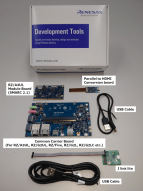
此评估板套件特别适用于评估 RZ/A3UL。 RZ/A3UL 评估板套件由模块板 (SOM) 和扩展板组成。 SOM 符合 SMARC v2.1 标准。
有两种类型的评估板:QSPI版本和Octal SPI版本。
- QSPI版本:内存配置/QSPI串行闪存(Boot) + DDR4:RTK9763U02S01002BE
- Octal-SPI版本:内存配置/ Octa 闪存(Boot) + Octa RAM + DDR4:RTK9763U02S01003BE
RZ/A3M MPU 评估套件
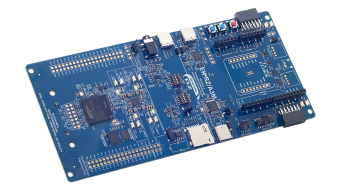
借助 EK-RZ/A3M 评估套件,用户能够轻松评估 RZ/A3M MPU 的功能。 此套件包含 EK-RZ/A3M 评估板、5 英寸 720x1280 像素 LCD MIPI 图形扩展板和 USB 连接线,可实现无缝高清人机界面 (HMI) 评估、USB 摄像头输入等多种功能。 通过板载 J-Link 调试器,用户无需借助额外的调试工具即可快速启动调试工作。 此外,它还配备多种扩展接口(例如 SDIO、PMOD 和 Arduino),可用于连接传感器、Wi-Fi 和 Bluetooth® Low Energy(LE),用户无需扩展电路板空间即可实现功能拓展。
RZ/T2H 评估板套件
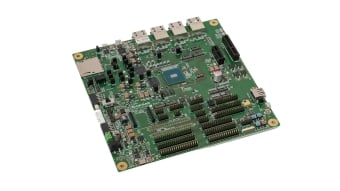
RZ/T2H 评估板套件是用于 RZ/T2H MPU 的一款评测和开发套件。 由于它具有板载仿真器,您只需将附带连线接到 PC 即可开始评测。 该评测板包含千兆以太网 PHY、非易失性存储器和 LPDDR4 存储器等功能丰富的元件,无需扩展板即可评估 RZ/T2H 的各种功能。
此外,通过扩展逆变器板,还可以实现多轴电机控制。
瑞萨 RZ/T2M 入门套件+
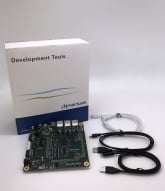
瑞萨 RZ/T2M 入门套件+ 是 RZ/T2M MPU 的一款评测和开发套件。 由于它具有板载仿真器,您只需将附带的数据线连接到 PC 即可开始评测。 该评测板包含千兆以太网 PHY 和八进制闪存等多功能 IC,您可以在没有扩展板的情况下完全评测功能。
瑞萨 RZ/T2ME 入门套件+
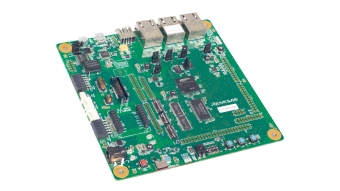
瑞萨 RZ/T2ME 入门套件+ 是 RZ/T2ME MPU 的一款评测和开发套件。
由于它具有板载仿真器,您只需将附带的数据线连接到 PC 即可开始评测。 该评测板包含千兆以太网 PHY 和八进制闪存等多功能 IC,您可以在没有扩展板的情况下完全评测功能。
瑞萨 RZ/T2L 入门套件+
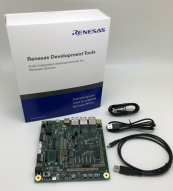
瑞萨 RZ/T2L 入门套件+ 是用于 RZ/T2L MPU 的一款评测和开发套件。
只需将附带的电缆连接到您的 PC,即可立即通过板载仿真器开始评估。 该产品包含千兆以太网 PHY 和Octal Flash等多种功能的 IC,以便您可以在没有扩展板的情况下评测 RZ/T2L 的各种功能。
使用EtherCAT时,请参见Renesas Starter Kit+ for RZ/T2L用户手册中的 "9. 使用注意事项"。
RZ/N2H 评估板套件
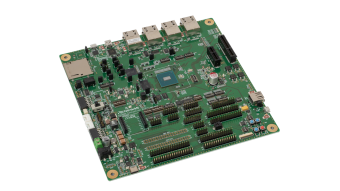
RZ/N2H 评估板套件是用于 RZ/N2H MPU 的一款评测和开发套件。 由于它具有板载仿真器,您只需将附带连线接到 PC 即可开始评测。 该评测板包含千兆以太网 PHY、非易失性存储器和 LPDDR4 存储器等功能丰富的元件,无需扩展板即可评估 RZ/N2H 的各种功能。
此外,通过扩展逆变器板,还可以实现多轴电机控制。
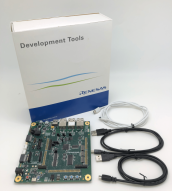
用于RZ/N2L的Renesas Starter Kit+
用于RZ/N2L的Renesas Starter Kit+是用于RZ/N2L MPU评估和开发的套件。
它搭载板载仿真器,只需将随附的电缆连接到PC上即可立即开始评估。此外,其板上还配备了Gigabit Ethernet PHY和OctalFlash等丰富的高性能IC,无需扩展板即可进行充分的功能评估。
RZ/G2L MPU 评估板套件
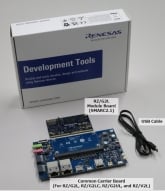
该评估板套件适用于评估 RZ/G2L。 RZ/G2L 评估板套件由模块板(SOM)和扩展板组成。 模块板符合 SMARC v2.1 标准。
- 目录
- RZ/G2L 模块板(SMARC2.1)
- 公共载板(用于 RZ/G2L、RZ/G2LC、RZ/G2UL 和 RZ/V2L)
- USB 电缆(USB Type-A- Micro USB Type-B)
*请自行准备以下设备:
- 65W USB Type-C 充电器
- USB PD 接口
- 输出:5V3A、9V3A、15V3A、20V3.25A
- USB Type-C 转 Type-C 电缆
- 支持 USB-C 和 USB-C 3.1 Gen2 USB-PD 100W
- 微型标清... 阅读详情
远程测试该板卡
RZ/G2LC 评估板套件
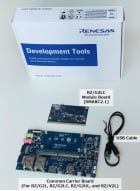
该评估板套件适用于评估 RZ/G2LC。 RZ/G2LC 评估板套件由模块板 (SOM) 和扩展板组成。 SOM 符合 SMARC v2.1 标准。
- Contents
- RZ/G2LC Module Board (SMARC2.1)
- Common Carrier Board (For RZ/G2L, RZ/G2LC, RZ/G2UL and RZ/V2L)
- USB Cable (USB Type-A- Micro USB Type-B)
*Please prepare the following by yourself:
- 65W USB Type-C Charger
- USB PD
- Output:...
RZ/G2UL MPU 评估板套件
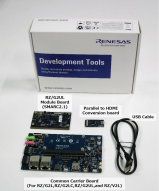
该评估板套件适用于评估 RZ/G2UL。 RZ/G2UL 评测板套件由模块板(SOM)和扩展板组成。 模块板符合 SMARC v2.1 标准。
配件:
- RZ/G2UL 模块板(SMARC2.1)
- 公共载板(用于 RZ/G2L、RZ/G2LC、RZ/G2UL 和 RZ/V2L)
- USB 数据线(USB Type-A、Micro USB Type-B)
*请自行准备以下设备:
- 65W USB Type-C 充电器
- USB PD 接口
- 输出:5V3A,9V3A,15V3A,20V3.25A
- USB Type-C 转 Type-C 电缆
- USB-C 和 USB-C 3.1 Gen2 USB-PD 100W... 阅读详情
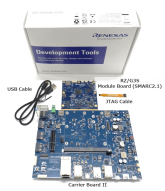
RZ/G3S 评估板套件
该评估板套件适用于评估 RZ/G3S。 RZ/G3S 评估板套件由模块板 (SOM) 和扩展板组成。 模块板符合 SMARC v2.1 标准。
- 目录
- RZ/G3S SMARC 模块板 (SMARC2.1)
- RZ SMARC 系列扩展板 II
- RZ SMARC 系列 JTAG 适配器电缆
- USB Type-A 转 USB Micro B 电缆,用于串行调试
- 配件:螺丝和垫片
*请自行准备以下内容:
- 65W USB Type-C 充电器
- USB PD 支持
- 输出:5V3A,9V3A,15V3A,20V3.25A
- USB Type-C 转 Type-C 电缆
- USB-C&USB-C 3.1 Gen2 USB-PD...
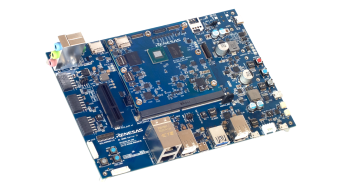
RZ/G3E MPU 评测板套件
RZ/G3E 评测板套件由模块板 (SOM) 和扩展板组成,是评测 RZ/G3E MPU 功能的理想之选。 模块板符合 SMARC v2.1 标准,是基于模块板进行产品开发的良好参考。
主要配件:
- RZ/G3E SMARC 模块板 (SMARC2.1)
- RZ SMARC 系列扩展板 II(与 RZ/G3S-EVKIT 通用)
- 各种适配器板、电缆、螺钉等
*请自行准备以下设备:
- 65W USB Type-C 充电器和 USB Type-C 至 Type-C 连接线
- USB PD 支持
- 输出:5V3A、9V3A、15V3A、20V3.25A
- 微型标清 UHI 级 10 8GB 或以上
*有关更多信息,请参阅... 阅读详情
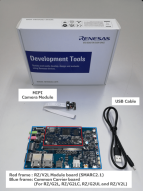
RZ/V2L 评估板套件
该评估板套件适用于评估 RZ/V2L。 RZ/V2L 评估板套件由模块板 (SOM) 和扩展板组成。 此外,产品附带 MIPI 摄像头模块 (MIPI CSI)。 扩展板通常适用于按照 SMARC v2.1 标准制备的 RZ/G2L,RZ/G2LC,RZ/G2UL,RZ/V2L模块 (SOM)。 基于这种适用性,在使用这些设备时,您可以体验到无缝且灵活的评估。
远程测试该板卡
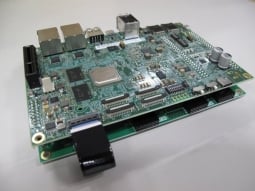
RZ/V2H 四核视觉 AI MPU 评测套件
RZ/V2H AI MPU 评测套件 (RTK0EF0168C04000BJ) 用于评测瑞萨电子 RZ/V2H 四核视觉 AI MPU。 该套件包括 CPU 板和扩展 (EXP) 板。 支持 RZ/V2H 标准软件包,能轻松实现低功耗 AI 推理和视频流等软件开发任务。 此外,这款评测套件还支持图像信号处理器 (ISP)、3D 图形引擎 (GE3D) 和可信安全 IP 等可选功能。
远程测试该板卡
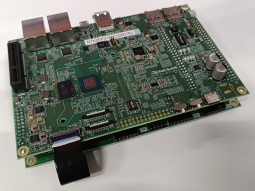
RZ/V2N 四核视觉 AI MPU 评测套件
RZ/V2N AI MPU 评测套件 (RTK0EF0186C03000BJ) 用于评测我们的 RZ/V2N 四核 视觉 AI MPU。 该套件包括一块 CPU 评测板、扩展 (EXP) 板和两块子板。 我们提供了 AI 软件开发包 (AI SDK) 作为该评测套件的软件开发环境。 它支持对低功耗 AI 推理、视频流和其他内置功能进行评测。 该套件还支持图像信号处理器 (ISP)、3D 图形引擎 (GE3D) 和可信安全 IP 等可选功能。
视频和培训
Learn how to migrate projects that use the legacy RZ/A, RZ/G, RZ/N, RZ/T, and RZ/V Flexible Software Packages (FSPs) to the unified RZ FSP v4.x.x. The new RZ FSP provides a single framework that supports multiple RZ device families.
We will walk through the full migration process, including creating a new project, moving source code, updating FSP configuration, and completing build and debug steps. It also introduces example use cases, and the same procedure can be applied when migrating to other supported environments.
更多详情
组件
- 适用于 e2 studio 集成开发环境的 CMSIS 兼容文件包
- 用于 RZ MPU 和板卡的 BSP
- 用于访问外围设备的HAL 驱动程序
- 实时操作系统 (RTOS)
- 中间件协议栈
- 模块配置工具和代码生成器
- 提供源文件,可以与任何开发环境及第三方工具集成
支持的工具链
FSP 中的软件组件支持以下工具链:
- e2 studio 集成开发环境,支持 GCC Arm Embedded 工具链。
- IAR Embedded Workbench
软件安装说明
请参考 FSP GitHub 页面上的安装和使用说明:FSP GitHub 说明
e2 studio 集成开发环境
FSP 提供了众多可提高效率的工具,用于开发针对瑞萨电子 RZ 系列 MPU 产品的项目。 e2 studio 集成开发环境提供一个熟悉的开发控制台,从该控制台中,可以管理项目创建、模块选择和配置、代码开发、代码生成以及调试等关键步骤。 FSP 使用图形用户界面 (GUI) 来简化高级模块及其关联应用程序接口 (API) 的选择、配置、代码生成和代码开发,从而显著加速开发过程。
e2 studio 配备了一组选项,用于配置应用程序项目的各个方面。 其中一些选项包括:
BSP 配置
从初始项目选择中配置或更改 MPU 和板的特定参数。
时钟配置
为您的项目配置 MPU 时钟设置。 时钟配置显示 MPU 时钟树的图形视图,允许修改各种时钟分频器和时钟脉冲源。
引脚配置
引脚配置提供 MPU 引脚的灵活配置。 这样可以配置每个端口引脚的电气特性和功能。 由于许多引脚能够提供多种功能,引脚配置器使您可以轻松地在外围设备上配置引脚。 引脚配置工具通过突出显示错误并为每个引脚或每个外围设备提供选项,简化了带有高度复用引脚的大型封装的配置。
模块配置
模块配置为基于 RTOS 和非 RTOS 的应用程序添加 FSP 模块(HAL 驱动程序、中间件堆栈和 RTOS)提供了选项,并配置了模块的各种参数。 对于每个所选的模块,属性窗口提供对配置参数、中断优先权、引脚选择等的访问。
中断配置
中断配置允许添加新的用户中断或事件,并设置中断优先权。 它还将允许用户绕过外围设备中断,并为外围设备中断提供用户定义的 ISR。
组件配置
组件配置允许选择或删除应用程序所需的单个模块。 针对添加到应用程序中的模块,会自动选择所有必要的模块。 您可以勾选所需组件旁的方框,轻松选择或删除其他模块。
旧版本
FSP 的旧版本可从以下 GitHub 链接下载。
支持
支持社区
- RZ/N2L芯片是否支持软件中断
支持软件中断的话,软件中断触发的例程有吗,给一个参考一下谢谢
2025年1月17日 - 安装带有RZ FSP V4.0的e2s软件,新建RZ工程显示无FSP包!!!望速救我狗命!
... 了一下好像时FSP包的问题,就尝试新建工程,结果发现无可用fsp。但是奇怪的是,当前工程的FSP Configuration可以打开! 安装包setup_rzfsp_v4_0 ...
2026年5月21日 - 安装带有RZ FSP V4.0的e2s软件,新建RZ工程显示无FSP包!!!望速救我狗命!
... 了一下好像时FSP包的问题,就尝试新建工程,结果发现无可用fsp。但是奇怪的是,当前工程的FSP Configuration可以打开! 安装包setup_rzfsp_v4_0 ...
2026年5月21日
知识库
- RZ/A3: FSP 支持
FSP 支持免费 RTOS 和 Azure RTOS。 https://www.renesas.com/zh/software-tool/rza-flexible-software-package-fsp
- RZ/T2H, RZ/N2H: 示例软件(生成驱动软件)
... FSP) 自动生成。有关FSP的更多信息,可从 GitHub https://github.com/renesas/rzt-fsp (适用于 RZ/T2H) 或 https://github.com/renesas/rzn-fsp (适用于 RZ/N2H) 获 ...
- 在e² studio中安装FSP的方法
... 请从各Release项目的末尾“Assets”中下载zip文件。• RA: https://github.com/renesas/fsp/releases• RZ: https://github.com/renesas/rz-fsp/releases下载的zip文件中,如下 ...


