
概述
描述
e² studio is an Eclipse-based integrated development environment (IDE) for Renesas MCUs. In addition to Eclipse’s own powerful code editor, e² studio offers a rich range of extended functions. e² studio covers all development processes, from the downloading of sample code to debugging.
We provide the platform installer includes Flexible Software Package (FSP) and e² studio for users using FSP support RZ Family products. For more detail, see Release Information.
发布信息
| Architecture | Ver. | Released |
|---|---|---|
| 64-bit version | 2026-04.2 | May 20, 2026 |
| 32-bit version (Note) | V7.8.0 | Apr 20, 2020 |
Note
Henceforth, only the 64-bit version of the e² studio is to have regular updates. Updates to the 32-bit version of the e² studio, on the other hand, will be limited to essential modifications.
- Details of upgrade (See Tool News)
- Operating Environment
- How to install
Refer to User's Manual Chapter 2
We recommend to install e² studio by platform installer included FSP (Flexible Software Package).
FSP Platform installer for RZ Family
It can be obtained as a platform installer from the FSP page for each RZ family series. Click a ‘Flexible Software Package (FSP) Platform Installer of e² studio (and Smart Configurator)’ on ‘Downloads’ list.
Information on Usage
Installation, Building and Debugging: e² studio Integrated Development Environment User's Manual: Getting Started RENESAS MCU RZ Family (PDF | English, 日本語)
Generating Code
| Device groups | Related documents, Related product pages |
|---|---|
| RZ/A2M | RZ/A2M Smart Configurator User Guide: e² studio (PDF | English, 日本語) Details of the RZ/A2M Software Package |
| RZ/A3UL | RZ/A Getting Started with Flexible Software Package V3.61 (Deprecated) (PDF) Details of the RZ/A3UL Software Package |
| RZ/T2M, RZ/T2ME, RZ/T2L, RZ/N2L, RZ/T2H, RZ/N2H | RZ/T2, RZ/N2 Getting Started with Flexible Software Package V3.10 (Deprecated) (PDF) |
| RZ/G2L, RZ/G2LC, RZ/G2UL, RZ/G3S | RZ/G Multi-OS Package |
| RZ/V2H, RZ/V2N, RZ/V2L | RZ/V Multi-OS Package |
FAQ
目标设备
Note
We provide the platform installer includes Flexible Software Package (FSP) and e² studio for users using FSP support RZ Family products. For more detail, see Release Information.
下载
Please be sure to check software agreement before downloading e² studio installer.
|
|
|
|
|---|---|---|
| 类型 | 文档标题 | 日期 |
| 升级 - IDE | e² studio 2026-04.2 installer for Windows
|
|
| 升级 - IDE | e² studio 2026-04.2 installer for Linux
|
|
| 软件和工具 - 其他 | ||
|
3 项目
|
||
文档
|
|
|
|
|---|---|---|
| 类型 | 文档标题 | 日期 |
| 发行说明 |
PDF
2.85 MB
The e² studio 2026-04.2 Release Note describes product information, supported devices and supported features such as toolchains, emulators, code generation (Smart Configurator), and Smart Manual. Refer to "What is new" section for new the features and improvements in this version. Notifications of known issues are found in 'Useful workarounds and information' and 'Open issues' section.
|
|
| 工具新闻 - 发布公告 |
PDF
174 KB
日本語
Tool news to announce the upgrade to the e² studio 2026-04.2. This document explains improvements of functionality and how to update. The main enhancements are upgrading eclipse/CDT, Smart Configurator and debugger features.
|
|
| 应用说明 |
PDF
908 KB
日本語
AI 生成的摘要:
This section explains how to set up and use CUnit version 2.1-2 with e² studio for Renesas RX using GCC. It details building the CUnit static library by downloading the package, creating a new Renesas RX C/C++ library project, configuring toolchain and device settings, and copying necessary source and header files. It also covers project configuration steps such as deleting unnecessary folders and adding include directories. Finally, it describes building the library to generate the static library file libCUnit.a, which can be used for unit testing in C/C++ projects.
|
|
| 发行说明 |
PDF
2.92 MB
The e² studio 2025-12 Release Note describes product information, supported devices and supported features such as toolchains, emulators, code generation (Smart Configurator), and Smart Manual. Refer to "What is new" section for new the features and improvements in this version. Notifications of known issues are found in 'Useful workarounds and information' and 'Open issues' section.
|
|
| 工具新闻 - 发布公告 |
PDF
174 KB
日本語
Tool news to announce the upgrade to the e² studio 2025-12. This document explains improvements of functionality and how to update. The main enhancements are Renesas 365 support and adding supported devices.
|
|
| 传单 |
PDF
913 KB
English
, 日本語
e² studio 是面向瑞萨电子 MCU 的基于 Eclipse 的集成开发环境(IDE)。 除了 Eclipse 自己强大的代码编辑器外,e² studio 还提供了丰富的扩展功能。e² studio 涵盖了从下载示例代码到调试的所有开发过程。 有关最新信息,请在下方选择您的器件家族,并查看每个器件的 e² studio 信息页面: 【支持 MCU/MPU:RA、RE、RX、RL78、RH850、Renesas Synergy、RZ】
|
|
| 工具新闻 - 发布公告 |
PDF
214 KB
日本語
This is a Tool News announcing the revision of AI Navigator V2.1.0, IDE for AI Applications.
AI Navigator offers a comprehensive suite of functionalities, including AI model conversion, utilization of sample applications, and support for transfer learning.
The main revision upgrades are support for RA8 series devices, additional sample AI applications, automatic installation of the RUHMI framework, and compatibility with RZ/V AI TLT v6.00 have been implemented.
|
|
| 发行说明 |
PDF
2.93 MB
The e² studio 2025-10 Release Note describes product information, supported devices and supported features such as toolchains, emulators, code generation (Smart Configurator), and Smart Manual. Refer to "What is new" section for new the features and improvements in this version. Notifications of known issues are found in 'Useful workarounds and information' and 'Open issues' section.
|
|
| 工具新闻 - 发布公告 |
PDF
163 KB
日本語
Tool news to announce the upgrade to the e² studio 2025-10. This document explains improvements of functionality and how to update. The main enhancements are updating the Smart Configurator (RX, RL78) and adding supported devices.
|
|
| 工具新闻 - 发布公告 | PDF 153 KB 日本語 | |
| 发行说明 | PDF 740 KB 日本語 | |
| 发行说明 | PDF 3.25 MB | |
| 工具新闻 - 发布公告 | PDF 184 KB 日本語 | |
| 工具新闻 - 发布公告 | PDF 229 KB 日本語 | |
| 发行说明 | PDF 573 KB 日本語 | |
| 发行说明 | PDF 3.09 MB | |
| 工具新闻 - 发布公告 | PDF 148 KB 日本語 | |
| 工具新闻 - 发布公告 | PDF 194 KB 日本語 | |
| 发行说明 | PDF 519 KB 日本語 | |
| 发行说明 | PDF 3.22 MB | |
| 工具新闻 - 发布公告 | PDF 174 KB 日本語 | |
| 工具新闻 - 发布公告 | PDF 148 KB 日本語 | |
| 发行说明 | PDF 3.27 MB | |
| 工具新闻 - 发布公告 | PDF 191 KB 日本語 | |
| 应用说明 |
PDF
666 KB
日本語
AI 生成的摘要:
The document explains how to integrate and use IAR Systems compilers within the e² studio development environment for Renesas microcontrollers. It details the installation of IAR Embedded Workbench and IAR Eclipse plugins, project creation, build configuration, and build execution using IAR compilers. The guide focuses on the RA family with the IAR ARM compiler but applies similarly to other Renesas devices. It also recommends using standalone Flexible Software Package configurators for RA and RZ families to enhance development. The environment setup assumes Windows 10 64-bit, e² studio 2024-07, and IAR tools installed.
|
|
| 发行说明 | PDF 3.64 MB | |
| 工具新闻 - 发布公告 | PDF 181 KB 日本語 | |
| 应用说明 |
PDF
678 KB
日本語
AI 生成的摘要:
This document explains how to use Doxygen within the e* studio integrated development environment. It details the confirmed environment setup, including Windows 10, e* studio 2024-04, Doxygen 1.8.16 bundled with the Eclox plugin, and Graphviz 11.0.0. It guides users through installing the Eclox plugin via Eclipse Marketplace and configuring the Doxygen version in e* studio preferences to generate documentation efficiently. The document notes that Doxygen, Eclox, and Graphviz are third-party open-source tools without Renesas technical support.
|
|
| 工具新闻 - 注意事项 | PDF 146 KB 日本語 | |
| 手册 - 开发工具 | PDF 8.52 MB 日本語 | |
| 工具新闻 - 发布公告 | PDF 175 KB 日本語 | |
| 发行说明 | PDF 2.91 MB | |
| 应用说明 |
PDF
852 KB
日本語
AI 生成的摘要:
Cyclomatic complexity measures the complexity of source code, indicating software quality by quantifying how complex the code is. Higher values suggest increased complexity and a greater chance of bugs. Using e² studio, cyclomatic complexity can be measured via two external tools: SourceMonitor and Lizard. These tools integrate with e² studio through its external tools feature, allowing users to measure and display complexity results directly within the IDE. The document details installation, configuration, and execution steps for both tools on a Windows 10 environment with e² studio 2024-01.
|
|
| 发行说明 | PDF 2.64 MB | |
| 工具新闻 - 发布公告 | PDF 170 KB 日本語 | |
| 应用说明 |
PDF
980 KB
日本語
AI 生成的摘要:
e² studio allows users to install, update, and add features or toolchains without rerunning the installer. It supports three installation types: Lite, Standard, and Custom, catering to different user needs from basic editing to advanced debugging. Updates can be performed via the installer or through the built-in update function, though adding device families or features requires separate procedures. The update process involves checking for updates, accepting licenses, and restarting the IDE to complete installation.
|
|
| 工具新闻 - 发布公告 | PDF 176 KB 日本語 | |
| 工具新闻 - 发布公告 | PDF 217 KB 日本語 | |
| 工具新闻 - 发布公告 | PDF 182 KB 日本語 | |
| 工具新闻 - 发布公告 | PDF 129 KB 日本語 | |
| 工具新闻 - 发布公告 | PDF 154 KB 日本語 | |
| 应用说明 |
PDF
1.11 MB
日本語
AI 生成的摘要:
This guide explains how to create and build CMake projects using e² studio. It covers installing necessary tools such as e² studio, CMake, and GNU Make, creating a new CMake project, and configuring the builder by disabling the default CDT Core Builder and adding CMake and Make commands. The instructions include setting up environment variables and specifying CMake command parameters to generate native build files from platform-independent CMakeLists.txt configurations.
|
|
| 应用说明 |
PDF
2.26 MB
日本語
AI 生成的摘要:
This document explains how to automate CUnit tests in Renesas e² studio using EGit and Jenkins. It covers creating a Git repository, pushing code changes via EGit, and setting up Jenkins to build and run CUnit tests automatically. The process includes configuring Jenkins to poll the repository, build the project, execute tests, and generate reports. It also details modifying the SampleC Unit project to link the CUnit static library and output test results to a file for automation.
|
|
| 应用说明 |
PDF
2.00 MB
日本語
AI 生成的摘要:
This section explains how to install and set up Jenkins on Windows 10 for standalone use. It covers downloading the Jenkins installer from the official site, running the installer, and starting Jenkins via localhost. The initial admin password is retrieved from a specific file to unlock Jenkins. Users can skip plugin installation initially and start using Jenkins immediately. It also describes how to add more users through the Jenkins UI under Manage Jenkins > Manage Users.
|
|
| 应用说明 |
PDF
1.79 MB
日本語
AI 生成的摘要:
This section explains how to install and configure EGit within the e² studio environment. It details selecting Git integration during e² studio installation, updating EGit via the Help menu, and adding the EGit update repository. The guide also covers setting user identification for Git commits by configuring user name and email in the preferences. Finally, it describes opening the EGit perspective to start using Git features within e² studio.
|
|
| 手册 - 开发工具 | PDF 4.78 MB 日本語 | |
| 工具新闻 - 发布公告 | PDF 194 KB 日本語 | |
|
47 项目
|
||
设计和开发
视频和培训
学习如何在现有的 e² studio 安装环境中添加新的器件系列。本视频将介绍推荐的方法:重新运行 e² studio 安装程序,以及通过“Install New Software”菜单选项的替代方法。
Additional Details
See the table below for features of the software and tools available for use with the e² studio on RZ-family products.
For an overview of the functions and features of the e² studio, refer to e² studio (the general page).
Support for code generation and other useful functions for the RZ family
| Tool name | Description |
|---|---|
| Smart Configurator | A GUI-based tool that provides support for downloading and importing middleware for code generation and configuring various settings |
| Smart Manual | A function that allows you to find various information in a hardware manual, such as on registers, without opening the actual hardware manual |
| Smart Browser | A function that allows you to easily search and show the latest version of the hardware manual, technical updates, application notes, and tool news for the Renesas microcontroller you are using |
Compilers for the RZ Family
| Supported Compiler | Information on Usage |
|---|---|
| Open Source GNU Arm Embedded |
|
Debugging tools for the RZ Family
- Segger J-Link (Note1)
Note
- Product from a Renesas partner
QE: Tools for Particular Applications for the RZ Family
- QE for Display: Development Assistance Tool for Display Applications
- QE for Camera: Development Assistance Tool for Camera Applications
Details: QE(Quick and Effective tool solution)
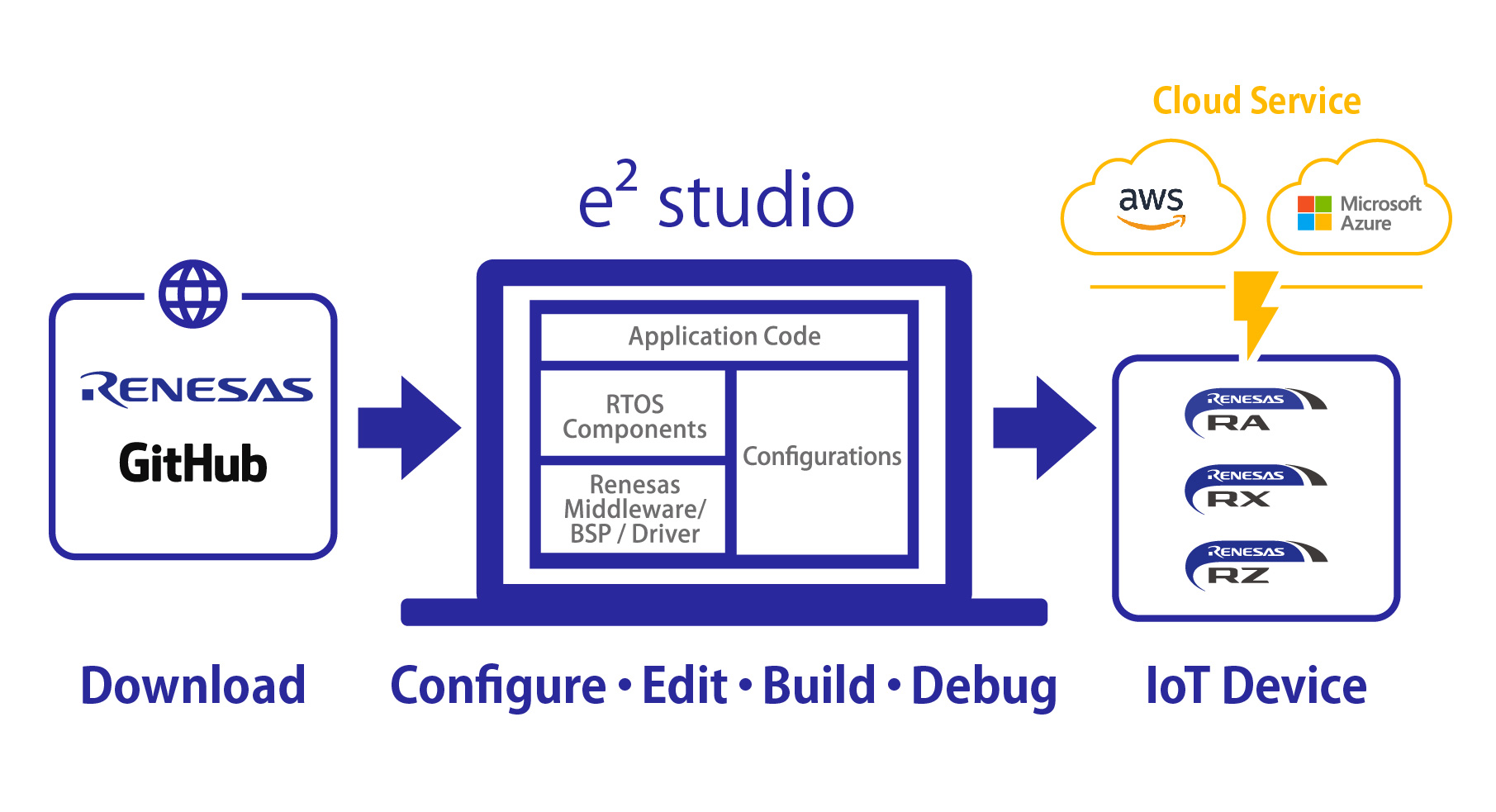
Simpler Development of IoT Devices Connectable with Cloud Service
The e² studio supports the development of software for IoT devices to be connectable with Amazon Web Services (AWS) or Microsoft Azure Cloud Computing Service. The e² studio offers the following powerful functions for FreeRTOS or Azure RTOS.
- Quick building after downloading the latest version of FreeRTOS or Azure RTOS project directly from GitHub®
- Assisting in configuring RTOS, all required drivers, network stacks (TCP/IP, Wi-Fi, and MQTT), and component libraries (Device Shadow, Azure RTOS NetX duo so on)(Note1)
- Embedding additional middleware and drivers (such as for USB and file-system support) in IoT devices
Note
- The settable components of RTOS are as follows: MQTT, Greengrass Discovery, Device Shadow, Azure RTOS NetX duo , Secure Sockets, and TCP/IP
- AWS and Amazon Web Services are trademarks of Amazon.com, Inc. or its affiliates in the United States and/or other countries. (https://aws.amazon.com/trademark-guidelines/)
- Azure is a trademark owned by Microsoft Corporation and its affiliated companies.(https://www.microsoft.com/en-us/legal/intellectualproperty/Trademarks/)
- Microsoft has announced the open sourcing of Azure RTOS.
Azure RTOS will now be provided by the Eclipse Foundation as Eclipse ThreadX. For details, see the Microsoft website. - FreeRTOS is a trademark of Amazon Web Services, Inc. (http://www.openrtos.net/copyright.html)
- GitHub® is a trademark of GitHub, Inc. (https://github.com/logos)
- See below for building FreeRTOS projects in e² studio: Knowledge Base "Building FreeRTOS projects in e² studio"


