跳转到主要内容
瑞萨电子 (Renesas Electronics Corporation) - June is Pride Month, a month to raise awareness of the rights and the culture of the LGBTQ+ community

描述

QE for Capacitive Touch is a tool for assisting in the development of embedded systems that include the use of capacitive touch keys.
This tool simplifies the initial settings of the touch user interface and the tuning of the sensitivity.
This product is available free of charge.


特性

  • The GUI makes it easy for even a beginner to develop touch user interfaces.
  • Automatic tuning for touch sensor sensitivity
  • Learn More

发布信息

Product NameLatest Ver.ReleasedTarget Device (Note1)Details of upgradeDownloadOperating Environment
QE for Capacitive TouchV4.3.0Mar 24, 2026RA Family
RL78 Family
RX Family
Renesas SynergyTM
See Release NoteDownloade² studio plug-in(Note2)(Note3)
Operating Environment

Notes

  1. For details on supported MCUs, refer to the section Target Devices.
  2. We recommend using the e² studio installer provided for the RA Family for customers using RA Family. For details, see the GitHub page on the Flexible Software Package (FSP).
  3. For development of Renesas Synergy™, we recommend to install e² studio by platform installer included SSP(Synergy Software Package). 
    For details

Installing This Product

目标设备

类型 文档标题 日期
软件和工具 - 软件
登录后下载 ZIP 236.67 MB 日本語
1 项目
类型 文档标题 日期
发行说明 PDF 384 KB 日本語
QE for Capacitive Touch is an assistance tool for applications and operates under the e2 studio integrated development environment. In the development of an embedded system based on an RX family, RA family, RL78 family or Renesas Synergy MCU that incorporates the capacitive touch sensing unit, this product facilitates the easy initialization of touch interfaces and tuning of their sensitivity, thus reducing development times.
工具新闻 - 发布公告 PDF 160 KB 日本語
The functionality of the CTSU2 Functional Safety Self Test Software has been improved with the upgrade of the CTSU module and QE for Capacitive Touch. Updating the following products is required to use this function.
应用说明 PDF 6.87 MB 日本語
Functional safety functions are becoming an important on system design as automatic electronic control systems continue to expand to a wide range of applications. This APN describes the software for capacitive touch sensor(CTSU) functional safety self test.
工具新闻 - 发布公告 PDF 176 KB 日本語
应用说明 PDF 2.82 MB 日本語
The CTSU2, the enhanced version of the Renesas Capacitive Touch Sensing Unit (CTSU), supports an active shield as one of its anti-noise countermeasures. This document describes the self-capacitance waterproof touch button demo software, which implements the active shield function.
传单 PDF 797 KB English , 日本語
工具新闻 - 发布公告 PDF 155 KB 日本語
This is the Tool News announcing the revision upgrade to QE for Capacitive Touch V4.2.0, Development Assistance Tool for Capacitive Touch Sensors. QE for Capacitive Touch is a tool for assisting in the development of embedded systems that include the use of capacitive touch keys. This tool simplifies the initial settings of the touch user interface and the tuning of the sensitivity. The main revisions are improvements to the sensor drive pulse frequency determined by automatic tuning (CTSU2) and support for the new device "RA0L1 Group, RL78/F22, RL78/F25, and RL78/L23".
发行说明 PDF 384 KB 日本語
QE for Capacitive Touch is an assistance tool for applications and operates under the e2 studio integrated development environment. In the development of an embedded system based on an RX family, RA family, RL78 family or Renesas Synergy MCU that incorporates the capacitive touch sensing unit, this product facilitates the easy initialization of touch interfaces and tuning of their sensitivity, thus reducing development times.
应用说明 PDF 853 KB 日本語
This document describes the contents of the sample code for the RL78/F22 Capacitive Touch Evaluation System.
应用说明 PDF 957 KB 日本語
应用说明 PDF 1.34 MB 日本語
应用说明 PDF 844 KB 日本語
应用说明 PDF 4.99 MB 日本語
应用说明 PDF 948 KB 日本語
应用说明 PDF 1.33 MB 日本語
应用说明 PDF 4.54 MB 日本語
应用说明 PDF 8.65 MB 日本語
The Capacitive Touch Evaluation System for the RL78/G23 supports development with CS+, the standalone version of the Smart Configurator, and the standalone version of QE for Capacitive Touch. The standalone QE for Capacitive Touch enables flexible development independent of the device or integrated development environment (IDE). This application note describes the steps for developing capacitive touch applications using the Capacitive Touch Evaluation System.
工具新闻 - 注意事项 PDF 153 KB 日本語
应用说明 PDF 5.29 MB 日本語
AI 生成的摘要: The document explains how to develop capacitive touch applications using the RL78/G22 fast prototyping board and the standalone version of QE for Capacitive Touch. It details creating projects with the Smart Configurator, tuning touch interfaces, and monitoring their operation. The development environment includes CS+ IDE, Smart Configurator, and QE tools. It supports RL78 family devices with capacitive sensing units and covers hardware and software setup, touch interface configuration, and sample application development. The document also provides detailed procedures for hardware timer use and code generation.
应用说明 PDF 959 KB 日本語
工具新闻 - 发布公告 PDF 144 KB 日本語
发行说明 PDF 440 KB 日本語
应用说明 PDF 953 KB 日本語
AI 生成的摘要: The RA4L1 Capacitive Touch Evaluation System example project demonstrates capacitive touch functionality using RA4L1 MCU. It includes sample software integrating FSP components, QE-generated capacitive touch configurations, and LED control applications. The software performs LED tests on startup and controls LEDs based on touch inputs from buttons, sliders, and wheels. It supports serial monitoring and tuning via UART and uses peripherals such as CTSU for touch measurement and AGT for LED control. The project operates at 80MHz with a 5V supply and is developed using e2 studio and Arm GNU Toolchain.
应用说明 PDF 14.17 MB 日本語
AI 生成的摘要: The guide explains methods to enhance noise immunity for capacitive touch sensor MCUs by addressing environmental noise issues that affect capacitance measurements. It covers noise types such as radiated RF, conducted noise, electrostatic discharge (ESD), and electrical fast transients (EFT), referencing IEC 61000-4 standards. The document details hardware and software countermeasures, including board design, multi-frequency measurement, filtering techniques, and protection circuits. It targets RX, RA, RL78 MCU families and Renesas Synergy devices embedding the CTSU module, providing practical design guidelines and evaluation results to ensure stable capacitive touch operation under noisy conditions.
应用说明 PDF 1.50 MB 日本語
AI 生成的摘要: The Smart Wakeup Solution implements low-power capacitive touch detection on RX261/RX260 MCUs by switching between standby and active modes. Standby mode uses multi-electrode measurement and automatic judgment to detect touch with minimal power consumption, measuring 11 channels simultaneously. When touch is detected, the system transitions to active mode, enabling full touch interface operation with buttons, sliders, and wheels. The system returns to standby after inactivity or specific touch conditions. The software runs on RX261 hardware at 24 MHz and 5 V, using e2 Studio and CC-RX compiler. It includes detailed software structure, power measurement methods, and capacitive touch tuning.
工具新闻 - 发布公告 PDF 147 KB 日本語
发行说明 PDF 387 KB 日本語
工具新闻 - 注意事项 PDF 56 KB 日本語
应用说明 PDF 2.18 MB 日本語
AI 生成的摘要: The software filters for capacitive touch systems include FIR, IIR, single-pole IIR, and median filters, each with detailed specifications, usage examples, and API descriptions. The document covers embedding these filters into existing projects for RA2L1, RX130, and RL78/G16 microcontroller groups, detailing operation conditions, software configuration, and filter parameter adjustments. It also provides development environment and hardware setup information to support capacitive touch evaluation systems.
应用说明 PDF 771 KB 日本語
AI 生成的摘要: The sample code enables capacitive touch functionality on the RL78/G23 microcontroller, supporting multiple electrodes including buttons, slider, wheel, and shield. It integrates LED control linked to touch inputs and CPU board push buttons. The system supports USB serial communication for serial monitoring and tuning at 115200bps. The software structure uses Smart Configurator-generated components and includes touch interface configuration, tuning, and sensitivity adjustment. Operation is confirmed on RL78/G23 at 32MHz with USB power. The package contains source files for touch control, LED functions, and peripheral configurations.
工具新闻 - 发布公告 PDF 148 KB 日本語
发行说明 PDF 1.12 MB 日本語
应用说明 PDF 734 KB 日本語
AI 生成的摘要: The RL78/G22 Capacitive Touch Evaluation System sample code enables capacitive touch functionality for electrodes including buttons, sliders, wheels, and shields. It supports USB serial communication for serial monitoring and tuning via QE tools. LED control can be switched between capacitive touch inputs and CPU board push buttons by configuring SW6 and build options. The software integrates components generated by the Smart Configurator and includes touch configuration, LED control, and serial communication modules. Operation is confirmed on RL78/G22 MCU at 32MHz with USB power, using Renesas e2 studio and QE for Capacitive Touch development tools. The file structure includes source code for touch, LED control, and peripheral drivers.
发行说明 PDF 974 KB 日本語
应用说明 PDF 3.34 MB 日本語
AI 生成的摘要: Capacitive touch sensing integrates with Renesas RA microcontrollers using QE and FSP tools. The process includes creating a project with RA Smart Configurator, adding required modules, building a capacitive touch interface, tuning with QE for Capacitive Touch, and monitoring touch performance. Supported devices include RA6M2 and RA2L1 with CTSU/CTSU2 units. Development requires e2 studio IDE, GCC ARM compiler, QE for Capacitive Touch plug-in, and FSP middleware. The example demonstrates starting measurements with RM_TOUCH_ScanStart() and detecting touch via RM_TOUCH_DataGet().
应用说明 PDF 657 KB 日本語
AI 生成的摘要: The RA6M2 Capacitive Touch Evaluation System sample code enables capacitive touch functionality for multiple electrodes including buttons, slider, wheel, and shield. It integrates LED control responding to touch inputs and CPU board push buttons. The system supports USB serial communication for serial monitoring and tuning via QE tools. The software structure relies on FSP-generated components and includes detailed configuration files, constants, and peripheral usage. Operation is confirmed on RA6M2 MCU with specified hardware and software environments. The package includes source files for touch configuration, LED control, and main application logic.
快速入门指南 PDF 1.21 MB 日本語
应用说明 PDF 2.75 MB English , 日本語
应用说明 PDF 2.41 MB English , 日本語
应用说明 PDF 511 KB 日本語
AI 生成的摘要: The RA2L1 Capacitive Touch Evaluation System example project demonstrates capacitive touch functionality across multiple electrodes, including buttons, slider, wheel, and shield. It integrates LED control linked to touch inputs and CPU board push buttons, and supports USB serial communication for tuning and monitoring via QE tools. The software structure relies on FSP-generated components, with detailed configuration files and tuning logs included. Operation is confirmed on RA2L1 MCU at 48MHz using e2 studio and GCC compiler, facilitating development of capacitive touch applications with precise sensitivity adjustments.
快速入门指南 PDF 994 KB 日本語
应用说明 PDF 1.79 MB 日本語
AI 生成的摘要: This document explains how to develop capacitive touch applications using Renesas RX microcontrollers with QE and FIT modules. It guides through project creation in e² studio IDE, using Smart Configurator and QE for Capacitive Touch plug-in to create, tune, and monitor touch sensing. It lists required tools including RX140 evaluation board, Renesas compilers, emulators, and software modules. The document details high-level integration steps and provides an example application workflow for touch detection.
工具新闻 - 发布公告 PDF 154 KB 日本語
应用说明 PDF 5.97 MB English , 日本語
工具新闻 - 发布公告 PDF 262 KB 日本語
发行说明 PDF 854 KB 日本語
应用说明 PDF 2.64 MB 日本語
AI 生成的摘要: Steps for integrating capacitive touch sensors with Renesas RX microcontrollers using the standalone QE for Capacitive Touch tool and IAR Embedded Workbench for Renesas RX are detailed. It covers installation of required software including IAR EWRX, Smart Configurator, and QE tools, project creation with Smart Configurator, and configuring touch sensor parameters. The workflow includes generating source code, setting up the project environment, tuning touch sensors, and monitoring sensor performance. Essential URLs for downloading software and manuals are provided to support development and evaluation using the RSK-RX140 evaluation kit.
发行说明 PDF 214 KB 日本語
应用说明 PDF 4.53 MB 日本語
AI 生成的摘要: The guide explains how to develop 3D gesture recognition applications using AI with capacitive touch sensors via the QE for Capacitive Touch tool. It supports devices with capacitive touch IP in RX, RA, and RL78 families and Renesas Synergy™ platform. Key features include gesture data recording, AI model generation through automated deep learning, and real-time monitoring and tuning to improve recognition accuracy. The tool simplifies AI development without requiring specialized skills. The operating environment includes e2 studio IDE, GNU Arm toolchain, and specific evaluation boards and emulators. The guide covers setup, tuning, gesture recording, learning, coding, and monitoring workflows.
应用说明
登录后下载 PDF 426 KB 日本語
AI 生成的摘要: The RX130 Capacitive Touch Evaluation System sample code uses components generated by the Smart Configurator, including various FIT modules such as r_bsp, r_byteq, r_cmt_rx, r_ctsu_qe, Config_PORT, and r_sci_rx. The software structure diagram illustrates the integration of application and hardware components. The file structure includes source and header files for touch configuration, sample applications, and LED/switch functions, organized into folders corresponding to different modules. Separate sample projects exist for self-capacitance and mutual-capacitance touch boards, each containing tuning logs and configuration files.
工具新闻 - 注意事项 PDF 153 KB 日本語
快速入门指南 PDF 2.49 MB 日本語
发行说明 PDF 170 KB 日本語
工具新闻 - 注意事项 PDF 31 KB 日本語
应用说明 PDF 1.92 MB 日本語
AI 生成的摘要: The document explains how to generate and transfer QE code for Capacitive Touch using e² studio and Keil® MDK on Renesas RA microcontrollers, specifically targeting the RA2L1 evaluation system. It details the setup of the development environment, including required IDE versions, toolchains, and configuration tools. Step-by-step instructions guide users through creating projects in e² studio, configuring Capacitive Touch, tuning, and migrating the code to Keil® MDK for execution. The workflow supports efficient development and debugging of capacitive touch applications on Renesas RA devices.
应用说明 PDF 2.06 MB 日本語
AI 生成的摘要: The document explains how to generate and transfer QE code for Capacitive Touch using e² studio and IAR Embedded Workbench for ARM with Renesas RA microcontrollers. It details steps for creating projects in e² studio, configuring capacitive touch, tuning, and migrating the code to IAR EWARM. The setup involves RA2L1 evaluation boards, specific IDE versions, toolchains, and configuration tools. It guides users through project creation, device selection, build settings, and integration of touch drivers to run capacitive touch applications efficiently.
工具新闻 - 发布公告 PDF 65 KB 日本語
发行说明 PDF 161 KB 日本語
工具新闻 - 注意事项 PDF 47 KB 日本語
发行说明 PDF 161 KB 日本語
工具新闻 - 发布公告 PDF 157 KB 日本語
工具新闻 - 发布公告 PDF 104 KB 日本語
发行说明 PDF 146 KB 日本語
工具新闻 - 注意事项 PDF 31 KB 日本語
应用说明 PDF 1.36 MB 日本語
AI 生成的摘要: Capacitive touch sensing integration using Renesas Synergy MCUs involves creating a project with e2 studio and Synergy Smart Configurator, adding required modules, and using QE for Capacitive Touch plug-in for interface creation, tuning, and monitoring. The process includes starting measurements with scanStart() API, checking results, and detecting touches via dataGet() API. Development requires S3A7(CTSU) board, e2 studio IDE, GNU ARM compiler, QE for Capacitive Touch, and SSP drivers. The document guides through project creation, module addition, interface setup, tuning, and performance monitoring.
工具新闻 - 发布公告 PDF 153 KB 日本語
发行说明 PDF 172 KB 日本語
发行说明 PDF 138 KB 日本語
工具新闻 - 发布公告 PDF 106 KB 日本語
发行说明 PDF 311 KB 日本語
工具新闻 - 通告 PDF 304 KB 日本語
工具新闻 - 发布公告 PDF 105 KB 日本語
工具新闻 - 发布公告 PDF 484 KB 日本語
发行说明 PDF 133 KB 日本語
工具新闻 - 发布公告 PDF 864 KB 日本語
工具新闻 - 发布公告 PDF 1.12 MB 日本語
工具新闻 - 发布公告 PDF 735 KB 日本語
77 项目

样例程序

样例程序

筛选
类型 文档标题 日期 日期
示例代码
[Toolchains=CC-RL|V1.15.01]
登录后下载 ZIP 7.52 MB 日本語
应用: 汽车, 消费电子产品
Compiler: CC-RL Function: Evaluation Kit, HMI IDE: e2 studio
This document describes the contents of the sample code for the RL78/F22 Capacitive Touch Evaluation System.
示例代码
[Toolchains=CC-RL|V1.15.00]
登录后下载 ZIP 7.69 MB 日本語
应用: 人机界面(HMI), 家电
Compiler: CC-RL Function: Evaluation Kit, HMI IDE: e2 studio
示例代码
[Toolchains=CC-RL|V1.15.00]
登录后下载 ZIP 5.93 MB 日本語
应用: 人机界面(HMI), 家电
Compiler: CC-RL Function: Evaluation Kit, HMI IDE: e2 studio
示例代码
[Software=RA Flexible Software Package|v6.10],[Toolchains=GNU Arm Embedded|13.2]
登录后下载 ZIP 2.97 MB 日本語
应用: HMI 电容式触摸技术, 人机界面(HMI), 家电
Compiler: GNU ARM Embedded Function: Evaluation Kit, HMI IDE: e2 studio
示例代码
[Toolchains=CC-RL|V1.15.00]
登录后下载 ZIP 7.61 MB 日本語 Compiler: CC-RL IDE: e2 studio
示例代码
[Toolchains=CC-RL|V1.15.00]
登录后下载 ZIP 8.75 MB 日本語
应用: 人机界面(HMI), 工业
Compiler: CC-RL Function: Evaluation Kit, HMI IDE: e2 studio
示例代码
[Software=RA Flexible Software Package|v5.9.0],[Toolchains=GNU Arm Embedded|13.2]
登录后下载 ZIP 7.41 MB 日本語
应用: 人机界面(HMI), 家电
Compiler: GNU ARM Embedded Function: Evaluation Kit, HMI IDE: e2 studio
示例代码
[Toolchains=CC-RL|V1.15.01]
登录后下载 ZIP 27.34 MB 日本語
应用: 人机界面(HMI)
Compiler: CC-RL Function: Application Example, HMI IDE: CS+ for CC
This is an example of a touch application developed using CS+ and the standalone version of QE for Capacitive Touch. Two types of projects are provided: a simple implementation example and an applied example, both of which can be immediately tested on the capacitive touch evaluation system. These can be used as reference materials to understand the development procedure in conjunction with the application note.
示例代码
[Toolchains=CC-RL|V1.15.00]
登录后下载 ZIP 23.20 MB 日本語
应用: 工业, 消费电子产品
Compiler: CC-RL Function: Application Example, HMI IDE: CS+ for CC
示例代码
[Software=RA Flexible Software Package|v5.80],[Toolchains=GNU Arm Embedded|13.2]
登录后下载 ZIP 3.47 MB 日本語
应用: 互联家居与娱乐, 人机界面(HMI)
Compiler: GNU ARM Embedded Function: Evaluation Kit, HMI IDE: e2 studio
示例代码
[Software=RX Driver Package|V1.44],[Toolchains=CC-RX|V3.06.00]
登录后下载 ZIP 19.95 MB 日本語
应用: 人机界面(HMI)
Compiler: CC-RX Function: Evaluation Kit, HMI IDE: e2 studio
示例代码
[Software=RX Driver Package|V2.20;RA Flexible Software Package|v5.3.0],[Toolchains=CC-RL|V1.13.00;CC-RX|V3.06.00;GNU Arm Embedded|13.2.1.arm-13-7]
登录后下载 ZIP 16.10 MB 日本語
应用: 消费电子产品
Compiler: CC-RL, CC-RX, GNU ARM Embedded Function: Application Example, HMI IDE: e2 studio
示例代码
[Toolchains=CC-RL|V1.13]
登录后下载 ZIP 6.43 MB 日本語 Compiler: CC-RL Function: Evaluation Kit, HMI IDE: e2 studio
示例代码
[Toolchains=CC-RL|V1.13]
登录后下载 ZIP 6.43 MB 日本語 Compiler: CC-RL Function: Evaluation Kit, HMI IDE: e2 studio
示例代码
登录后下载 ZIP 2.94 MB 日本語
应用: 消费电子产品
Compiler: GNU ARM Embedded Function: Evaluation Kit, HMI IDE: e2 studio
示例代码
[Software=RA Flexible Software Package|v4.6.0],[Toolchains=GNU Arm Embedded|10.3-2021.10]
登录后下载 ZIP 2.56 MB 日本語
应用: 消费电子产品
Compiler: GNU Arm Embedded Function: Evaluation Kit, HMI IDE: e2 studio
示例代码
[Software=RX Driver Package|v1.34],[Toolchains=CC-RX|v3.04.00]
登录后下载 ZIP 21.92 MB 日本語
应用: 消费电子产品
Compiler: CC-RX Function: Evaluation Kit IDE: e2 studio
17 项目

相关评估板和套件

Features

The GUI makes it easy for even a beginner to develop touch user interfaces.

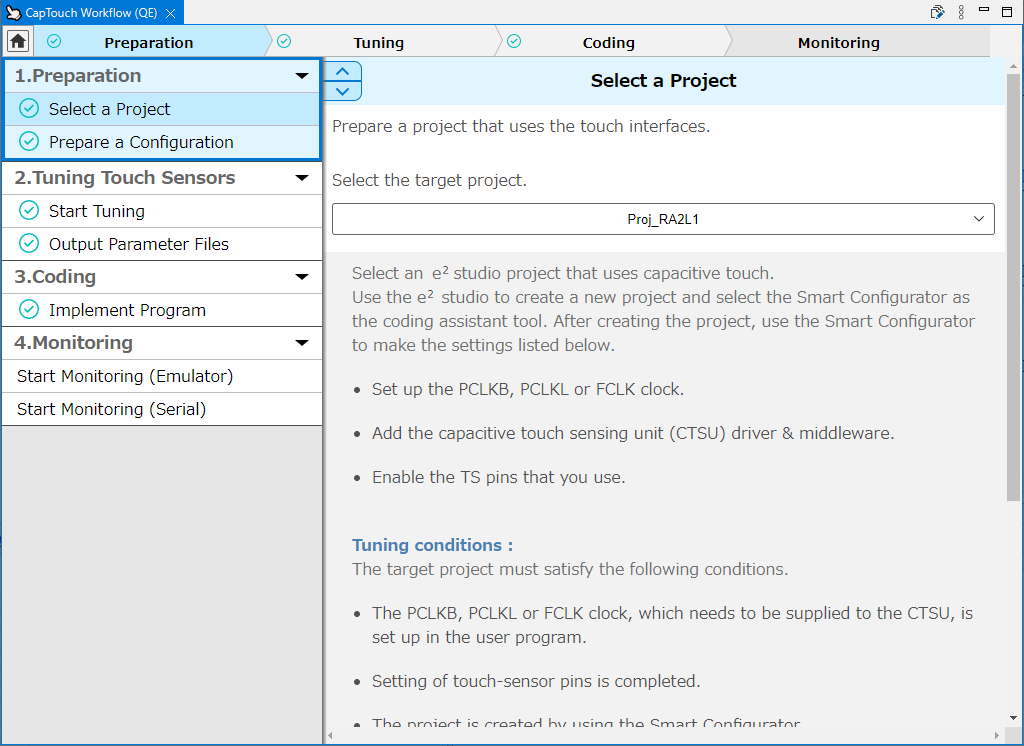
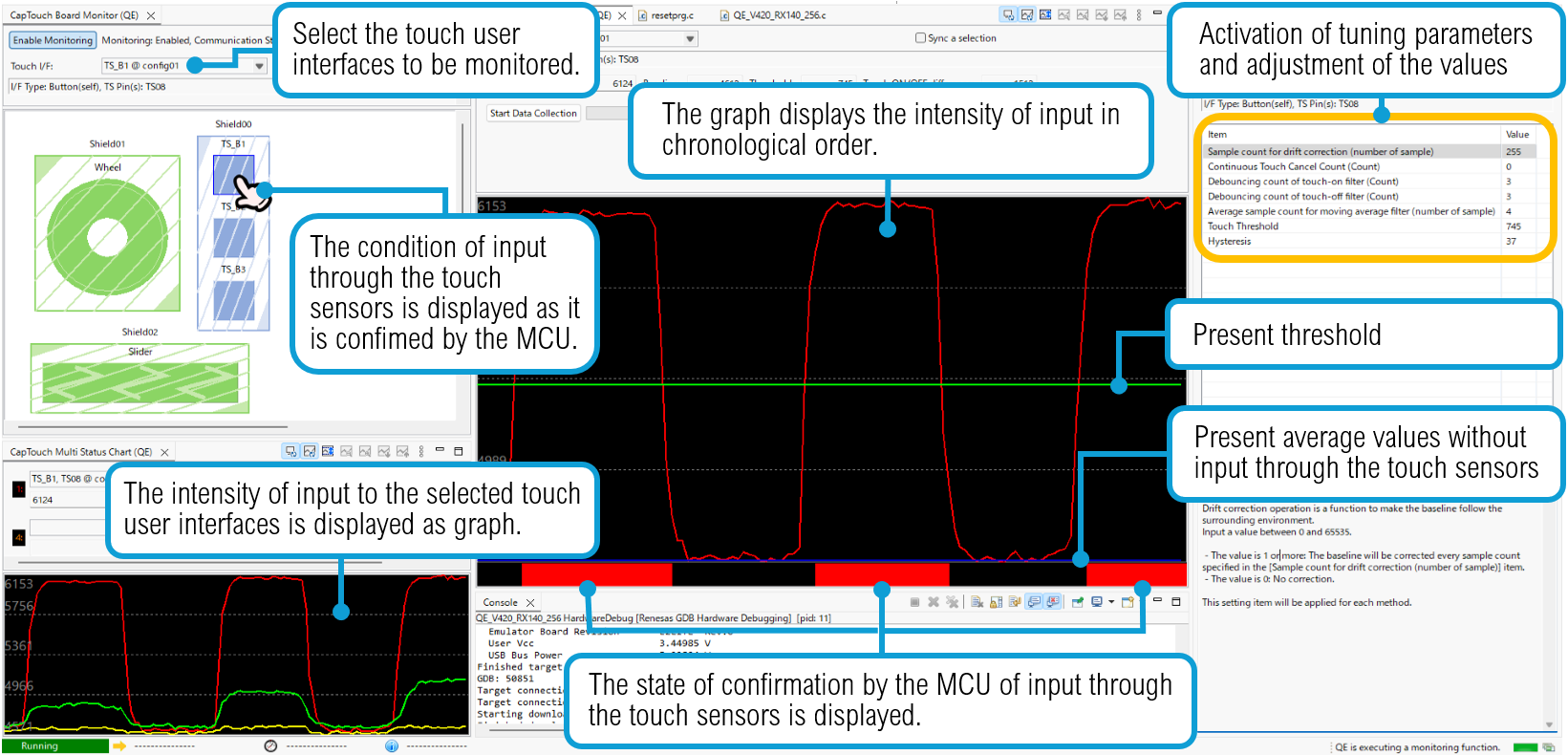
Simple GUI operations allow even a beginner to create the configuration for use with a touch user interface, monitor the state of input through the touch sensors, and adjust parameters.

Furthermore, since this tool can adjust tuning parameters and reflect the results through display in real-time, it is very useful for finding the appropriate parameters in various situations, such as in the presence of much static electricity or in cases of use with wet hands.
图像
QE for Cap Touch_Workflow image
图像
Adjustment Function

Automatic tuning for touch sensor sensitivity

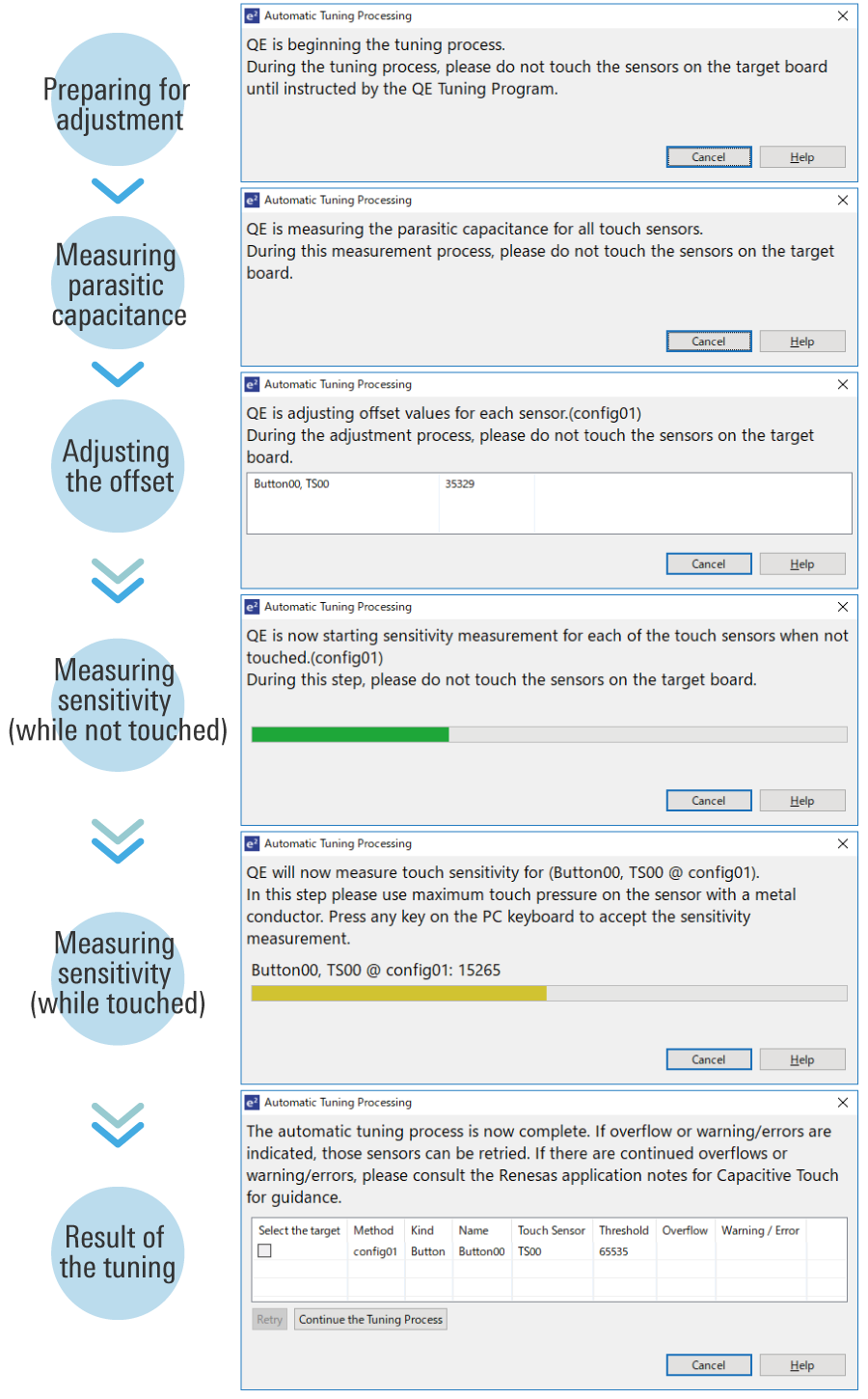
This tool enables automatic tuning for the sensitivity of the capacitive touch sensors. You can complete basic tuning within a few minutes by following the instructions in the pop-up messages.
图像
Automatic tuning for touch sensor sensitivity


3D gesture recognition

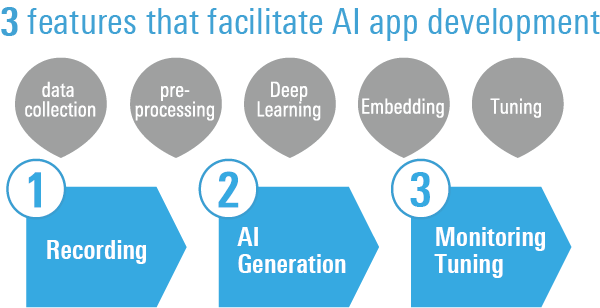
You can develop a gesture application that reacts "by anyone's hand" without any specialized skills just by actually performing the gesture that you want AI to remember on the capacitance sensor.
图像
3dgesture-concept-en

Supported Driver and Middleware

DeviceDriverVersion
RA FamilyCSTU (Capacitive Touch Sensing Unit) Driver
Flexible Software Package (FSP) Component for RA Family
Component name: r_ctsu
V6.4.0
Touch Middleware
Flexible Software Package (FSP) Component for RA Family
Component name: rm_touch
V6.4.0
RX FamilyDriver for capacitive touch sensor unit
RX Family QE CTSU Module Using Firmware Integration Technology
Module name: r_ctsu_qe
V3.30
Middleware for touch sensors
RX Family QE Touch Module Using Firmware Integration Technology
Module name: rm_touch_qe
V3.30
RL78 FamilyDriver for capacitive touch sensor unit
RL78 Family QE CTSU Module Software Integration System
Module name: r_ctsu
V2.30
Middleware for touch sensors
RL78 Family QE Touch Module Software Integration System
Module name: rm_touch
V2.30
Renesas SynergyCTSU (Capacitive Touch Sensing Unit) Driver
Synergy Software Package (SSP) Component for Renesas Synergy
Component name: r_ctsuv2
V2.6.0
Capacitive Touch Framework
Synergy Software Package (SSP) Component for Renesas Synergy
Component name: sf_touch_ctsuv2
V2.6.0

See here for details on adding and setting middleware related to QE for Capacitive Touch

The confirmed debugging tools

DeviceE2 emulatorE2 emulator LiteSEGGER J-Link
RA Family
RX Family
RL78 Family 
Renesas Synergy  


支持社区

  1. RX140官网下载的工程不能打开和编译错误

    在官网下载了一些关于CTSU的触控例程,但是打开发现编译错误,并且不能打开.scfg文件。 community-ja.renesas.com/.../r01an6378xx0100_2D00_rx140_2D00_rssk_2D00_sample.zip

    2022年11月11日

知识库

  1. RL78 MCU: 如何安装、更新和查看QE For Capacitive Touch的版本

    ... 网站提前下载好的QE For Capacitive Touch安装文件(QE for Capacitive Touch: Development Assistance Tool for Capacitive Touch Sensors Information for Users ),例如RenesasQE_cap-touch_RARL78SynergyRX_V420\QE-CapTouch\RenesasQE_cap-touch_V420.zip,然后选择Renesas QE ...

  2. RL78微控制器触控开发

    ... 装智能配置器:https://www.renesas.com/software-tool/rl78-smart-configurator 要安装QE for Capacitive Touch,请点击此处:https://www.renesas.com/software-tool/qe-capacitive-touch-development-assistance-tool-capacitive-touch-sensors ...

    2025年8月27日
支持社区

支持社区

在线询问瑞萨电子工程社群的技术人员,快速获得技术支持。
浏览文章

知识库

浏览我们的知识库,获取文章、常见问题解答及其他实用资源。
提交工单

提交工单

需要咨询技术性问题或提供非公开信息吗?